More budgeting theory isn't the primary requirement. What's needed is an app that answers a simpler question: where did the money go, and how much effort will it take to keep tracking it next week?
That's where the best app expense tracker usually wins or loses. Not on the size of the feature list, but on setup cost. Some apps want bank connections, categories, goals, rules, and a paid plan before they become useful. Others let people record spending immediately and clean things up later. That difference matters a lot for busy households, freelancers, and anyone who has already bounced off spreadsheets.
Modern expense trackers have also changed. Mainstream apps now treat automatic transaction import, receipt scanning, and real-time dashboards as standard features, not extras. For example, Expensify's Google Play listing says it helps more than 15 million people worldwide and includes SmartScan receipt extraction, mileage logging, manual expense entry, and built-in chat for transactions.
Table of Contents
- 1. rondre
- 2. YNAB
- 3. Monarch Money
- 4. Quicken Simplifi
- 5. Copilot Money
- 6. EveryDollar
- 7. Goodbudget
- 8. Honeydue
- 9. Toshl Finance
- 10. Moneydance
- Top 10 Expense Tracker Apps, Core Comparison
- How to Choose Your App & a Simple First Step
1. rondre

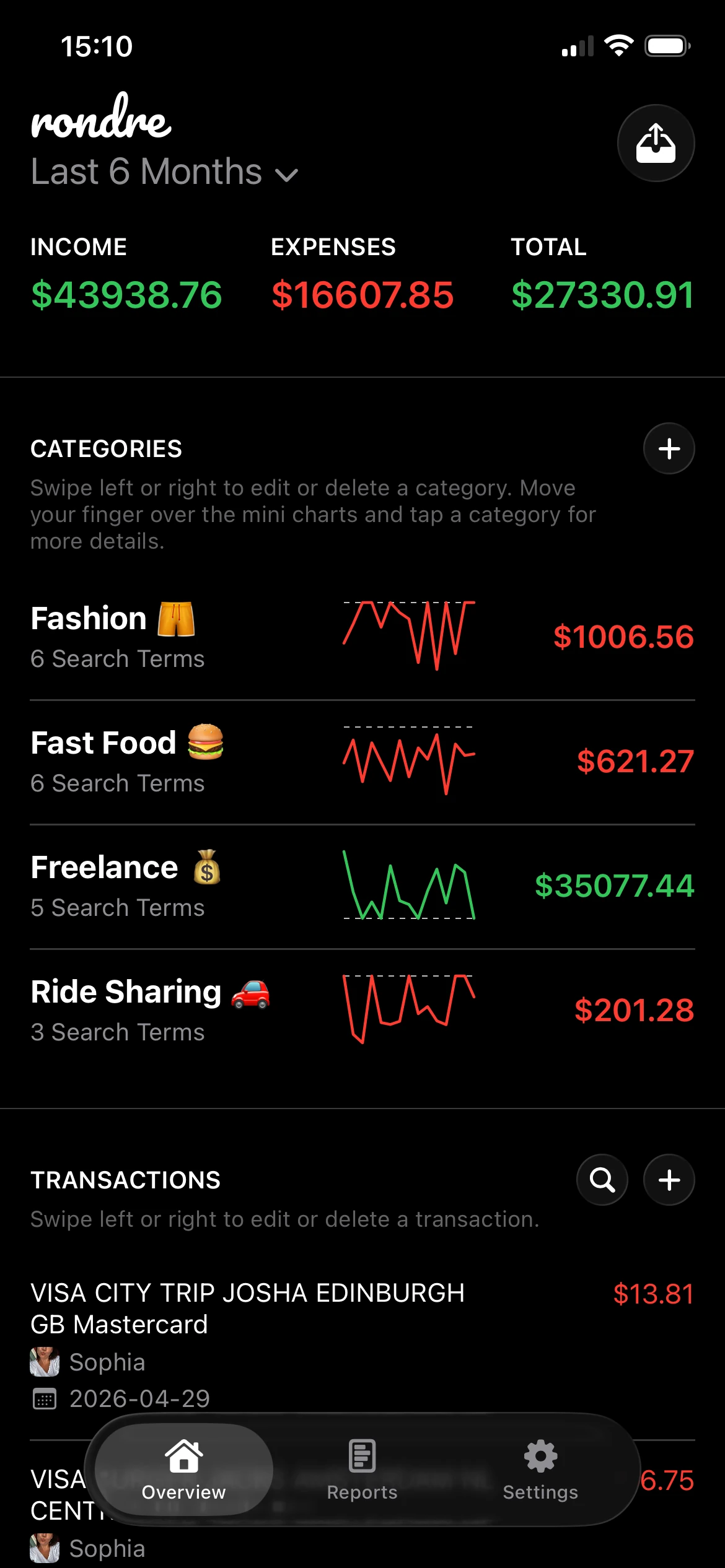
rondre has the lowest setup cost on this list. It opens fast, doesn't require an account, and doesn't make people hand over bank credentials before they can log the first transaction. For anyone who has quit a finance app during onboarding, that's a real advantage.
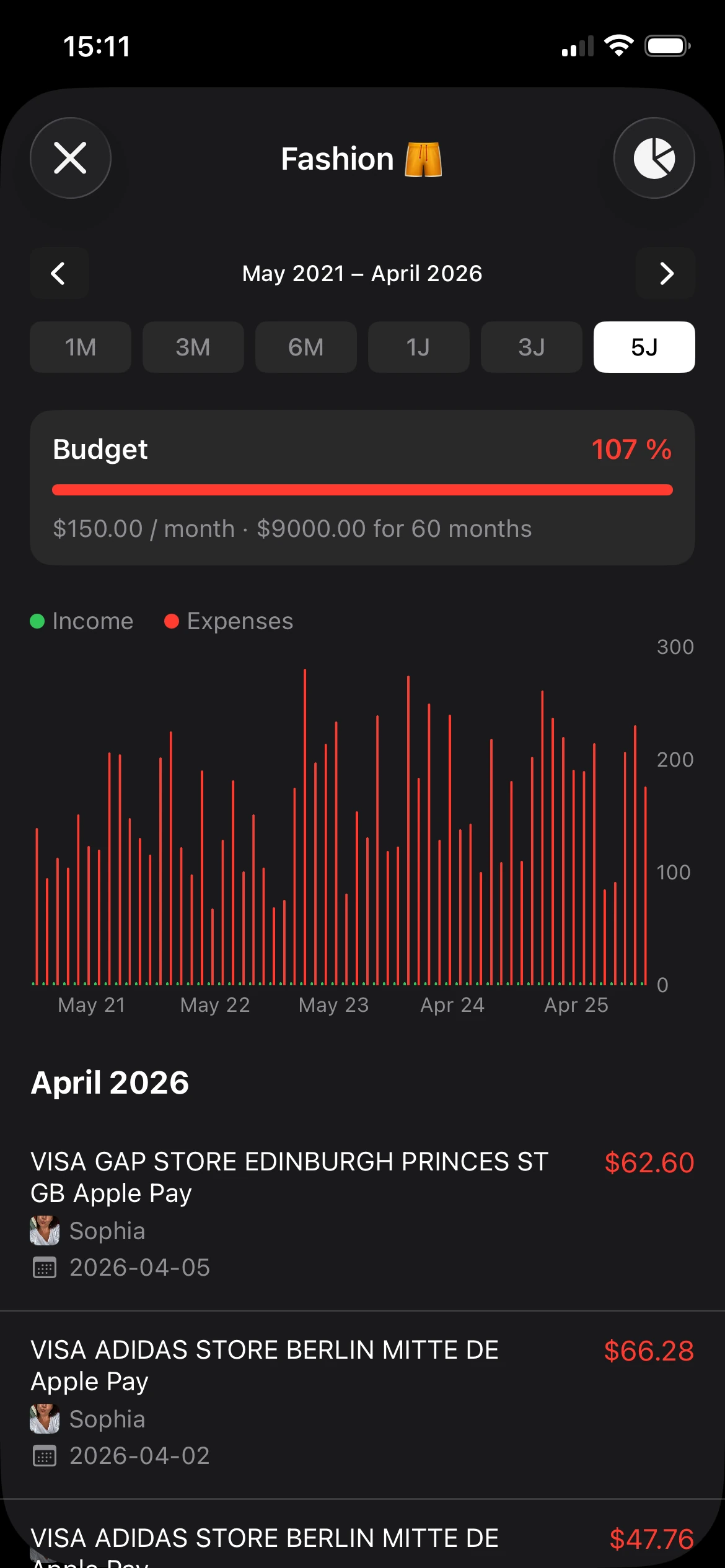
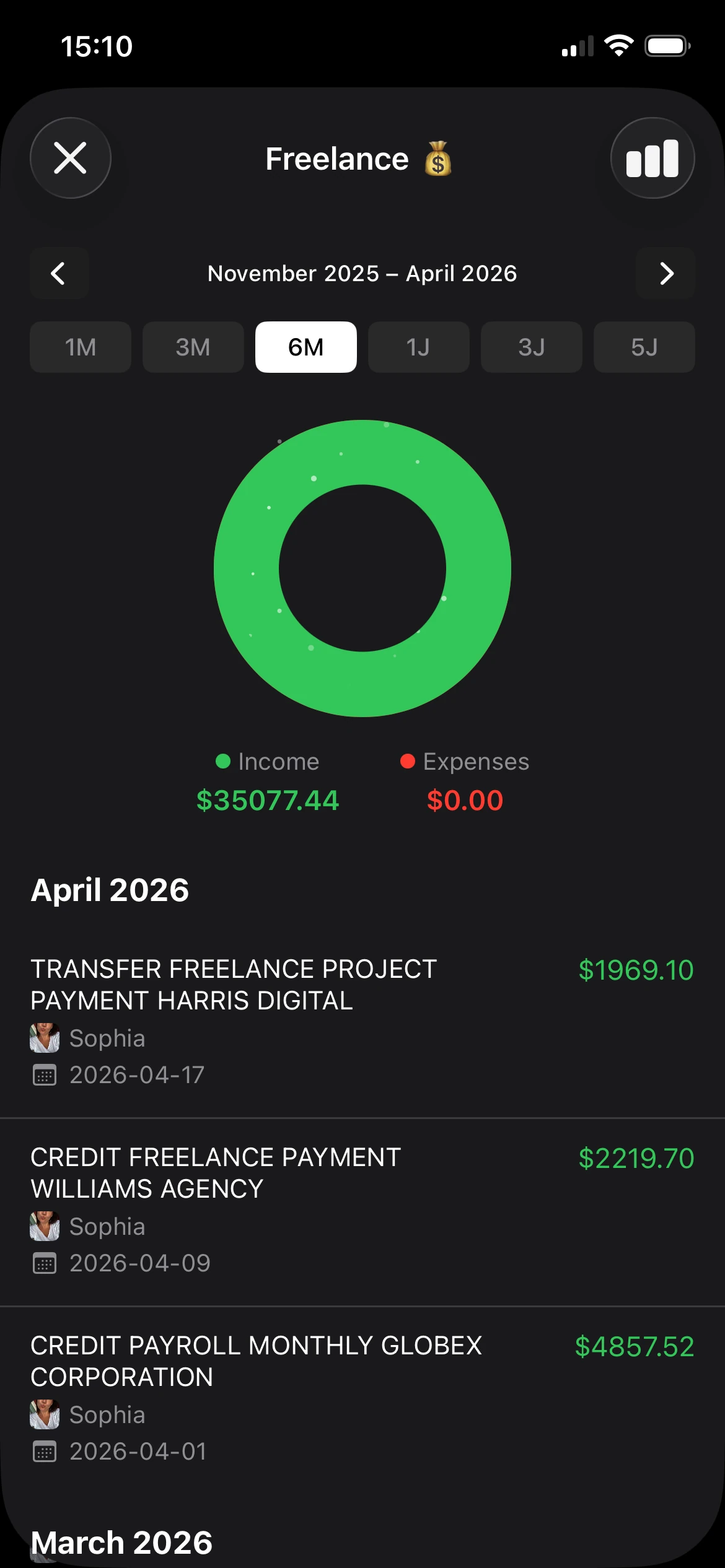
The app is built for recording income and expenses without clutter. Transactions stay front and center, categories are easy to shape around real life, and the charts are simple enough to read at a glance. It also handles CSV files and PDF bank statements, which is useful for people who want import help without full bank syncing. Anyone comparing options can also look at this guide to an expense tracker app.
Why rondre stands out
A lot of “best expense tracker” lists focus on automation first. That's fine for some users, but it misses a big practical issue: privacy and friction. Many top apps lean on connected accounts, premium upsells, or both. By contrast, rondre's pitch is much simpler. No account. No ads. No tracking. No premium tiers.
That makes it a strong fit for people who want control without extra exposure. The privacy angle matters because many alternatives center their value around bank syncing and continuous financial insights, while some users just want a clean ledger they can trust.
Practical rule: If someone won't connect bank accounts, won't tolerate ads, and won't pay before seeing value, rondre is one of the easiest apps to recommend.
Best fit
rondre works especially well for couples, families, and freelancers because it supports multiple books and shared books. That's more useful than it sounds. One book can hold household spending, another can track freelance expenses, and a third can hold a specific project or trip.
Its main trade-off is clear. There's no automatic bank-to-app sync, so people with very high transaction volume may prefer a more automated system. But for users replacing notes, spreadsheets, or scattered screenshots, the lower time cost usually matters more than missing one more sync feature.
- Best for privacy-first tracking: No account, no ads, no tracking, and no forced upsell.
- Best for shared money: Shared books make partner and family tracking much cleaner.
- Best for mixed use: Separate books help split household, side business, and personal spending without moving into full accounting software.
2. YNAB

YNAB isn't just an expense tracker. It's a budgeting method wrapped in software. That's why people either love it or bounce off it quickly.
For users who want every dollar assigned a job, YNAB is one of the strongest options available. It can support bank connections and manual entry, but the bigger commitment is mental. The app asks people to plan ahead, adjust often, and stay engaged. Users trying to understand category handling around cards may find this explanation of credit cards in YNAB useful.
Where YNAB works best
YNAB makes sense for people who want structure more than convenience. It's strong for paycheck planning, funding goals, and staying intentional when money is tight or irregular.
The trade-off is setup and learning time. This isn't the best app expense tracker for someone who just wants to log purchases and move on. It asks for regular attention, and the subscription can feel steep if someone mainly needs visibility rather than a full budgeting system.
YNAB works best when the user wants a framework, not just a ledger.
3. Monarch Money

Monarch Money is for people who want a polished financial control center. It pulls together spending, budgets, cash flow, and net worth in a clean interface that feels more like a full household finance hub than a basic expense log.
It's also a good example of how the market has split into different lanes. Some apps are free or low-cost personal trackers, while others are paid platforms built around broader planning. NerdWallet's roundup shows just how wide that spread is, from Money Manager at $0 to EveryDollar premium at $17.99 per month or $79.99 per year after a 14-day free trial. Monarch sits closer to the premium, all-in-one side of that divide.
Why people choose Monarch
Monarch is a strong fit for households that want shared visibility and don't mind connecting accounts. The app is ad-free, the interface is tidy, and its planning tools go beyond simple category tracking.
The downside is easy to spot. There's no permanent free tier, and it can feel like overkill for someone who only wants to know what they spent on groceries, rent, and eating out. It's powerful, but the setup cost is higher in both time and money than a lightweight tracker.
- Choose Monarch for household planning: Better for people who want spending, forecasting, and a broader financial picture in one place.
- Skip it for simple logging: If manual entry is enough, there are easier and cheaper ways to get clarity.
4. Quicken Simplifi

Quicken Simplifi tries to hit the middle ground. It's more automated than a manual tracker, but less rigid than a method-driven app like YNAB. For many people, that balance is exactly the appeal.
Its strongest feature is practical day-to-day visibility. The spending plan, projected balances, and subscription tracking are useful for users who want guidance without rebuilding their whole money system. Simplifi also connects directly to bank accounts, credit cards, and investment portfolios in one real-time dashboard, as noted earlier in the verified market segmentation.
Who should pick Simplifi
Simplifi suits users who want a quick overview of what's left to spend and what bills are coming next. It's less about financial philosophy and more about staying oriented.
The trade-off is depth. It doesn't feel as lightweight as a pure tracker, and it doesn't feel as behavior-focused as YNAB. That makes it a solid generalist, but not always the best app expense tracker for users with strong preferences around privacy or manual-first workflows.
5. Copilot Money

Copilot Money is one of the best-looking options in the category, and that matters more than people admit. A finance app that feels quick and pleasant tends to get used more consistently than one that feels like homework.
It's especially appealing to Apple users. The app has a native feel on iPhone, iPad, and Mac, and it leans hard into automation with bank sync, smart transaction rules, and clean bulk editing.
What it gets right
Copilot reduces the drag of cleanup. Categories, rollovers, and budget adjustments feel less tedious than they do in many older apps, and investment tracking is stronger than what most basic expense trackers offer.
Still, its audience is narrow. There's no Android version, and there's no permanent free tier. People who value a strong iOS experience will like it. People who want lower commitment or more privacy usually won't.
A good-looking app isn't a bonus feature in finance. It often decides whether someone keeps tracking after the first week.
6. EveryDollar

EveryDollar is built for simplicity and for users who already like the Ramsey approach. It uses a zero-based style that's easy to understand, and the free tier works if someone is comfortable entering transactions manually.
That's a meaningful distinction. A lot of people don't need endless customization. They need an app that says, “set categories, assign income, track spending, repeat.” EveryDollar does that well.
The real trade-off
The free version keeps things basic. Premium adds bank connections and more reporting, but the app still feels most useful when someone wants a straightforward monthly budget, not a flexible financial dashboard.
That makes it a good fit for beginners and Ramsey followers. It's less compelling for users who want richer reports, more category nuance, or strong shared-finance tools.
- Works well for beginners: The structure is simple and doesn't bury users in settings.
- Works less well for power users: Reporting and customization are limited compared with broader money management apps.
7. Goodbudget
Goodbudget is the manual tracker for people who like discipline. It uses digital envelopes instead of heavy automation, and that old-school approach still solves a real problem. Manual entry forces awareness.
It's also one of the few tools that has been clearly positioned for shared use. ExpenseVisor highlights Goodbudget for couples, small households, and teams sharing expenses, which matches how many people use envelope budgeting.
Why manual still works for some people
Goodbudget is a smart pick for couples or roommates who want one shared system and don't care much about bank syncing. It's easy to understand and stable enough that it doesn't need a lot of babysitting.
The downside is obvious. If someone wants automatic imports, deep analytics, or broader account aggregation, Goodbudget will feel thin. But for users who want intentional spending and simple collaboration, that limitation is part of the appeal.
8. Honeydue
Honeydue is one of the few apps that starts with the relationship instead of the individual. That changes the product in useful ways. Transaction chat, bill reminders, and visibility around who paid what make more sense for couples than generic budgeting screens.
For many partners, that's the actual problem. They don't need a better pie chart. They need fewer awkward money conversations and a shared view of bills. This roundup on how to budget as a couple gets at the same issue from the user side.
Best use case
Honeydue is best when the goal is coordination. Couples can keep tabs on bills, spending, and shared responsibilities without adopting a heavier budgeting method.
Its limitation is depth. It's not as strong as a full personal finance suite, and bank connection reliability can vary. Still, for shared money conversations, it's much more focused than a solo-first app trying to stretch into couple use.
Some couples don't need advanced budgeting. They need one place to see bills, spending, and comments without texting screenshots back and forth.
9. Toshl Finance

Toshl Finance takes a different route from the cleaner, minimal apps on this list. It's more playful, more visual, and often more flexible with exports and currencies. That makes it useful for travelers, freelancers, and anyone whose finances don't sit neatly in one currency or one country.
Its tiering also reflects how segmented the market has become. Some tools are built for free personal budgeting, while others add automation and syncing only at higher levels. Toshl's free, Pro, and Medici options fit that pattern.
Where Toshl makes sense
Toshl works well for people who care about exports, tagging, visual planning, and multi-currency handling. If spending happens across trips, clients, and accounts, those features matter.
The trade-off is that it can feel less simple than cleaner apps. People who want one tap, one category, done may find it busier than necessary. People who need flexibility will probably accept that.
10. Moneydance

Moneydance is the outlier here, and that's why it still deserves a spot. It's desktop-first, stores data locally by default, and feels closer to traditional personal finance software than to a modern mobile subscription app.
That's not a flaw for the right user. Some people actively want local control, a one-time core license, and a product that doesn't revolve around cloud-first onboarding or constant account linking.
Why desktop still matters
Moneydance is a strong option for users who care about privacy posture and long-term data ownership. It also suits people who prefer file import workflows over handing over direct account access.
The cost is convenience. The interface feels older, and the mobile experience isn't the main attraction. But for users who want a serious ledger on their own machine, that trade-off is often worth it.
Top 10 Expense Tracker Apps, Core Comparison
| Product | Core features | UX & Privacy | Best for | Unique selling point | Price |
|---|---|---|---|---|---|
| rondre (Recommended) | Manual entry, CSV/PDF import, smart customizable categories, multiple “books”, shared books, mini/bar/donut charts | No account required, privacy‑first, no ads/tracking, clean dark stock‑style UI | Couples, families, freelancers, spreadsheet replacers, privacy‑minded users | Instant use with no signup; all core features free; seamless shared books | Free (all features), voluntary support |
| YNAB (You Need A Budget) | Zero‑based budgeting, goals, age‑of‑money, bank connections, shared access | Method-driven UX, strong education/community, some setup learning curve | Hands‑on budgeters, couples using YNAB Together | Proven zero‑based budgeting methodology + education | Subscription (monthly/annual paid) |
| Monarch Money | Account aggregation, budgeting, cash‑flow forecasts, net worth, household view | Clean web+mobile UI, ad‑free, claims no data sale | Users who want aggregation, forecasting, and polished UI | Polished aggregation with strong cash‑flow forecasts | Subscription (no permanent free tier) |
| Quicken Simplifi | Unified accounts, automatic categorization, Spending Plan, bill tracking | Practical, fast onboarding, cloud automation, Quicken connectivity | Everyday spenders who want automated daily money tools | “Spending Plan” with projected balances and practical tools | Subscription (often discounted first year) |
| Copilot Money | Fast bank sync, ML categorization, budget rollovers, investment tracking | Slick native iOS/macOS UX, strong auto‑categorization and widgets | iPhone/Mac users who want native automation and design | Native Apple experience with powerful auto‑categorization | Subscription (no permanent free tier) |
| EveryDollar (Ramsey) | Monthly zero‑based budget, simple goals, manual free tier, premium bank sync | Very simple interface, aligned with Ramsey teaching | Beginners following Ramsey Baby Steps | Straightforward Ramsey‑aligned budgeting workflow | Free (manual) / Premium for bank sync |
| Goodbudget | Digital envelopes, household sharing, CSV import/export, simple reports | Lightweight manual workflow, stable and ad‑free | Envelope budgeters, couples, roommates preferring manual control | Classic envelope system with easy multi‑device sharing | Free limited / paid plans |
| Honeydue | Couples account view, transaction chat, bill reminders, optional joint cash account | Couples‑focused UI, in‑app chat for transactions; core features free | Couples coordinating shared bills and expenses | Transaction chat + shared bill coordination for couples | Free core features; optional joint account services |
| Toshl Finance | Multi‑currency, visualizations, rich exports, optional auto bank‑sync (Medici) | Playful UI, strong export and travel support | Travelers, freelancers, multi‑currency users | Excellent multi‑currency support and flexible exports | Free / Pro / Medici (paid tiers) |
| Moneydance | Local data storage, budgeting, investment tracking, desktop apps, optional sync | Desktop‑first UX, local encrypted data by default, scriptable/mature | Users wanting local control, one‑time purchase, power users | One‑time license + strong local privacy and extensibility | One‑time license; optional Moneydance+ subscription for bank sync |
How to Choose Your App & a Simple First Step
The best app expense tracker is the one a person will still be using a month from now. That usually comes down to one question: how much friction can they tolerate?
Some people want zero setup. They don't want to create an account, connect a bank, compare plans, or sit through a trial countdown. They want to open an app and start recording spending. For that group, rondre stands out because it removes the usual barriers. It's free, doesn't require sign-up, has no ads, and works well for both solo and shared tracking.
Other people want a complete budgeting system. They're willing to accept more setup, more rules, and an ongoing subscription because they want planning, automation, and habit change. YNAB and Monarch Money fit that profile better. They ask more from the user, but they also offer more structure and broader financial views.
Some users have a narrower need. Couples may care most about shared visibility and bill coordination, which makes Honeydue attractive. People who want local data control and a desktop-first approach may prefer Moneydance. Users who like envelope budgeting and manual entry may still be happiest with Goodbudget, even if it looks less advanced on paper.
There's also a privacy question that many roundups skip. A lot of top apps now emphasize bank syncing, automated imports, and premium upgrade paths. Bookipi, for example, highlights secure real-time bank feeds and multiple bank connections, while mainstream comparison lists often sort tools by features and pricing rather than by how much personal data a user has to hand over. That's exactly why a privacy-first option can be the better practical choice, even when it looks simpler on a feature chart.
Bottom line: the right app isn't the one with the most features. It's the one with the lowest resistance for the financial habit someone is actually willing to keep.
A simple first step works better than a perfect plan. Pick one app based on tolerance for friction, not on feature envy. If setup feels annoying, choose the simplest option. If planning feels motivating, choose the stronger system.
The most useful move today is small. Track the next five purchases in one app. That's enough to tell whether the app fits real life or just looks good on a comparison list.
A good place to start is rondre. It keeps expense tracking simple, private, and fast, with no sign-up, no ads, and no paywall before the useful features. For anyone who wants to stop overthinking and start seeing where the money goes, it's one of the easiest apps to try today.