Take Control: Why the Right Finance App Changes Everything
A messy money system usually looks the same. Receipts pile up, transactions live across multiple bank apps, and the end of the month brings the same question: where did it all go? The right app for personal finance fixes that by reducing friction, not by adding another chore.
Personal finance apps have transitioned from niche tools to everyday habits. In S&P Global Market Intelligence's 2024 US Consumer Insights survey, 83% of internet adults in the U.S. said they had used a digital finance service app over the past year, up from 78% in 2021. People who used financial apps also used 2.4 apps on average, with 62% using two or more and 37% using three or more. That tells a simple story: many users already use several tools, but they still need one place that makes spending and income easier to understand.
The market has expanded just as fast. Zion Market Research estimated the global personal finance apps market at USD 101.75 billion in 2023 and projected growth to USD 675.08 billion by 2032, a projected 23.40% CAGR from 2024 to 2032. The category is large, crowded, and mature enough that picking the wrong app wastes time fast.
This list gets to the point. Some tools are best for strict budgeting. Some are better for investing. Some are strongest when privacy and setup speed matter more than bank syncing.
Table of Contents
- 1. rondre
- 2. YNAB
- 3. Monarch Money
- 4. Quicken Simplifi
- 5. Copilot Money
- 6. Tiller
- 7. Rocket Money
- 8. EveryDollar
- 9. Empower Personal Dashboard
- 10. Honeydue
- Top 10 Personal Finance Apps Comparison
- Your Next Step Start Tracking Today, Not Someday
1. rondre
A lot of finance apps ask for too much up front. Email, password, bank login, onboarding survey, then a paywall. rondre takes the opposite approach. It opens fast, skips signup, and lets users start tracking income and expenses immediately.

That difference matters more than it sounds. A privacy-first angle is still underserved in personal finance, even though bank-linked automation dominates most app coverage and data-sharing concerns remain a real barrier for many users, as noted in this personal finance app development analysis. For people who don't want to hand over banking credentials just to track spending, rondre is one of the cleanest answers.
Why rondre stands out
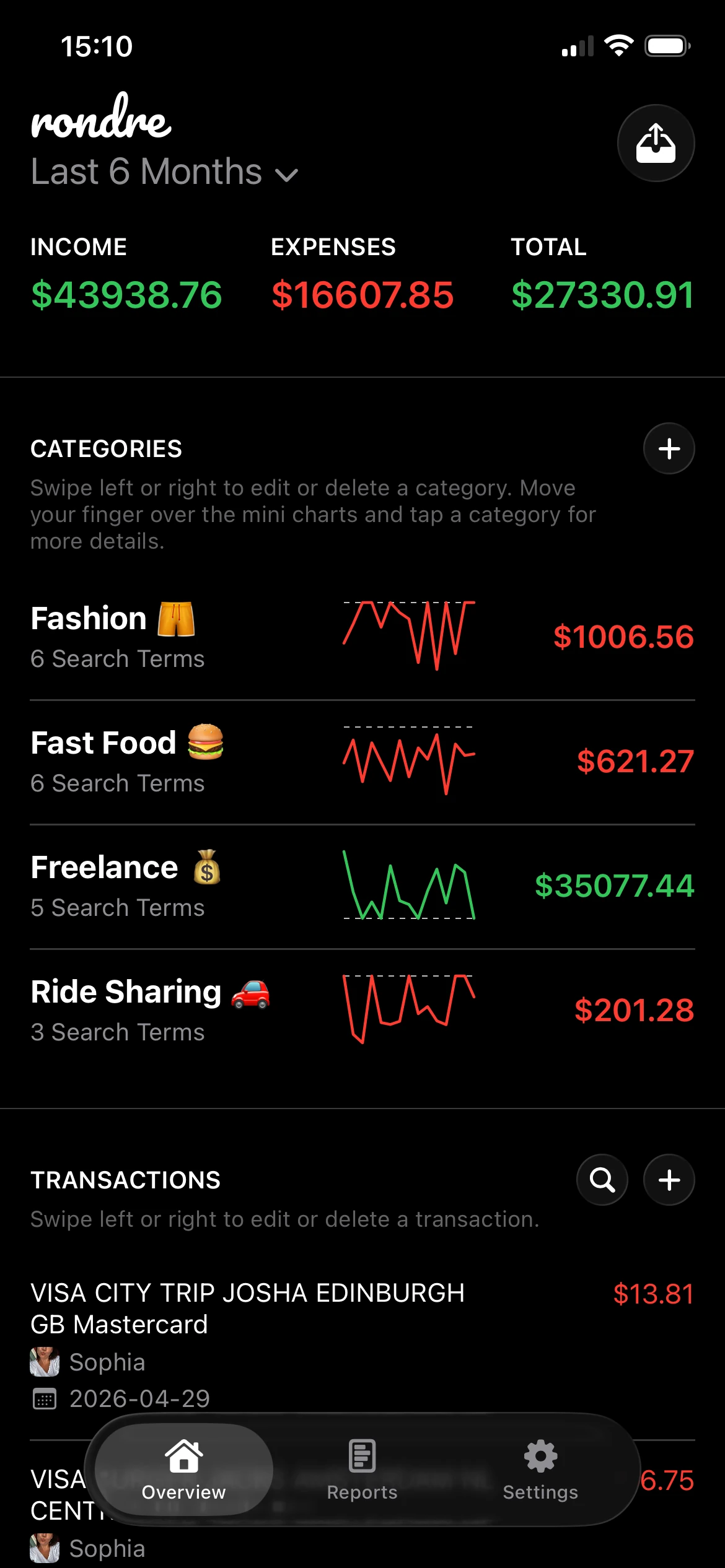
rondre focuses on the core mechanics needed day to day: adding transactions, organizing them well, and finding them later. Users can enter transactions manually or import data through CSV files and PDF bank statements. That makes it useful for people who want control without committing to full bank syncing.
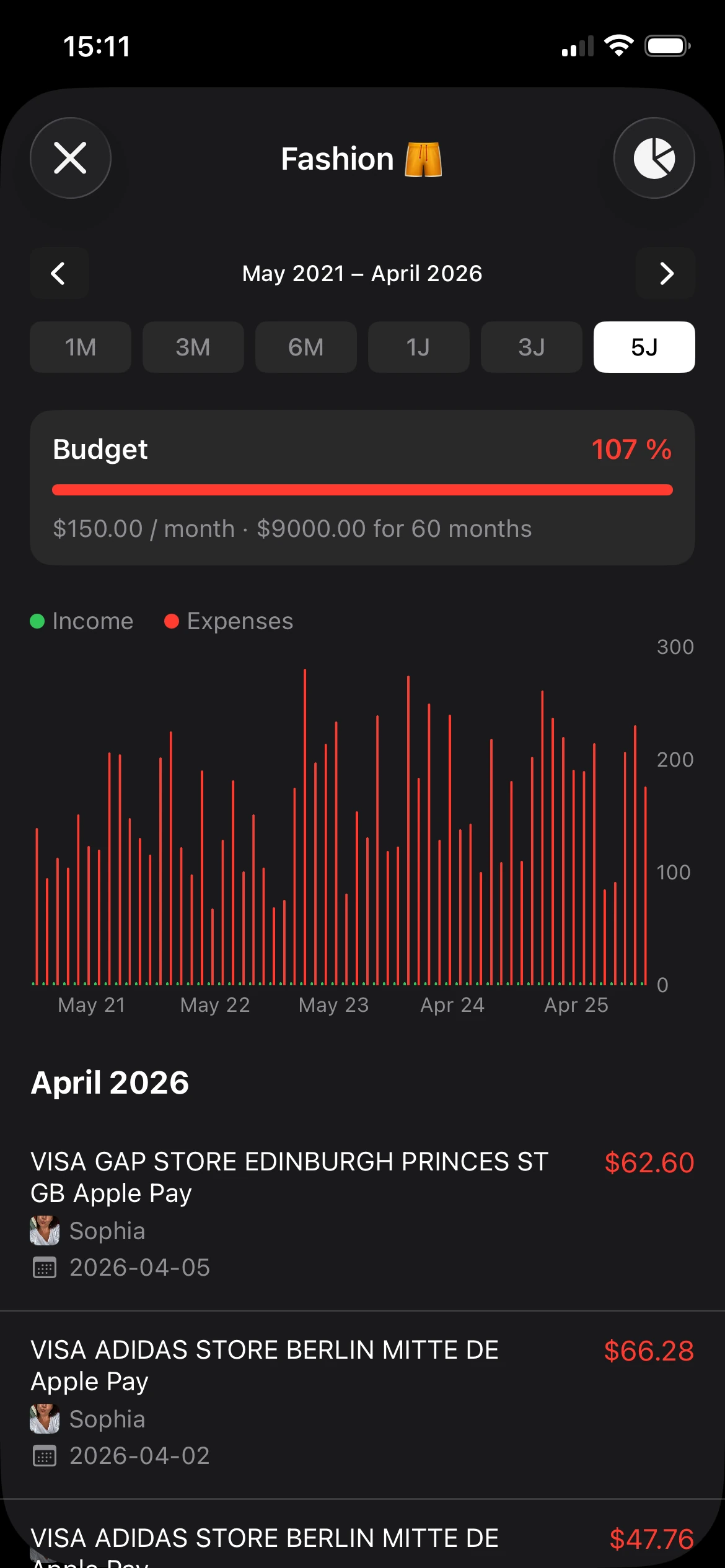
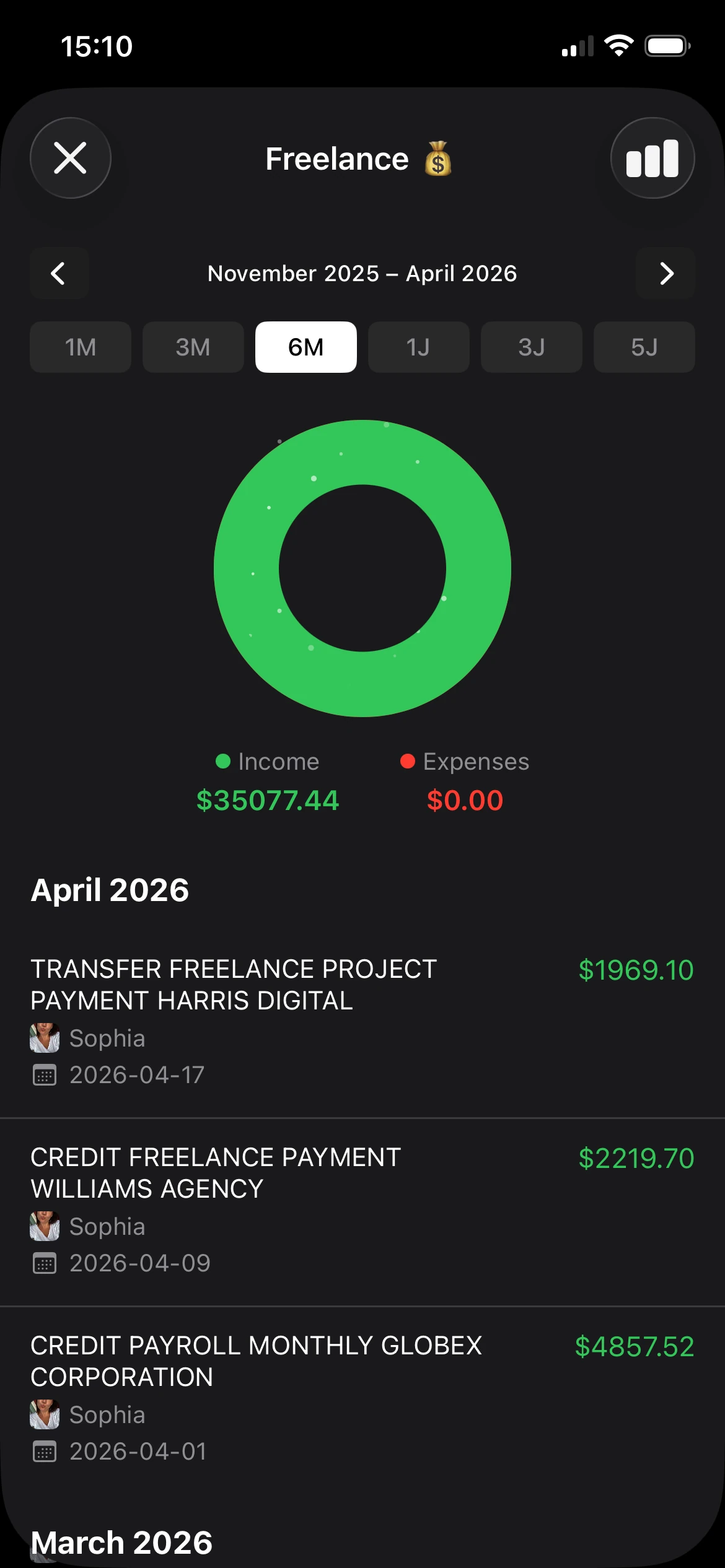
Its category system is especially practical. Smart categories with custom search terms reduce repetitive cleanup, which is where many trackers become annoying after the first week. The mini-charts, bars, and donut charts also stay compact and readable, so the app shows trends without turning every screen into a dashboard.
Practical rule: If a finance app makes setup feel like opening a new bank account, many people will abandon it. rondre avoids that problem.
Another strength is separation. Multiple books let users keep personal spending, side work, family budgets, or travel costs apart. Shared books are even more useful because couples and families can collaborate without forcing a complicated joint-finance setup. People looking for more ideas in this category can also compare it with other tools in this guide to the best app expense tracker.
Best fit and trade-offs
rondre is a strong app for personal finance when privacy, speed, and low-friction tracking matter most. It's especially good for iPhone users who want something lighter than a full banking hub, freelancers who sort expenses across different books, and households that need shared visibility without feature bloat.
The trade-off is clear. There's no direct bank-to-app syncing, so users rely on manual entry or imports. That's slower than fully connected aggregators, but it also gives users tighter control over what data gets added and when.
A few quick reasons it works well:
- No signup friction: Users can start without email, password, or subscription pressure.
- Flexible imports: CSV and PDF support make it easier to pull in real transaction history.
- Good shared setup: Shared books work well for partners, families, and split budgets.
- Focused design: The interface keeps attention on transactions, not upsells.
For people who want forecasting, deep investment tools, or tax-heavy reporting, this won't replace a more advanced platform. For everyone else, especially those tired of noisy finance apps, it gets the basics right.
2. YNAB
YNAB is the strongest choice on this list for people who want a budgeting method, not just a tracker. Its whole system is built around zero-based budgeting, or giving every dollar a specific job before it's spent.
That approach works best for users who don't mind frequent interaction. YNAB rewards regular check-ins, category adjustments, and intentional planning. People who want to set things once and forget them may find it demanding.

Where YNAB works best
YNAB is excellent for category control. Targets, goals, debt-paydown planning, and real-time sync across devices make it especially useful for households that actively budget together. Subscription sharing for up to six people also makes it more practical for families than many single-user tools.
It also supports bank import in the U.S., Canada, U.K., and parts of Europe, plus file and CSV imports. That flexibility matters because linked accounts aren't always reliable, and some people prefer to mix automation with manual review. For readers comparing methods, this breakdown of credit cards in YNAB is worth reading before committing.
YNAB is at its best when the user wants behavior change, not just reporting.
The downside is the learning curve. People coming from a basic expense tracker may feel like they're adopting a budgeting philosophy along with the software. That's great when someone wants discipline, but it can feel heavy if the primary need is seeing spending clearly.
Use YNAB if budgeting is the main goal. Skip it if investing and net worth tracking matter more than category planning.
3. Monarch Money
Monarch Money is one of the cleanest premium options for households that want a shared financial hub. It combines budgeting, cash flow, goals, and net worth into a single polished view, and it handles couple collaboration better than many apps that still feel built for one person.
Its core appeal is range. Monarch covers bank accounts, credit cards, investments, custom categories, and transaction rules without feeling as rigid as strict budgeting systems. For many households, that's the sweet spot.
Best for shared financial planning
Monarch fits best when spending is only part of the picture. A couple trying to manage daily expenses, long-term savings, and investments in one place will usually get more value here than in a pure budgeting app. Shared household views are one of its strongest practical features because they reduce the back-and-forth that often happens when each person uses a separate tool.
The app is also ad-free, which makes the experience feel more trustworthy and less cluttered. That matters in a category where some users already feel uneasy about how much financial data gets aggregated and stored.
A few real trade-offs stand out:
- Broad visibility: Good for users who want spending, saving, and net worth in one dashboard.
- Household friendly: Collaboration feels built in, not bolted on later.
- Premium model: There's no free path for long-term use, and some advanced features sit on higher tiers.
- Sync limits: Like most aggregation-based apps, connection reliability can vary by institution.
This is a better fit than YNAB for users who want flexibility over strict budgeting discipline. It's less appealing for privacy-first users who'd rather avoid linking accounts altogether.
4. Quicken Simplifi
Quicken Simplifi feels familiar in the best way. It aims for the mainstream personal finance user who wants one dashboard, a clear spending plan, bill visibility, and projected cash flow without learning a full budgeting doctrine.
That makes it easier to recommend to someone replacing an older all-in-one finance app. The interface is usually straightforward, and the web plus mobile experience is strong enough that users don't feel trapped on one device.
Best for cash flow visibility
Simplifi stands out most in forward-looking money management. Its projected cash flow and upcoming bill views are helpful for people whose biggest problem isn't category setup but timing. Someone who earns regularly but still gets surprised by due dates or low-balance weeks will often get more immediate value here than in a stricter budgeting app.
The app also includes goals, watchlists, and investment tracking, which gives it broader coverage than many budget-only tools. That said, it still feels more spending-centered than investment-centered.
A good cash flow app doesn't just explain what happened. It helps prevent the next mistake.
The main downside is dependence on paid access and aggregator quality. There isn't a free tier, and users can still run into the same import or sync hiccups common in account-linked platforms. People who want a lightweight, private app for personal finance may prefer a manual or import-driven tool instead.
Simplifi is best for users who want a practical command center without the intensity of YNAB or the spreadsheet depth of Tiller.
5. Copilot Money
Copilot Money is one of the best-designed personal finance apps for Apple users. It feels fast, native, and polished across iPhone, iPad, and Mac, which matters more than many reviews admit. A finance app that feels smooth gets opened more often.
Its strengths are categorization, recurring expense detection, and quick search. The experience is clearly built around Apple hardware, with features like widgets and Face ID making everyday use feel frictionless.

Best for Apple users who want polish
Copilot works well for users who care about interface quality but still want substance. Budget rollovers, cash-flow summaries, investment tracking, and net worth views make it more capable than a simple expense tracker. The recurring expense calendar is especially useful because it surfaces subscriptions and repeat charges in a way that's easy to act on.
Another plus is the paid, no-ads model. Users who dislike free apps monetized through data or aggressive upsells will usually prefer this style of product.
Still, it isn't universal. Copilot is heavily oriented around the Apple ecosystem and U.S. financial institutions. People outside that setup may find its appeal drops quickly. It also lacks the cross-platform flexibility of tools with a dedicated web app.
This is a strong choice when the user wants premium design and native Apple convenience. It's a weaker choice when privacy-first manual tracking or broad non-Apple access matters more.
6. Tiller
Tiller is the best option here for spreadsheet people. Instead of giving users a fixed app experience, it feeds bank transactions and balances into Google Sheets or Microsoft Excel, then lets them build from there.
That sounds niche, and it is. But for the right user, Tiller solves a common problem: many apps hide the data structure, while spreadsheets expose it completely.

Best for spreadsheet control
Tiller is strongest when customization matters more than convenience. Users can automate feeds, use foundation templates, apply AutoCat rules, and collaborate through shared spreadsheets. The data living in the user's own sheet is a practical advantage because exporting, backing up, and changing the system later is much easier.
This style also works well for freelancers, detailed planners, and anyone who already uses spreadsheets for money decisions. It gives far more flexibility than a typical app dashboard.
The trade-offs are obvious:
- Maximum control: Templates and formulas can be changed to fit almost any workflow.
- Data ownership feel: The spreadsheet model makes backup and custom reporting easier.
- More setup effort: Users need to be comfortable with sheets, formulas, and a bit of DIY.
- Weak native mobile feel: On a phone, Sheets or Excel is still Sheets or Excel.
This isn't the easiest app for personal finance on the list. It may be the most adaptable one for people who think in rows, tabs, and formulas.
7. Rocket Money
Rocket Money is built for quick wins. It's especially effective for people who suspect they're leaking money through subscriptions, trial renewals, and small recurring charges that blend into the background.
That focus gives it a different personality from apps that begin with budgeting theory or investment dashboards. Rocket Money starts with cleanup.
Best for subscription cleanup
Its subscription tracking and reminders are the headline feature for a reason. Users can spot recurring charges, get a calendar view, and use budgeting and categorization tools without a lot of setup friction. The optional bill negotiation angle also makes it feel more action-oriented than many trackers that stop at reporting.
The Premium structure is unusual too, with a pay-what-you-think-is-fair approach that some users will appreciate. For people who hesitate to commit to a high annual fee just to test whether an app sticks, that flexibility lowers the barrier.
If someone's main frustration is "I keep paying for things I forgot about," Rocket Money is often a better first pick than a full budgeting platform.
The limitations are familiar. Some premium features cost extra, and sync quality can vary because the app still depends on account aggregation. It's also not the best choice for deep long-term planning or privacy-first manual workflows.
Rocket Money is most useful when the first priority is reducing recurring waste, not building a full financial operating system.
8. EveryDollar
EveryDollar keeps things simple. It's a zero-based budgeting app tied closely to Dave Ramsey's Baby Steps framework, and that makes its target user easy to spot. This is for people who want a straightforward plan, debt payoff focus, and clear categories without much experimentation.
The free version supports manual budgeting, while paid access adds bank sync and other extras. That split matters because some users will be perfectly happy with the manual version, while others will hit the limits quickly.

Best for simple zero-based budgeting
EveryDollar works best for users who want less flexibility and more direction. The envelope-style logic is easy to grasp, and the educational ecosystem around it gives many beginners enough structure to stay consistent. For debt payoff households, that kind of simplicity can be a real advantage.
This is also one of the easier budgeting apps to explain to a partner. There's less feature sprawl, fewer custom workflows, and a clearer philosophy than in more advanced tools.
Still, the limits show up fast for power users. Investment visibility is light, automation requires paid access, and the app isn't designed for people who want deep analytics or a broader money picture. Users who want an all-in-one finance hub will probably outgrow it.
EveryDollar is a good starter tool when the mission is basic budgeting discipline. It's less compelling once finances become more complex than monthly category planning.
9. Empower Personal Dashboard
Empower Personal Dashboard is the most investment-oriented option in this list. It's less about detailed budgeting and more about seeing net worth, holdings, retirement accounts, and spending in one place.
For users with multiple investment and retirement accounts, that focus can be more useful than a category-perfect budget. Many budgeting apps treat investments as an afterthought. It does the opposite.
Best for investments first
The app excels when the user wants portfolio context. The retirement planner, fee analyzer, and cross-account net worth view make it particularly useful for people who already save and invest consistently but want a stronger overview. Brokerage, retirement, bank, and loan accounts can all sit in the same dashboard.
It also benefits from being a free tool on the dashboard side, which lowers the barrier for users who mainly want visibility. The catch is that some users may receive marketing outreach tied to the platform's advisory business, and that can be a drawback for people who want a quieter experience.
The budgeting tools are serviceable, not standout. Someone looking for hands-on envelope budgeting or high-control transaction workflows will likely prefer YNAB, Simplifi, or a privacy-first tracker like rondre.
It is a smart pick when investments are central to the financial picture. It's not the best fit when day-to-day category management is a pain point.
10. Honeydue
Honeydue is one of the few finance apps built specifically for couples rather than retrofitted for them. That focus shows up in the details. Shared views, bill reminders, in-app chat, and privacy controls all center on the practical reality that two people rarely want to share everything the same way.
That makes Honeydue appealing for partners who want visibility without merging their whole financial identity. It keeps the conversation lighter than many household finance tools.

Best for couples who need lightweight sharing
Honeydue is strongest when the goal is coordination, not analysis. Couples can choose what to share, track bills, message inside the app, and keep money conversations tied to the actual transactions. That sounds small, but it reduces friction because it removes the need to bounce between banking apps and chat apps.
For newer couples or households testing a shared system, that flexibility is useful. Not every pair wants a full joint-budget setup from day one. Readers comparing this category more thoroughly can also look at this roundup of the best budgeting app for couples.
A few things to keep in mind:
- Couple-first design: Sharing controls are more thoughtful than in many general-purpose apps.
- Communication built in: In-app chat keeps bill and spending conversations connected to context.
- Lighter planning: There's no advanced forecasting or investment depth.
- Extra financial layer: The optional joint banking product may be useful for some couples, but others won't want another account relationship.
Honeydue is a strong relationship tool with budgeting features. It's weaker as a complete financial planning platform.
Top 10 Personal Finance Apps Comparison
| Product | Core features | UX & privacy | Best for | Price / Value |
|---|---|---|---|---|
| rondre | Manual + CSV/PDF import, smart categories, mini/bar/donut charts, multiple shared "books" | Fast no‑signup flow, clean dark UI, privacy-first (no ads/trackers), stores data on own servers | Couples, families, freelancers wanting simple private tracking | Free; no paywalls, voluntary support |
| YNAB (You Need A Budget) | Zero‑based budgeting, goals, debt pay‑down, bank imports | Strong education & community, real‑time sync; steeper learning curve | Users committed to active, disciplined budgeting | Subscription (paid), 34‑day free trial |
| Monarch Money | Account aggregation, budgets, cash‑flow, investment analytics, forecasting | Clean shared dashboard, ad‑free stance; advanced tools on paid tier | Households wanting broad planning & shared views | Premium model; Plus tier for advanced features |
| Quicken Simplifi | Unified dashboard, projected cash‑flow, budgets, bills, investment overview | Polished web + mobile parity, mainstream UX | Users wanting quick setup and proactive cash‑flow views | Paid (annual); no free tier |
| Copilot Money | Native iOS/macOS apps, ML categorization, recurring expense detection, budgets | Best‑in‑class Apple UX, widgets, Face ID; private paid model | Apple users who want fast native apps and recurring tracking | Subscription (paid), no ads |
| Tiller | Automated daily bank feeds into Google Sheets/Excel, templates, AutoCat rules | Spreadsheet‑first; max customization, DIY setup required | Power users and spreadsheet fans who want control | Subscription (paid), 30‑day trial |
| Rocket Money (Truebill) | Subscription tracking, budgets, savings automations, bill negotiation options | Approachable design, pay‑what‑you‑want Premium model; aggregator reliability varies | Users focused on cutting subscriptions and quick savings | Freemium; Premium/pay‑what‑you‑want, add‑ons may cost extra |
| EveryDollar (Ramsey) | Zero‑based templates, envelope‑style budgeting, Ramsey content & coaching | Very simple UI; free manual entry, Premium adds bank sync | US users following Ramsey Baby Steps, debt payoff planners | Free manual tier; Premium (paid) for bank sync |
| Empower Personal Dashboard | Net‑worth, spending analysis, retirement planner, investment fee analyzer | Robust investment tools, free dashboard with advisory upsell | Investors wanting portfolio & retirement planning | Free dashboard; paid wealth management option |
| Honeydue | Shared transactions, category budgets, bill reminders, in‑app chat, optional joint account | Purpose‑built for couples, customizable privacy controls, fast setup | Couples who want lightweight shared visibility and conversations | Free; optional joint banking features |
Your Next Step Start Tracking Today, Not Someday
Financial clarity doesn't appear all at once. It builds from repeated small actions, and the best app for personal finance is usually the one a person will keep opening after the first week. That's why the right choice depends less on feature lists and more on fit.
Some people need a strict budgeting system. YNAB and EveryDollar are strongest when spending needs guardrails and every dollar needs a role. Some people want a broader household dashboard. Monarch Money and Quicken Simplifi are better when cash flow, goals, and account aggregation matter more than budgeting doctrine.
Other users need a very different kind of tool. Tiller is excellent for spreadsheet-first planners who want control over structure. A platform providing strong investment and retirement visibility is effective when these are prioritized over detailed budgets. Honeydue is useful when the biggest challenge is sharing finances with a partner without forcing a full merge.
Privacy deserves more weight than it usually gets in this category. Many finance apps assume that linking accounts is automatically better, but that isn't true for everyone. Some users want manual control, import flexibility, and a setup that doesn't start with handing over logins or personal details. That use case is more important than many app roundups admit.
The broader market supports that shift toward easier, more accessible tools. The Business Research Company's market report estimates the global personal finance apps market at $165.9 billion in 2025 and projects it to reach $507.64 billion by 2030, a projected 25% CAGR. Research Nester's regional forecast also identifies North America as the largest market and Asia-Pacific as the fastest-growing, with one projection putting North America at a 35.3% share by 2035. In practical terms, that growth supports tools that reduce friction, including manual entry, CSV import, and bank-statement parsing for users who don't want every account permanently connected.
For many iPhone users, that makes rondre an easy recommendation. It's free, requires no signup, supports CSV and PDF imports, and works well for both solo and shared tracking. It doesn't try to be a bank, an investment advisor, and a budgeting course at the same time. It helps users record transactions, organize them, and understand their money without noise.
The most useful next step is simple. Pick one app from this list and track spending for the next week. Not perfectly. Just consistently. If privacy, simplicity, and fast setup matter most, rondre is one of the easiest places to start.
If a simple, private finance tracker sounds better than another bloated dashboard, rondre is worth trying. It's free, has no ads, requires no signup, and makes it easy to track income and expenses, import CSV or PDF statements, and share a book with a partner or family.