Stop Guessing Where Your Money Is Going
It is Thursday night. Rent cleared, you split takeout twice this week, your campus job deposit still has not hit, and your bank balance looks lower than expected. That is the moment most students open a budgeting app. They do not want a lecture. They want a fast answer.
The right app does three jobs well. It shows what already happened, warns you about what is about to hit, and helps you sort out shared costs without turning every grocery run into a math problem. For students, that last part matters more than a lot of reviews admit. Roommates, partners, and housemates blur the line between personal spending and group spending fast.
Privacy matters just as much. A budgeting app can be useful and still ask for more access than you are comfortable giving. Some students want full bank syncing because it saves time. Others would rather enter transactions manually if it means sharing less data. Both approaches are reasonable. The better choice depends on your tolerance for convenience versus control.
That is the angle here.
Instead of rating apps by feature count alone, this guide looks at which ones are practical for student life: low or uneven income, missed receipts, split bills, and the question of how much financial data you want to hand over. A dedicated comparison also calls out two things that usually get buried: which apps do a better job with financial privacy, and which ones make collaboration easier when you share expenses with roommates or a partner.
Table of Contents
- 1. rondre
- 2. YNAB
- 3. Monarch Money
- 4. Quicken Simplifi
- 5. Copilot Money
- 6. Rocket Money
- 7. PocketGuard
- 8. Goodbudget
- 9. EveryDollar
- 10. Splitwise
- Student Budgeting Apps, Top 10 Comparison
- Your First Step to Financial Clarity Today
1. rondre

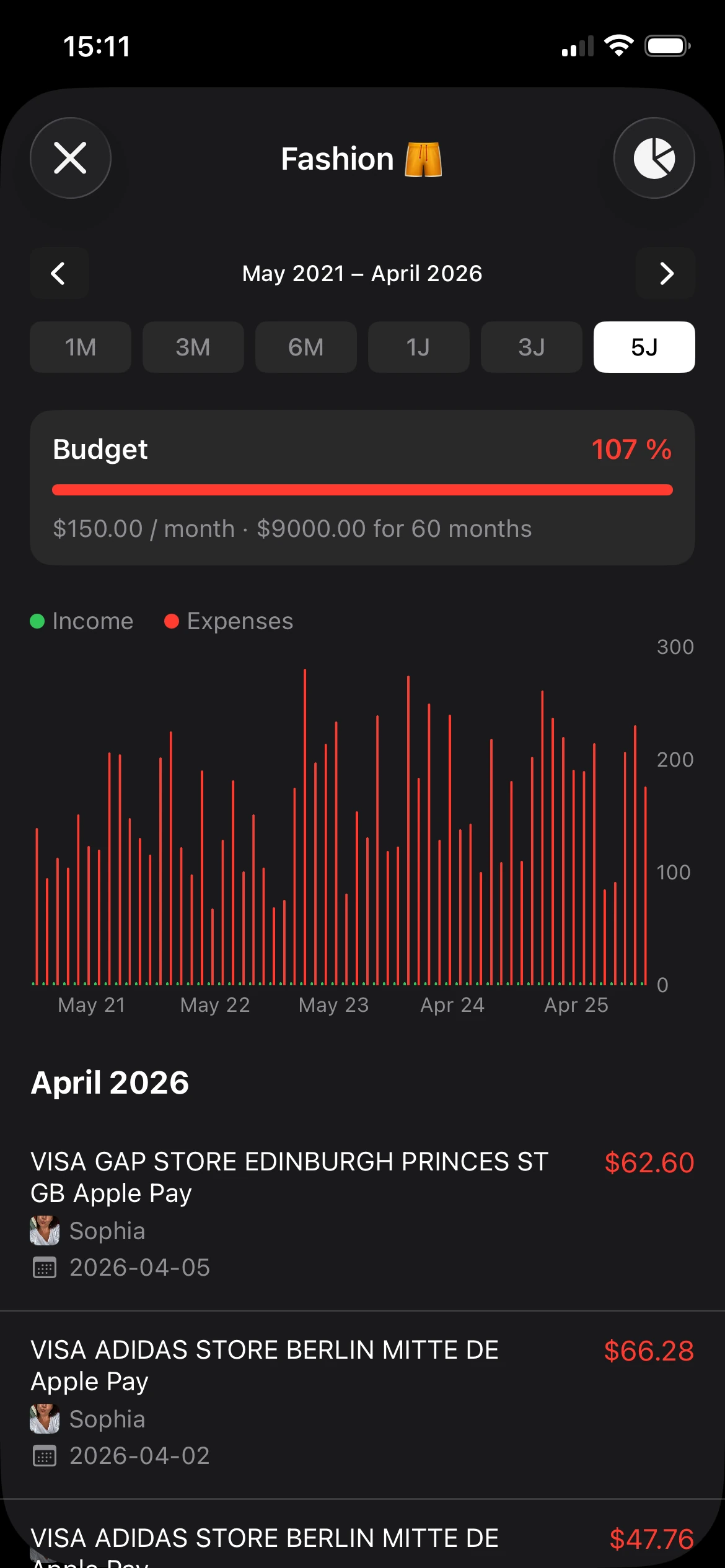
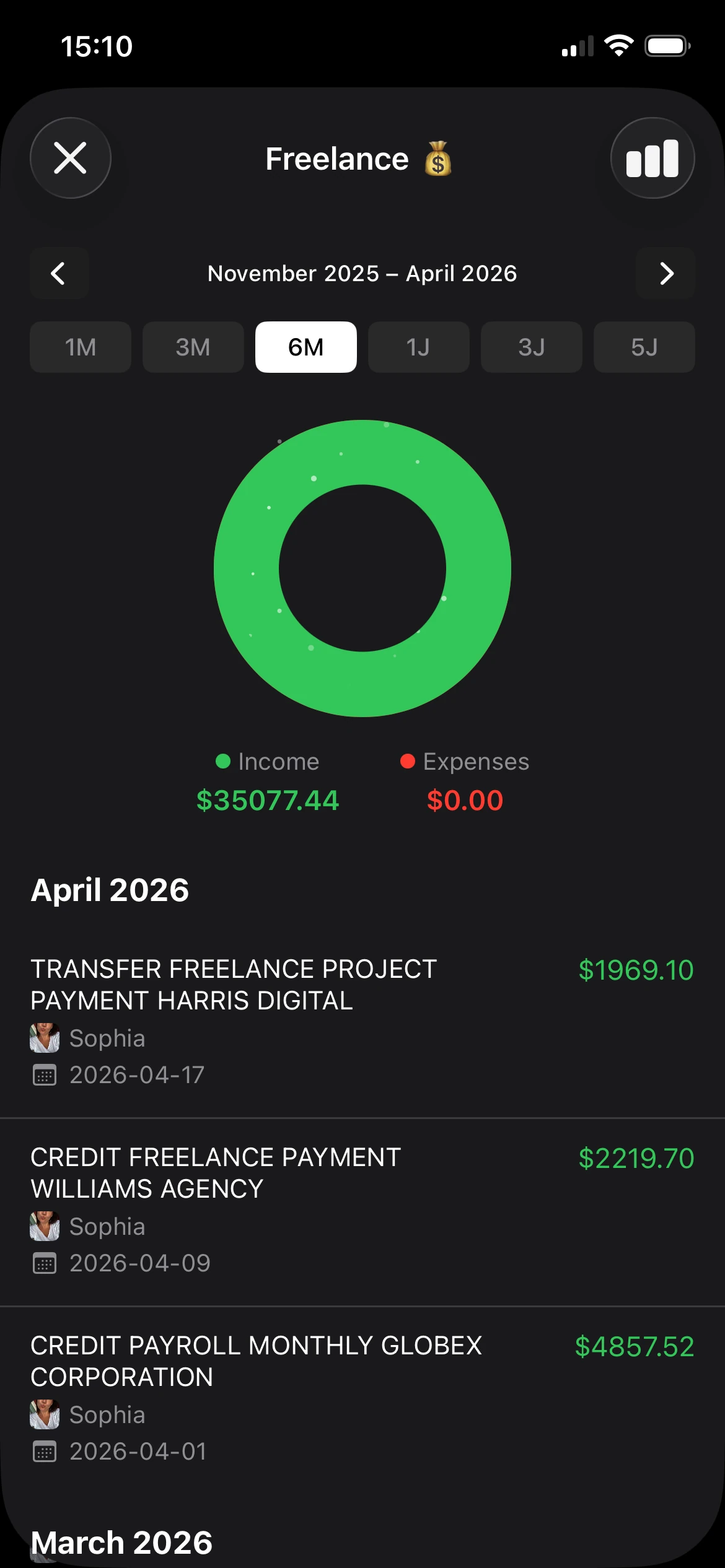
It is Tuesday night, rent is due, someone in the group chat is asking who still owes for groceries, and your banking app is not helping you sort any of it. rondre fits that kind of student life well because it removes the setup friction that usually kills momentum. You can open it and start tracking right away, with no sign-up, no email verification, and no upgrade prompts interrupting basic use.
That privacy is a practical benefit for students, not just a principle. Plenty of students do not want to hand over bank access just to keep an eye on spending, especially if they are sharing devices, managing money with family support, or trying to keep their financial life off another app's servers. That gap gets ignored in a lot of budgeting advice, as noted in Ent Credit Union's comparison of budgeting apps and spreadsheets for student money management.
Why it works for chaotic student life
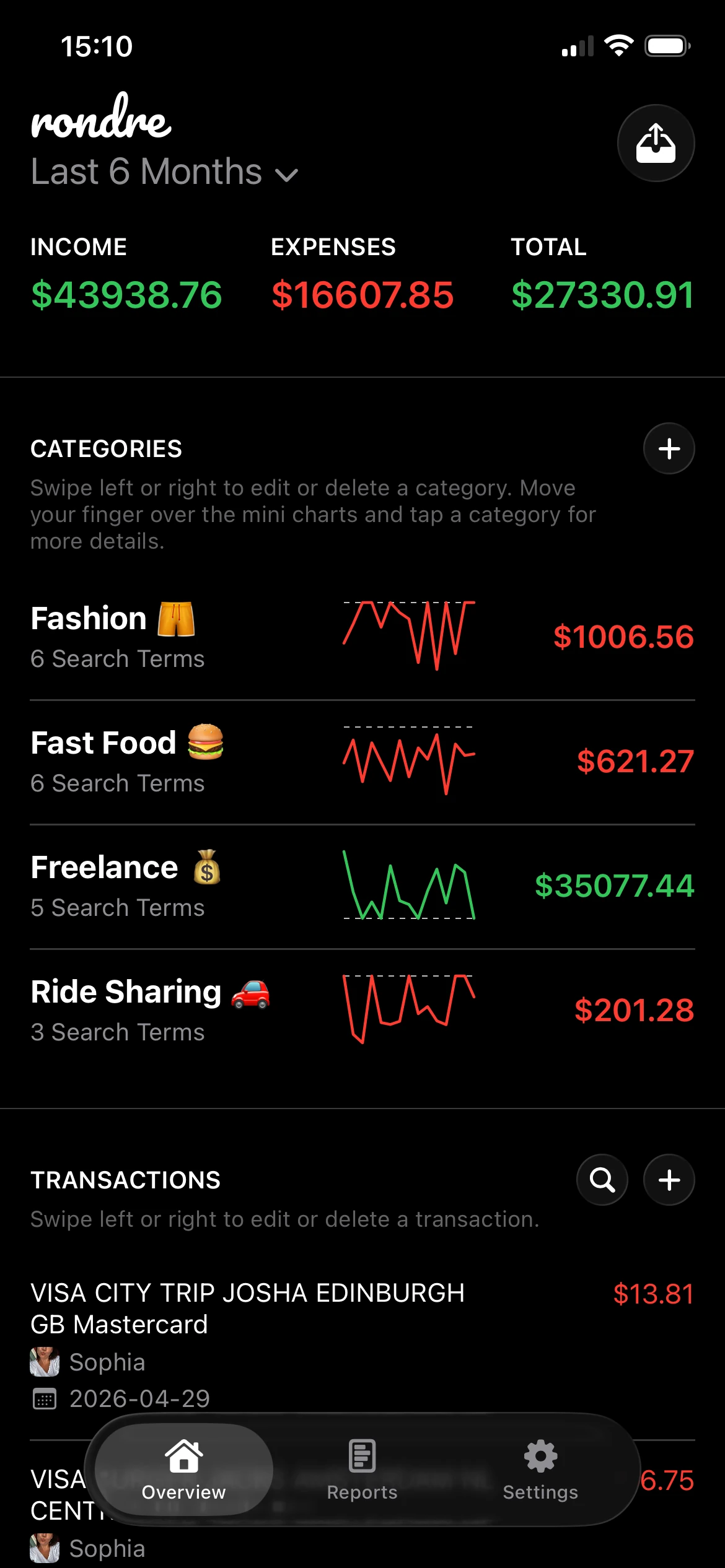
rondre keeps the core job simple. Add transactions manually, import them by CSV, or pull them from PDF bank statements. Custom categories and smart search terms help when your real spending does not fit neat labels, which is common for students balancing food, transport, class costs, and shared household expenses in the same week.
The collaboration piece is what makes it more useful than a basic solo tracker. Instead of forcing everything into one personal budget, rondre lets you create multiple books and share a book with a roommate, partner, or family member. That works better for split rent, groceries, trips, and apartment costs because shared money stays shared, while your own spending stays private.
Practical rule: If tracking money feels like admin work, students stop doing it as soon as classes, shifts, and deadlines pile up.
Best fit and trade-offs
rondre is strongest for students who care more about control, privacy, and low-friction tracking than full automation. If the goal is investment tracking, long-range forecasting, and automatic bank syncing in the background, another app on this list will do more.
That trade-off is reasonable for a lot of students. Manual or file-based tracking asks for a bit more input, but it also gives you more privacy and fewer distractions. If you are comparing lighter tools against stricter zero-based systems, this guide to a free alternative to YNAB for simpler budgeting is a useful reference point.
- Best for private tracking: No account, email, or password required.
- Best for shared budgets: Multiple books and book sharing make roommate or partner expenses easier to manage.
- Best for getting started fast: Free core features cover the basics without blocking them behind a paywall.
2. YNAB

YNAB is one of the most structured student budgeting apps on this list. It doesn't just track spending after the fact. It asks users to assign every dollar a job before the month gets away from them.
That approach works well for students who need boundaries more than summaries. If money tends to disappear into food delivery, rideshares, and small impulse purchases, YNAB forces a decision early. Tuition money isn't the same as grocery money, and YNAB makes that visible fast.
Where YNAB stands out
YNAB also has one student-friendly advantage that keeps it relevant year after year. Verified students can get a free first year, confirmed in Purdue Global's review of budgeting apps for college students. That lowers the barrier enough for students who want a serious system but aren't ready to pay right away.
Its education side is also strong. Workshops, guides, and a very deliberate method make it better for habit-building than many apps that only show charts after the damage is done.
For students comparing zero-based apps and simpler trackers, this free YNAB alternative overview is useful if the main goal is lighter setup and fewer moving parts.
Who should skip it
YNAB isn't a passive app. It rewards attention. Students who want an app to categorize transactions automatically in the background may find it demanding.
- Best for active planners: Strong for monthly budgeting, targets, and debt tools.
- Best for shared use: One subscription supports shared budgeting across multiple users.
- Less ideal for casual trackers: It asks for regular decisions, not occasional check-ins.
YNAB works best when the user wants a system, not just a spending log.
A direct link to YNAB pricing makes it easy to check current plans.
3. Monarch Money

Monarch Money feels like a grown-up money hub that still works for students who want something cleaner than older finance apps. It combines budgeting, goals, account connections, and broader financial tracking in one polished place.
For students nearing graduation, that can be appealing. A basic student budget often grows into car insurance, emergency savings, side income, and maybe the first investment account. Monarch is built for that wider view, not just weekly spending limits.
Where it earns its place
Its strongest practical advantage is collaboration. Unlimited collaborators make it easier to manage shared expenses with a partner or household without awkward login sharing or pieced-together workarounds. That's a meaningful difference from apps that still treat shared finances as an add-on.
The other plus is that it's ad-free. That sounds minor until a student tries an app packed with promos, upsells, and product nudges. A subscription-funded model often feels calmer to use.
The trade-off most students should think about
Monarch can be more app than a lot of students need. If the goal is to know whether there is enough left for groceries and transit this week, its broader net worth and integration features may feel like extra weight.
- Best for students transitioning into full financial planning: Budgets, goals, and connected accounts in one place.
- Best for shared money management: Collaboration is one of its real strengths.
- Less ideal for minimalists: A lighter app may be easier to stick with.
Students who want that all-in-one style can explore Monarch Money.
4. Quicken Simplifi

Quicken Simplifi is built for students who don't want to micromanage categories all day but still need a clear answer to one question: what's safe to spend right now?
That single question matters because "budgeting" often fails when it stays too abstract. A monthly total doesn't help much when rent cleared yesterday, the utility bill is pending, and weekend plans are coming up. Simplifi's Spending Plan is designed to make the answer more immediate.
Why some students will like it
This app is good at reducing guesswork. Guided onboarding and strong bank connectivity help students get started without much manual setup, and the forecast-style view makes upcoming cash flow easier to understand.
Students who like the Quicken ecosystem but want something lighter on mobile should also look at this guide to Quicken for iPad, especially if device compatibility matters as much as budgeting style.
Where it falls short
Simplifi is less appealing for students who want a strict zero-based method or envelope budgeting. It leans toward clarity and automation more than discipline-heavy planning.
The best use case for Simplifi is a student who earns, spends, and pays bills irregularly but wants a clean picture of what remains.
- Best for cash-flow visibility: Spending Plan is easy to understand.
- Best for low-effort setup: Bank syncing does a lot of the work.
- Less ideal for budgeting purists: YNAB or Goodbudget may feel more intentional.
Students interested in the platform can check Quicken Simplifi.
5. Copilot Money

Copilot Money is one of the better-looking student budgeting apps available, especially for Apple users. That sounds superficial until it isn't. Students are far more likely to check an app daily if the interface feels fast, clear, and pleasant to use.
Its AI-assisted categorization and subscription detection are the main draw. For students with several streaming charges, app renewals, software plans, and recurring bills, that automated cleanup can save a lot of friction.
Where it makes sense
Copilot is strongest for students already deep in the Apple ecosystem. iPhone, iPad, Mac, and web access make it flexible for quick mobile check-ins and more detailed budget review on a bigger screen.
It also suits students who like reviewing money often. The design encourages frequent glances, which can be more useful than a complex monthly budgeting ritual that gets skipped.
Why it won't fit everyone
The biggest limitation is simple. It's paid, and it doesn't offer a permanent free tier. Android users are also out.
- Best for Apple-first students: The experience is built around that ecosystem.
- Best for daily awareness: Strong visuals and automation encourage regular use.
- Less ideal for budget-conscious beginners: A free option may be the smarter starting point.
Students who care about polish and recurring expense visibility can visit Copilot Money.
6. Rocket Money
Rocket Money is the app for students whose finances are getting drained by recurring charges. Streaming services, app subscriptions, gym memberships, forgotten trials, and phone bills add up fast even when individual charges look harmless.
Its strongest angle isn't deep budgeting theory. It's cleanup. The app helps surface subscriptions and offers cancellation support and bill negotiation features, which can be useful for students who hate calling providers or putting off account admin.
What works well
Rocket Money makes sense for students who already know they're leaking money through recurring costs. In that case, tracking alone isn't enough. They need a tool that spots the repeat charges and helps remove them.
Its flexible premium model also lowers the pressure a bit compared with apps that force one rigid subscription decision up front.
What to watch out for
The pricing model can feel a little fuzzy, and the bill negotiation fee structure means students should read the terms carefully before handing over the task. It also isn't the strongest option for detailed long-term budgeting.
- Best for subscription cleanup: It quickly highlights repeat charges.
- Best for students avoiding awkward provider calls: Concierge-style help can be useful.
- Less ideal as a full budgeting system: It works better as a practical consumer money app than a complete planning tool.
For students focused on recurring charges and bill management, Rocket Money is worth a look.
7. PocketGuard

You check your bank balance on Thursday, rent already cleared, groceries mostly covered, and the number still looks decent. Then two days later you're surprised by how tight things feel. PocketGuard is built for that exact gap between "money in the account" and "money you can spend."
Its best feature is the safe-to-spend view. For students juggling tuition, food, rides, and random campus spending, that shortcut is often more useful than a pile of category charts. It answers the question students ask in real life: what can I spend today without creating a problem next week?
That makes PocketGuard a practical fit for students who do not want to manage a full budgeting system. It gives structure without demanding a lot of setup. If envelope budgeting feels too hands-on, a simpler safe-to-spend number may be easier to stick with. Students who want stricter category limits can compare that approach with a cash envelope budgeting method for controlling everyday spending.
PocketGuard also has a privacy and collaboration trade-off that matters more than many student reviews admit. It works best as a personal spending control app, not a shared money tool for roommates or couples. If splitting groceries, utilities, or household supplies is part of your weekly routine, PocketGuard will feel less helpful than apps built around shared visibility and expense coordination.
The same goes for features behind the paywall. The app is functional, but some of the more useful planning tools sit on the paid tier, and the design feels more practical than polished.
Students who overspend because their checking balance gives false confidence usually get value from this kind of app.
A direct visit to PocketGuard pricing will show whether the paid version makes sense for your budget.
8. Goodbudget
Goodbudget is the simplest way on this list to learn envelope budgeting without carrying actual cash. For students who need hard limits, that matters. Categories stop being theoretical once food, transportation, and entertainment each get their own digital envelope.
It also has a practical advantage for shared budgeting. Goodbudget works well for couples or students sharing categories across devices, which makes it more useful than many solo-first apps.
Why beginners often stick with it
The free plan is usable, and the method is easy to understand. That combination matters because complexity kills consistency. Students who bounce off finance apps usually do better with systems that feel clear on day one.
The envelope method can also be a strong fit for anyone trying to control discretionary spending. This explanation of cash budget envelope budgeting is useful for understanding why fixed category limits work so well for groceries, eating out, and everyday campus spending.
The trade-off
Goodbudget is more manual than many newer apps, especially on the free plan. That is either a strength or a hassle depending on the student.
- Best for disciplined spenders in training: The envelope setup creates clear limits.
- Best for simple sharing: Shared category budgeting works well.
- Less ideal for automation fans: Students wanting effortless syncing may get frustrated.
Students who like the envelope style can check Goodbudget subscription details.
9. EveryDollar

EveryDollar is strict in a way that some students will love and others will abandon in a week. It follows a zero-based budgeting style tied closely to Dave Ramsey's broader money philosophy, which means every dollar gets assigned before the month unfolds.
That clarity can help students avoid casual overspending. It works especially well for students who want to stay out of debt, control impulse purchases, and build a more intentional monthly plan.
Where it fits best
EveryDollar is strong when a student wants discipline, not experimentation. The setup is straightforward, and the shared household option helps if money is being managed with a partner.
It also benefits from being part of a larger educational ecosystem. Students who like structured financial guidance may find that reassuring.
Where it can feel limiting
The app's reports and analytics are less robust than some competitors, and the better automation features require Premium. Students looking for richer visual analysis or more flexible planning tools may outgrow it.
- Best for strict monthly budgeting: Clear categories and zero-based structure.
- Best for students motivated by rules: The method leaves less room for drift.
- Less ideal for nuanced tracking: Other apps offer more analysis and flexibility.
Students interested in the Ramsey approach can view EveryDollar Premium subscription details.
10. Splitwise

Splitwise isn't a full budgeting app, but it solves a student problem that many budgeting apps still handle badly. Shared expenses create confusion fast. Rent, groceries, utility bills, rides, trips, household supplies, and one person always forgetting to request payment. Splitwise keeps that visible.
Most students know it as a roommate tool, but the bigger issue is shared financial coordination more broadly. Current coverage often stops at bill-splitting and doesn't say much about couples, family budgeting, or how people maintain financial independence while still managing shared spending together, as noted in Amberstudent's discussion of budgeting apps for students.
Why it still matters
Splitwise is excellent at fairness and transparency. Everyone can see who paid, who owes, and what has been settled. That prevents the small resentments that build when shared expenses are tracked in texts or memory.
It works best as a companion tool. A student can use Splitwise for group balances and another app for personal budgeting, savings, and income tracking.
Best use case
Students living with roommates should strongly consider it. Students managing money with a partner may want something more integrated, especially if they need shared books and personal spending visibility in the same place.
Splitwise is for settling up. It isn't built to replace a full personal budget.
For shared balances and group expense tracking, Splitwise subscriptions are the place to start.
Student Budgeting Apps, Top 10 Comparison
| Product | Core features | UX & Privacy | Pricing & Value | Best for | Key differentiator |
|---|---|---|---|---|---|
| rondre (Recommended) | Transaction recorder, smart categories, mini‑charts, CSV/PDF import, multiple shared books | Fast, clean dark UI; no sign‑up, no ads, no tracking | Completely free; voluntary support | Minimalists, couples/families, privacy‑focused users | No account required; privacy‑first and instant setup |
| YNAB (You Need A Budget) | Zero‑based budgeting, targets, debt tools, bank sync, CSV import | Methodical, hands‑on workflow; strong education | Paid subscription (annual); 12 months free for students | Users wanting disciplined budgeting and habit change | "Give every dollar a job" system + workshops |
| Monarch Money | Account aggregation, budgets, goals, investments, unlimited collaborators | Modern, ad‑free UI across web & apps | Subscription (annual preferred); free trial | Users who want net‑worth + goals + household sharing | Broad integrations and unlimited collaborators |
| Quicken Simplifi | Cash‑flow forecasts, Spending Plan, goals, bank connectivity | Guided onboarding; clear safe‑to‑spend view | Annual billing (often promotional); 30‑day guarantee | Users wanting forecasting and simple cash‑flow planning | Spending Plan that shows what's safe to spend |
| Copilot Money | AI auto‑categorization, subscription detection, net‑worth | Polished, Apple‑centric UI (now web too) | Paid only (trial available) | Apple users who want fast, attractive automation | AI categorization + subscription insights |
| Rocket Money | Subscription detection, bill negotiation, cancellation concierge | Consumer‑focused; concierge services for bills | Free core; Premium paid; negotiation fee share if saved | People seeking lower recurring bills and cancellations | Human bill negotiation and cancellation service |
| PocketGuard | Safe‑to‑spend view, rollovers, debt payoff plan, rules | Utilitarian UI; quick snapshot of disposable cash | Plus subscription for premium features; lower annual cost | Users needing a fast "in my pocket" balance | Clear leftover safe‑to‑spend focus |
| Goodbudget | Digital envelopes, shared budgets, CSV import, limited bank sync | Simple, traditional UI; usable free tier | Free usable plan; Premium for unlimited envelopes/bank sync | Beginners and envelope‑method users/couples | Envelope budgeting with easy sharing |
| EveryDollar (Ramsey) | Zero‑based monthly budgets, categories, household sharing | Discipline‑first, pairs with Ramsey education | Free basic; Premium for bank sync (costly) | Fans of Ramsey method and strict budgeting | Integration with Ramsey's financial teachings |
| Splitwise | IOU tracking, group balances, currency conversion, settle via Venmo/PayPal | Very easy for groups; not a full budgeter | Free core; Pro subscription for receipts/analytics | Roommates, trip groups, shared expense tracking | Best for transparent group expense splitting |
Your First Step to Financial Clarity Today
It is 11:40 p.m., rent is due tomorrow, someone in the group chat is asking who paid for toilet paper, and the card charge from last weekend still has not been sorted into a category. That is the moment a budgeting app either helps or gets ignored.
The apps that stick with students do a few basic things well. They make spending visible fast, they do not create extra admin, and they fit the messy reality of split bills, irregular income, and forgotten receipts. Research on student budgeting habits, referenced earlier in this article, points in the same direction. Students are more likely to keep budgeting when the tool is easy to use and gives them a clearer sense of control.
That is why the best choice usually comes down to two questions, not a giant feature checklist. First, how much personal financial data are you comfortable handing over? Second, do you need to manage money alone, or with roommates or a partner?
Those trade-offs matter more than students often expect.
A fully connected app can save time, but it also asks for more account access and usually collects more financial data. A manual or low-data app takes a little more effort, but some students stick with it longer because it feels simpler and more private. The same goes for collaboration. Plenty of apps are fine for solo budgeting and clumsy for shared expenses. If rent, groceries, utilities, and random household purchases are part of weekly life, that gap becomes obvious fast.
The shortlist here reflects that reality. Students who care most about privacy, low setup friction, and shared tracking should prioritize the app in this list that keeps data collection light and collaboration easy. Students who want a stricter budgeting method and are willing to check in often will usually get more from YNAB or EveryDollar. Students who mainly need a quick safe-to-spend number may find PocketGuard or Simplifi easier to maintain. Students splitting costs with other people should keep Splitwise or a shared-budget option in the running, even if they use a second app for the actual budget.
Start smaller than you think.
Open one app today and enter the last five purchases. That is enough to spot useful patterns right away. You will usually see one of three problems first: food spending is drifting, recurring charges are piling up, or shared expenses are getting tracked badly enough to cause tension later.
Privacy deserves a final mention because students are often told to focus only on automation. Automation is useful. It is not free. The cost is usually more account access, more syncing, and less control over what gets shared across a household or friend group. For some students, that trade is fine. For others, especially anyone sharing devices, living with roommates, or trying to keep certain spending private, a simpler setup is the better call.
The practical move is straightforward. Pick the app that matches your real habits, your privacy comfort level, and the way you split costs with other people. A simpler app used every week beats a more advanced one that gets deleted after midterms.