A lot of people hit the same wall with credit cards in a budget. They buy groceries, fuel, and dinner on the card, then make one large payment from checking and suddenly the money picture looks wrong. The card balance drops, the bank balance drops, and the budget still feels fuzzy.
That confusion usually isn't a discipline problem. It's a bookkeeping problem. Credit cards are now so central to everyday spending that sloppy handling creates constant noise. In the United States, credit card spending reached $5.83 trillion in 2022, up from $4.19 trillion in 2019, and represented 33% of Personal Consumption Expenditures, according to the Consumer Bankers Association's review of card spending trends.
Table of Contents
- Why Managing Credit Card Payments in a Budget Feels Broken
- The Right Way to Think About Credit Card Spending
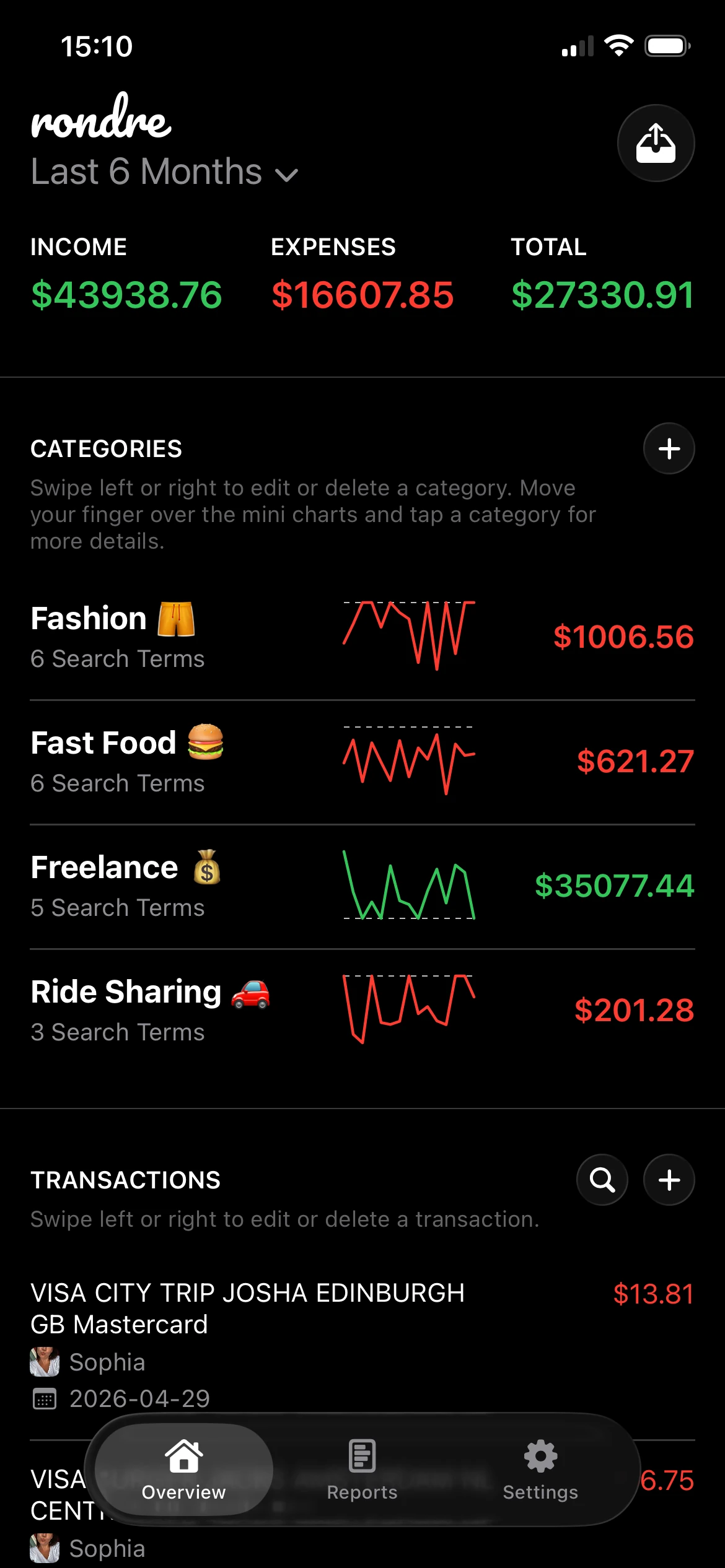
- How to Add Your Credit Card Accounts in rondre
- Your Daily Workflow for Purchases and Payments
- How to Reconcile Your Credit Card Balance in rondre
- Advanced Tips for Shared Books, Returns, and Debt Payoff
Why Managing Credit Card Payments in a Budget Feels Broken
The annoying part about credit cards isn't the swipe. It's what happens later.
A payment leaves checking, but that payment doesn't tell a budget anything useful about what was bought. Spending happened earlier, across many transactions. If the budget treats the payment like a fresh expense, everything gets counted twice. If it ignores the original purchases, spending categories stop meaning anything.
Where most people get tripped up
Two mistakes cause most of the mess:
- Treating the card payment as spending: that inflates monthly expenses.
- Treating the credit card balance as optional: that hides a real liability and makes overspending easier to miss.
That second mistake matters more than it looks. A credit card balance can feel abstract because the cash hasn't left checking yet. But the obligation is already real. Once a purchase hits the card, the money has effectively been committed.
Credit card budgeting feels broken when the app focuses on the payment instead of the purchase.
Why this matters now
Credit cards aren't a niche payment method for a small slice of careful users. They're routine. That means the bookkeeping method has to work for everyday life, not just for month-end cleanup.
The practical answer is a system that separates two events clearly:
| Event | What it really is | How it should affect the budget |
|---|---|---|
| Card purchase | Spending | Reduce the correct category |
| Card payment | Money movement | Reduce the liability, not the spending total |
Once that distinction is in place, the budget gets much calmer. Checking shows where cash sits today. The card account shows what still needs to be paid. Categories show what the money was used for.
That is the whole foundation of a reliable You Need a Budget credit card payment workflow. It isn't about making credit cards special. It's about refusing to let one transaction do two jobs.
The Right Way to Think About Credit Card Spending
A credit card purchase is spending. A credit card payment is moving money.
That single idea fixes most budget confusion.

The clean mental model
Think of the card as a temporary middle layer between the store and the cash already assigned in the budget. The spending category should take the hit when the purchase happens, not when the bill gets paid later.
That lines up with the Heritage Bank explanation of a You Need A Budget style credit card workflow, which says the correct method is to treat every card purchase as an immediate spending event and then budget cash for the upcoming statement payment. It also warns against a common pitfall: letting the credit card balance act like a discretionary expense instead of a pass-through liability.
What this looks like in practice
A useful way to think about it is this:
- A purchase happens at the store. The spending belongs to groceries, dining, fuel, or another category.
- The category needs cash behind it. If the category has no money available, the card didn't solve the problem. It only delayed the cash decision.
- The payment happens later. That payment doesn't create new spending. It settles what was already spent.
Practical rule: If the category wasn't funded at the time of purchase, the budget isn't ready for the credit card payment either.
What works and what doesn't
Here's the contrast that matters most:
| Method | What happens | Result |
|---|---|---|
| Correct method | Record the purchase in the real spending category and reserve cash for payment | Categories stay honest and card payoff is straightforward |
| Broken method | Ignore the purchase, then record the payment as an expense | Spending gets distorted and balances become harder to trust |
This is why a You Need a Budget credit card payment method often feels harder at first and much easier after a week or two. It asks for accuracy at the moment of purchase, but it removes the chaos later.
The budget should answer two simple questions without guesswork. What was spent? What is still owed? If one entry can't answer both, it needs to be split into purchase tracking and payment tracking.
How to Add Your Credit Card Accounts in rondre
The one-time setup matters because a wrong account structure creates bad reports later.
When adding a card account, the key is to treat it as its own account with its own running balance. That balance should reflect what the card issuer says is currently owed, not what feels close enough.

The setup that avoids future cleanup
In rondre, create a dedicated account for each card used for spending. Give it a clear name such as "Visa", "Amex Blue", or "Joint Mastercard" so imported transactions and transfers stay easy to review later.
A simple setup flow works well:
- Add one account per card: don't lump multiple cards into one line item.
- Use the current balance from the issuer: check the card app or website and enter that amount carefully.
- Keep names obvious: the transfer list is much easier to scan when account names are plain.
How to handle an existing balance
A starting balance deserves a little extra care. That opening amount isn't new spending for this month. It's existing debt or an existing payable that already happened before the tracking system began.
That means the starting balance should sit in the credit card account as the amount owed, while future purchases get recorded normally from that day forward. If someone mixes the opening balance into current categories, the first month gets distorted immediately.
A clean start beats a perfect history. Enter today's real balance, then track every new transaction accurately from this point forward.
Small decisions that help later
A few setup habits save time every week:
| Setup choice | Better option | Why it helps |
|---|---|---|
| Card naming | Specific card name | Makes transfers and imports easier to recognize |
| Opening balance | Exact current owed amount | Prevents mismatch on the first reconciliation |
| Multiple users | Separate shared card account | Keeps household activity visible in one place |
If statements or exports are available, they're worth keeping. CSV files and PDF statements are useful later when a missing transaction appears and the balance doesn't line up.
This setup doesn't need to be elaborate. It just needs to be accurate enough that the card account always answers one question clearly: how much is still owed right now?
Your Daily Workflow for Purchases and Payments
Daily handling is where the whole system either stays clean or drifts into guesswork.
The easiest way to keep it clean is to treat purchases and payments as two different transaction types every single time. The purchase gets categorized. The payment gets recorded as a transfer.

Recording a normal card purchase
Take a simple example. Coffee is bought on a credit card on the way to work.
The entry should look something like this:
- Account: the credit card used
- Payee or merchant: the coffee shop
- Category: Dining Out or Coffee
- Type: expense
That one entry does the important work. It records the spending where it belongs. The category reflects reality right away, which is the whole point of budgeting.
For readers who want a cleaner transaction habit overall, this guide on how to track expenses pairs well with credit card workflows because the same category discipline applies.
Recording the payment the right way
Later, the card gets paid from checking.
Many people break the system by adding a new expense called "credit card payment." That creates double counting because the spending was already logged at the time of purchase.
Instead, the payment should be entered as a transfer:
- From account: checking
- To account: the credit card
- Category: none, if the app treats transfers separately
- Type: transfer, not expense
That transfer lowers checking and lowers the card balance. It should not inflate dining, groceries, shopping, or total monthly expenses.
If a payment to the card changes a spending category, the transaction was probably entered the wrong way.
A reliable weekly rhythm
The day-to-day process doesn't have to be heavy. A short routine is enough:
- After each purchase: enter it or import it soon after, while the merchant and category are obvious.
- Before making a payment: check the card balance inside the app against the issuer balance.
- When paying the bill: record one transfer from checking to the card account.
A practical You Need a Budget credit card payment system isn't complicated. It's repetitive. That repetition is what makes the numbers dependable.
How to Reconcile Your Credit Card Balance in rondre
Reconciliation is the step that turns a good-looking budget into a trustworthy one.
Without it, small misses pile up. A duplicate charge, a forgotten subscription, or a return that posted late can leave the card balance slightly off. Once the balance is off, every decision based on it gets weaker.
The quick reconciliation habit
Among U.S. households carrying revolving credit card debt, the average balance was $10,563 in September 2024, according to NerdWallet's credit card data summary. That makes accurate balance tracking more than a nice-to-have for anyone carrying debt across statements.
A simple reconciliation habit looks like this:
- Open the card issuer app or statement.
- Compare the current balance with the credit card account balance in the tracker.
- Scan recent transactions for anything missing, duplicated, or miscategorized.
- Correct the difference immediately.
The fastest check is often the running balance, not just the transaction list. Readers who want that concept clearer can use this explanation of what a running balance means in practice.
When imports save time
Manual entry works well, but imports are the safety net.
If the balance doesn't match, uploading a CSV file or PDF statement can surface the issue quickly. Missing transactions stand out. Date mismatches become obvious. A refund posted as income instead of a reversal is easier to spot when the full statement is visible beside the account ledger.
| Common mismatch | What usually caused it | Fix |
|---|---|---|
| Balance slightly off | Missed small purchase | Add the missing transaction |
| Payment appears twice | Manual entry plus import duplicate | Delete or merge the duplicate |
| Category looks wrong | Purchase entered as transfer or payment entered as expense | Reclassify transaction type |
Reconciliation isn't about proving the app right. It's about proving the records match reality.
How often to do it
Weekly is manageable for active card users. Statement-close dates are another strong checkpoint, especially for anyone trying to avoid interest or stay tight on spending categories.
The important part isn't the exact schedule. It's keeping the gap short enough that errors are still easy to recognize.
Advanced Tips for Shared Books, Returns, and Debt Payoff
The basic workflow handles most of the work. The tricky part comes from edge cases.
Shared cards, refunds, and debt payoff plans all create mistakes when users treat them like special situations. Most of the time, they still follow the same rule: purchases are spending, payments are transfers, and balances need to stay visible.
Shared cards without confusion
For couples or households, one shared card account should live in one shared book so both people see the same transaction history and current liability. That prevents one partner from logging purchases privately while the other person logs the payment from checking.
A guide on expense tracking for couples can help with the household side of the workflow, especially when one person pays the bill and both people spend from the same card.
A few practical habits help:
- Use one shared account for the shared card: don't mirror the same card in separate books.
- Agree on category names: "Dining Out" and "Restaurants" shouldn't compete if both people are entering purchases.
- Reconcile together when needed: shared review catches merchant names one person might not recognize.
Returns and statement credits
Refunds should usually reverse the original spending category instead of being treated like new income. If a shirt gets returned, the refund belongs back in Clothing. If a grocery order is partially refunded, it should reduce Groceries.
Statement credits need a quick look before entry. Some offset a purchase. Some reduce the balance more generally. The key is not to force every credit into the same category without checking the details on the statement.
Debt payoff that actually reduces interest
Many people assume any extra payment is equally good. It isn't.
A Boston Fed working paper on the credit card spending channel of monetary policy found that a 1 percentage point APR increase reduced revolving balances by about 4%. For payoff strategy, that supports putting extra money toward the highest-APR card first while still making at least minimum payments on all cards.
That means the debt payoff version of a You Need a Budget credit card payment workflow should look like this:
- Keep normal purchases categorized correctly: debt payoff doesn't replace accurate spending records.
- Budget for minimums on every card: missing one creates fees and can derail progress.
- Send extra money to the highest-APR balance: that is the most efficient target when balances revolve.
The mistake that slows payoff most is waiting until the end of the month to see what's left. A better method is to decide the extra payment amount early, reserve it, and send it on purpose.
The practical takeaway is simple. Today, check the next credit card payment in the app and make sure it will be recorded as a transfer, not an expense. That one fix cleans up the whole system.
If a cleaner credit card workflow would help, rondre is one option for tracking it with manual entries, smart categories, CSV and PDF imports, and shared books on iPhone. It runs without ads, tracking, or account setup, so someone can open it and start recording purchases and card payments right away.