Molte persone iniziano a cercare un’app semplice e gratuita per il budget proprio nel momento in cui il denaro sembra più caotico del solito. Ci sono bollette da ricordare, abbonamenti che continuano a passare inosservati, spese alimentari che in qualche modo costano più del previsto e la vaga sensazione che ormai i numeri dovrebbero essere più chiari.
Poi inizia la ricerca dell’app. Un’app vuole un accesso bancario prima di mostrare qualcosa di utile. Un’altra sembra gratuita finché la funzione davvero utile non viene bloccata dietro un piano premium. Una terza riempie lo schermo di offerte, banner e “insight” che sembrano meno budgeting e più una sensazione di essere osservati.
Questa frustrazione è comprensibile. Per molte persone, “semplice” non significa automazione appariscente. Significa aprire un’app, registrare ciò che è successo e capire dove sono finiti i soldi, senza pubblicità, registrazioni o rumore extra.
Indice
- La ricerca di un’app per il budget davvero semplice
- Cosa rende davvero semplice un’app per il budget
- Perché la privacy è la funzionalità più importante
- Scegliere il modello della tua app gratuita per il budget
- Budgeting pratico per la vita reale
- Come iniziare in meno di cinque minuti
La ricerca di un’app per il budget davvero semplice
Per le persone che cercano di riprendere il controllo delle spese emerge spesso uno schema familiare. Scaricano un’app per il budget perché vogliono meno stress, poi passano i dieci minuti successivi a saltare tutorial, chiudere richieste di upgrade e chiedersi perché uno strumento “semplice” abbia bisogno di così tante informazioni fin dall’inizio.
Questa disconnessione conta. Il budgeting richiede già attenzione e onestà. Se lo strumento aggiunge attrito, molte persone smettono prima ancora di inserire la prima transazione.
Il mercato più ampio riflette questa tensione. Nell’ambiente delle app gratuite per il budget del 2026, le principali piattaforme si sono stabilizzate in ruoli diversi, con strumenti come NerdWallet focalizzati sul monitoraggio finanziario generale e Rocket Money focalizzato sugli abbonamenti. Allo stesso tempo, il mercato si è spostato anche verso opzioni gratuite costruite intorno a fiducia e trasparenza, come descritto nella panoramica di CommunityAmerica sulle app gratuite per il budget.
Quando semplice sembra stranamente complicato
Qualcuno che cerca di monitorare le spese alimentari non ha necessariamente bisogno di suggerimenti su prodotti di credito, funnel di ricompense o un lungo flusso di configurazione. Di solito quella persona ha bisogno di tre cose:
- Un avvio rapido per poter usare subito l’app
- Una visione chiara delle spese senza confusione aggiuntiva
- Una sensazione di controllo sui propri dati finanziari personali
Quando queste cose mancano, l’app può anche essere potente, ma non sembrerà semplice.
Uno strumento di budgeting dovrebbe ridurre il carico mentale, non aggiungere un altro sistema da gestire.
Un’app semplice e gratuita per il budget funziona meglio quando si comporta più come un quaderno strutturato che come una piattaforma finanziaria piena di richieste. Aiuta una persona a registrare entrate, annotare spese, ordinare transazioni in categorie utili e rivedere i modelli senza trasformare ogni azione in un funnel.
La semplicità è anche una filosofia
Per alcuni utenti, l’app giusta non è quella con la lista di funzionalità più lunga. È quella che rispetta i limiti. Nessuna pressione per collegare conti. Nessuna necessità di consegnare un indirizzo email prima di vedere l’interfaccia. Nessun dubbio su quale funzione sparirà dopo la fine di un periodo di prova.
È qui che la semplicità diventa più del design. Diventa un modo di gestire il denaro con meno rumore, più chiarezza e meno compromessi.
Cosa rende davvero semplice un’app per il budget
Un’app semplice non è solo pulita nell’aspetto. Molte app sembrano curate e dopo una settimana risultano comunque faticose. La vera semplicità si vede da quanto poco sforzo serve per svolgere, ancora e ancora, le attività che contano.

Semplice significa meno attrito
Il primo test è basilare. Una persona può aprire l’app e iniziare subito a tracciare?
Un’app semplice per il budget rimuove l’attrito di configurazione ovunque possibile. Se non è richiesto il collegamento bancario e non è obbligatoria la creazione di un account, l’utente arriva più rapidamente alla parte utile. Questo conta perché il budgeting spesso riesce o fallisce in base allo slancio iniziale. Una persona che può registrare una spesa in pochi secondi è molto più propensa a registrare anche la successiva.
L’interfaccia conta altrettanto. Un dashboard disordinato può far sembrare confuse anche le spese ordinarie. Un’interfaccia chiara mette transazioni, categorie, totali e tendenze dove possono essere compresi rapidamente.
Le azioni fondamentali che contano
Non servono decine di strumenti finanziari tutti insieme. Invece, alcune azioni devono funzionare senza intoppi.
Aggiungere rapidamente entrate e spese
Questa è la base. Se inserire un caffè, l’affitto, una fattura o un rimborso sembra lento, il registro inizia a rompersi.Usare categorie che corrispondono alla vita reale
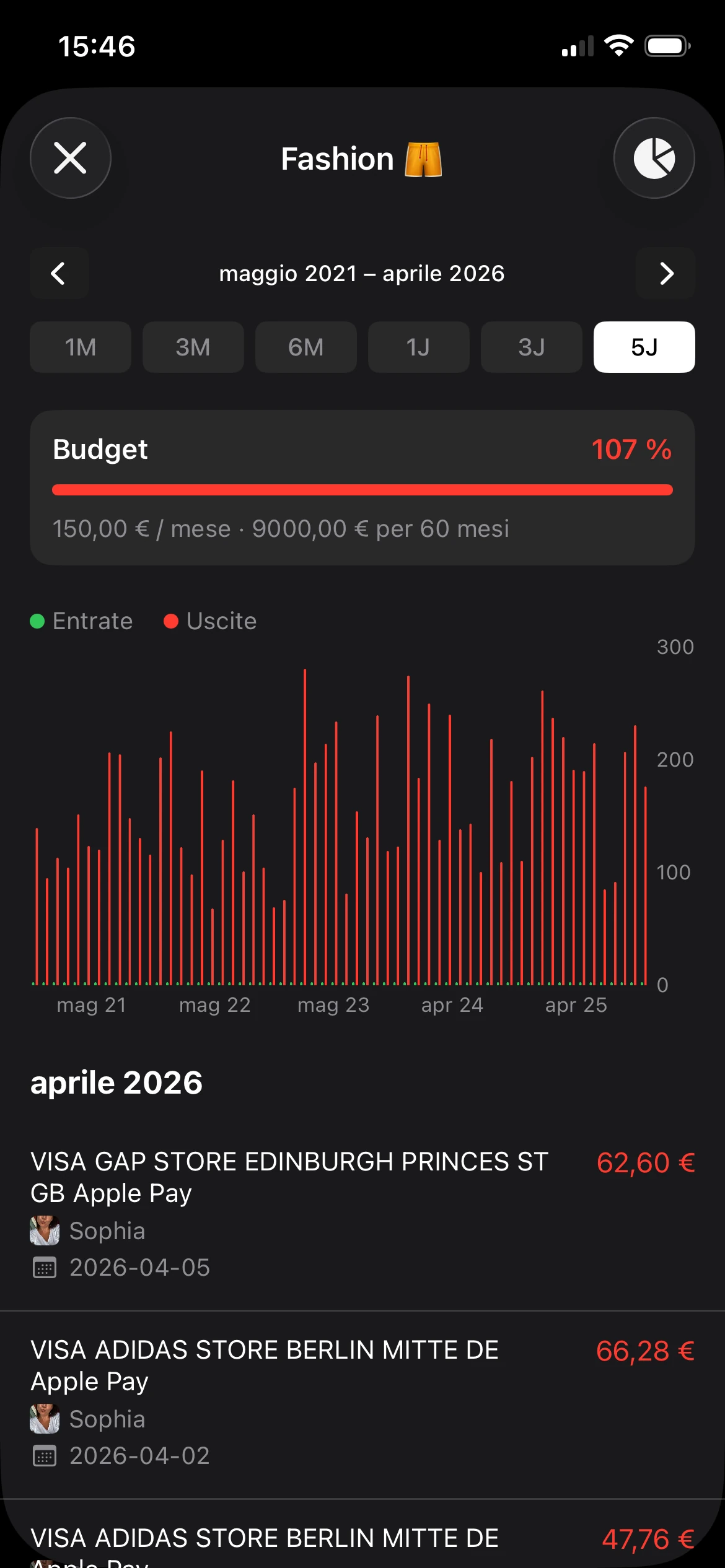
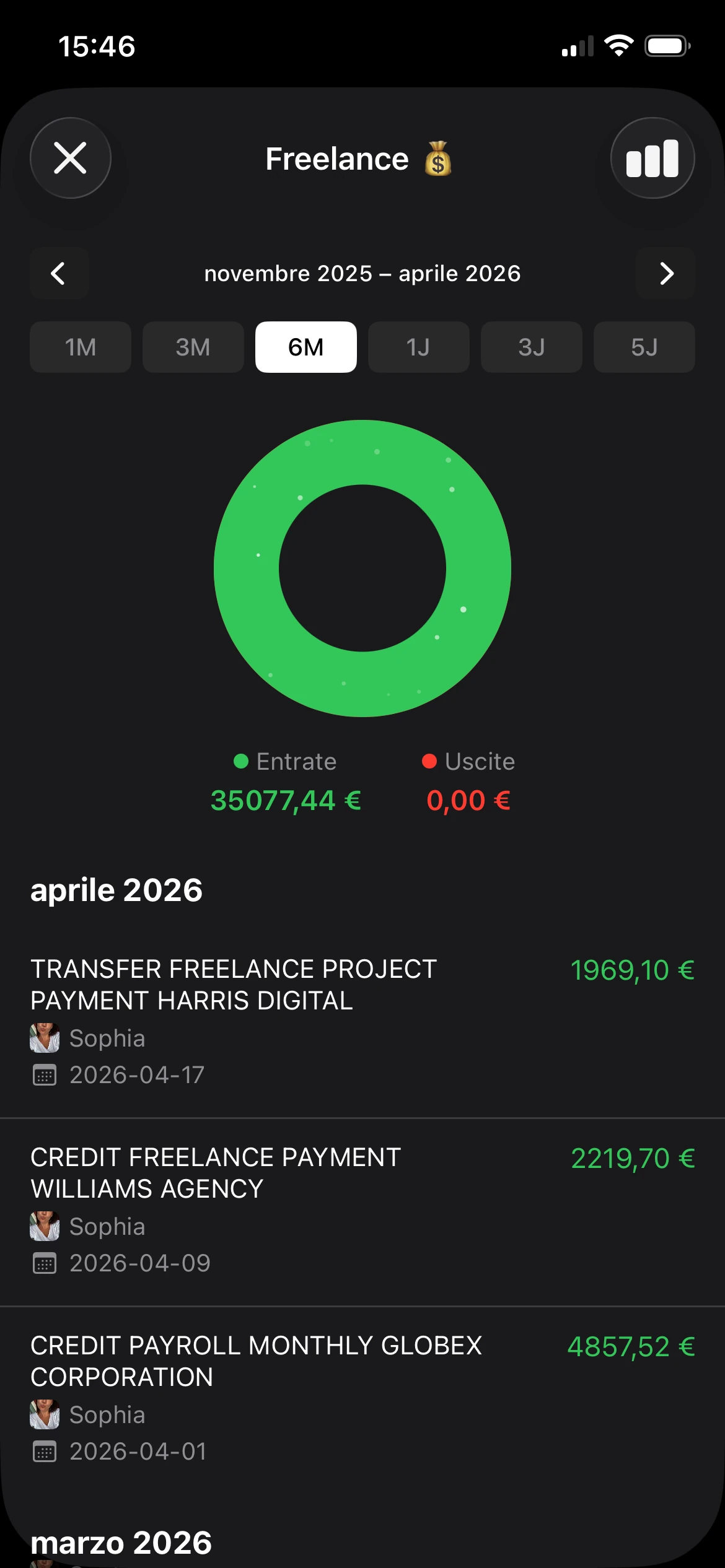
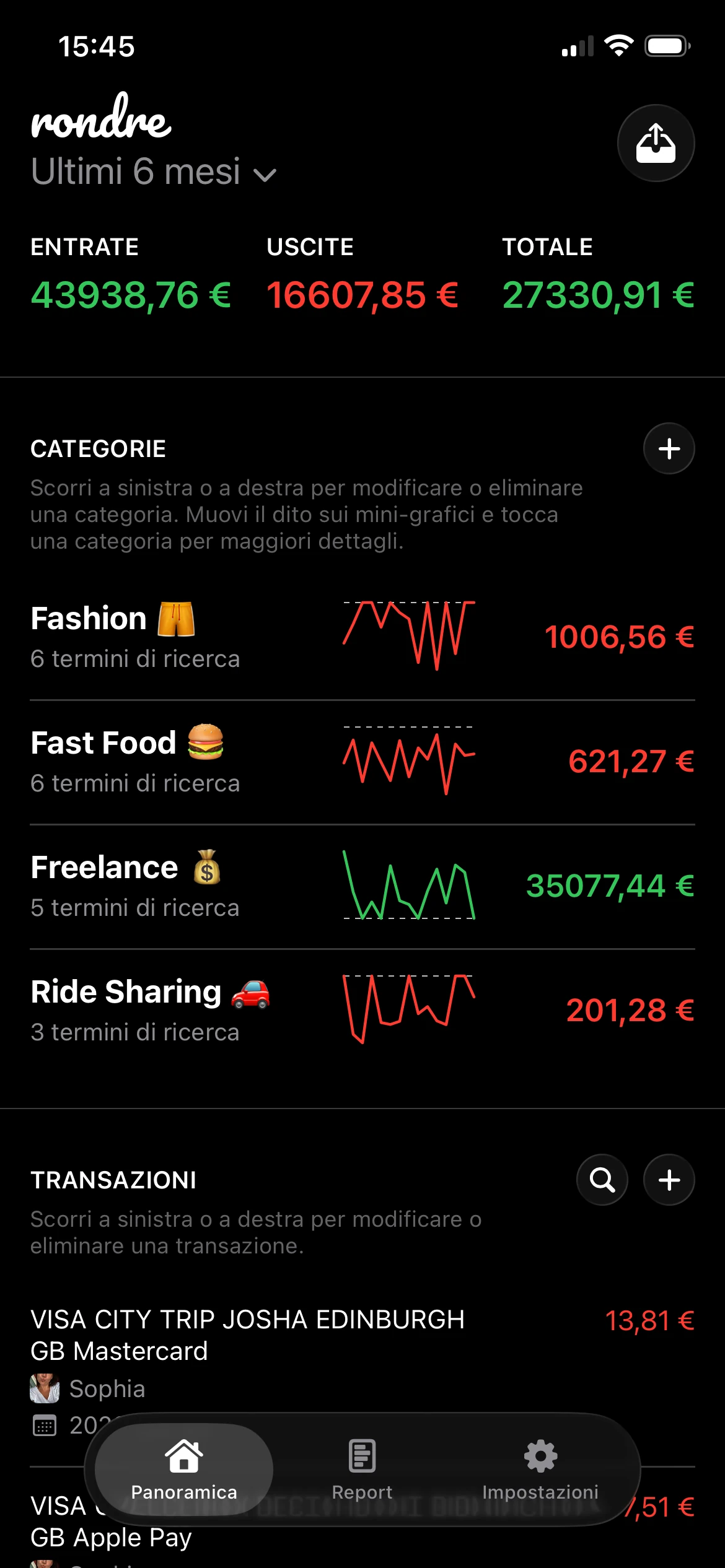
Le etichette fisse spesso creano attrito. Categorie personalizzate e termini di ricerca intelligenti funzionano meglio perché le persone non spendono denaro nello stesso modo. Una persona può volere “Spesa” e “Mangiare fuori”. Un’altra può volere “Casa”, “Bambini” e “Viaggi di lavoro”.Rivedere le spese visivamente
I report aiutano solo quando rispondono a domande semplici. Cosa è cambiato questo mese? Quale categoria sta aumentando? Le entrate coprono le spese regolari?Separare i contesti finanziari
Libri diversi o spazi separati sono utili per chi gestisce più di una vita finanziaria. Le spese personali e professionali di solito non dovrebbero stare nello stesso mucchio. Anche le spese domestiche condivise hanno bisogno della propria vista.Importare registri esistenti
Un nuovo inizio è piacevole, ma molte persone hanno già estratti conto o esportazioni bancarie. La possibilità di importare file CSV o estratti PDF rende l’app pratica, non solo minimale.
Un buon esempio di questo stile è rondre, che permette agli utenti iPhone di tracciare entrate e spese, creare categorie intelligenti con termini di ricerca personalizzati, importare file CSV ed estratti conto bancari PDF, usare libri separati, condividere un libro con un partner o la famiglia e cercare transazioni all’istante, tutto senza registrazione, pubblicità o tracciamento.
Regola pratica: se una funzione fa risparmiare tempo senza richiedere più dati personali, sostiene la semplicità. Se richiede più configurazione di quanto il problema richieda, di solito non la sostiene.
I migliori strumenti semplici non fanno meno solo per sembrare essenziali. Si concentrano sulle azioni indispensabili che aiutano una persona a rimanere costante.
Perché la privacy è la funzionalità più importante
Le app per il budget gestiscono alcune delle informazioni più personali che una persona possiede. Non solo saldi e acquisti, ma routine, abitudini, relazioni, indizi sulla salute, schemi di lavoro e punti di stress. Una lista di transazioni può rivelare molto più di un totale mensile.
Ecco perché la privacy non dovrebbe stare nelle note in piccolo. Deve essere tra i primi punti della checklist.

I dati finanziari sono particolarmente personali
Un’analisi di mercato del 2026 ha individuato una chiara lacuna nelle app gratuite per il budget. Poche danno priorità alla privacy, e molte opzioni popolari richiedono registrazione via email o collegamento bancario, lasciando poco serviti gli utenti attenti alla privacy, come indicato in questa analisi delle lacune di privacy nelle app per il budget.
Quella lacuna conta per chi sa già di non voler mantenere un altro account. Conta per i freelance che separano le spese dei clienti, per le coppie che vogliono visibilità condivisa senza esporre tutto e per chiunque non voglia che i dati di spesa siano collegati a pubblicità o sistemi di tracciamento ampi.
Un’app per il budget può essere gratuita e chiedere comunque molto in cambio.
Cosa cambia davvero l’assenza di un account
“Nessun account richiesto” sembra una funzione di comodità, ma è più di questo. Cambia il rapporto tra l’utente e l’app.
Senza registrazione obbligatoria, ci sono meno informazioni personali da consegnare prima ancora che il budgeting inizi. Senza pubblicità, c’è meno pressione perché l’interfaccia competa per l’attenzione. Senza tracciamento, il compito dell’app resta ristretto. Registrare transazioni. Organizzarle. Aiutare l’utente a capirle.
Le persone che cercano una configurazione orientata alla privacy spesso vogliono la stessa cosa da uno strumento gratuito di pianificazione finanziaria che mantenga la configurazione leggera e focalizzata sul controllo. Il punto non è evitare la tecnologia. È scegliere una tecnologia che resti al suo posto.
- Nessuna registrazione mantiene bassa la barriera d’ingresso.
- Nessuna pubblicità mantiene lo schermo tranquillo.
- Nessun tracciamento riduce la sensazione che il budgeting implichi sorveglianza.
- Nessun collegamento bancario forzato lascia all’utente decidere quanti dati condividere.
La privacy in un’app finanziaria non è un’impostazione di lusso. Modella quanto l’intera esperienza sembri sicura e gestibile.
Per l’utente giusto, la privacy non è una funzione extra accanto a grafici e categorie. È la condizione che rende utilizzabile tutto il resto dell’app fin dall’inizio.
Scegliere il modello della tua app gratuita per il budget
Non tutte le app “gratuite” sono gratuite allo stesso modo. Alcune sono gratuite perché supportate dalla pubblicità. Alcune sono gratuite finché non appaiono le funzioni utili. Alcune restano gratuite evitando sistemi costosi e concentrandosi su input più semplici.
Capire questo modello chiarisce molta confusione.
Tre modelli comuni
Le app supportate dalla pubblicità di solito eliminano il prezzo iniziale, ma spesso rendono l’esperienza più affollata. Una persona apre l’app per controllare le spese e invece deve gestire promozioni, suggerimenti o disordine visivo.
Le app freemium offrono una versione base e mettono le funzioni avanzate dietro un abbonamento. Questo modello è comune perché crea un percorso dall’utente gratuito al cliente pagante. Può funzionare bene per alcune persone, ma spesso significa che i flussi di lavoro più comodi sono riservati ai piani a pagamento.
Le app gratuite e private seguono una strada diversa. Spesso si basano su inserimento manuale o importazione di estratti invece che su costosa sincronizzazione live. All’inizio può sembrare meno avanzato, ma per molti utenti è un compromesso più pulito.
Secondo il confronto delle app per il budget di Experian, app a pagamento come YNAB a 109 $/anno, EveryDollar Premium a 79,99 $/anno e Monarch Money a 99 $/anno giustificano il costo aggiuntivo con la sincronizzazione bancaria automatica, mentre le opzioni gratuite spesso dipendono da inserimento manuale o importazioni CSV. La stessa analisi osserva che le soluzioni a pagamento offrono un vantaggio di tempo mensile perché le versioni gratuite di solito richiedono più inserimento manuale delle transazioni.
Confronto tra modelli di app gratuite per il budget
| Modello | Costo reale | Rischio per la privacy | Esperienza utente |
|---|---|---|---|
| Supportata dalla pubblicità | Gratuita nel prezzo, l’attenzione è il compromesso | Più alto, perché l’app può basarsi su monetizzazione guidata dai dati o superfici promozionali | Può sembrare distraente e affollata |
| Freemium | Gratuita per iniziare, ma le funzioni chiave di comodità possono essere dietro paywall | Moderato, a seconda dei requisiti di registrazione e delle pratiche sui dati | Spesso curata, ma limitata finché non si effettua l’upgrade |
| Davvero gratuita e privata | Gratuita senza livelli premium | Più basso, soprattutto quando non sono richiesti account o tracciamento | Più pulita per gli utenti che preferiscono controllo manuale e meno interruzioni |
Il compromesso economico è semplice. La sincronizzazione bancaria automatica è costosa da costruire e mantenere, quindi le app spesso recuperano quel costo con abbonamenti, livelli premium o monetizzazione più aggressiva. L’inserimento manuale e l’importazione CSV chiedono di più all’utente, ma rendono anche più realistico un modello completamente gratuito.
Per chi dà valore alla comodità sopra ogni cosa, un’app premium può valere la pena. Per chi dà valore a calma, controllo e condivisione minima dei dati, il terzo modello spesso si adatta meglio.
Budgeting pratico per la vita reale
Un’app per il budget diventa utile solo quando si adatta alle situazioni ordinarie. Bollette condivise. Entrate extra. Rimborsi. Preparazione fiscale. Spese irregolari. La buona notizia è che uno strumento semplice può comunque gestire tutto questo se la struttura è giusta.

Le analisi di mercato mostrano che alcune app gratuite leader ora includono funzionalità estese come suddivisioni delle spese, monitoraggio dei risparmi e report dettagliati senza livelli a pagamento. Questo sostiene l’idea che le persone dovrebbero aspettarsi uno strumento capace senza costi nascosti, come descritto nella scheda dell’app Simple Budget su Google Play.
Una coppia che gestisce spese condivise
Immagina una coppia che cerca di gestire affitto, spesa, utenze e spese del weekend senza unire ogni dettaglio finanziario. Un libro condiviso risolve un problema pratico. Entrambe le persone possono vedere le transazioni domestiche in un unico posto, mantenendo comunque conti bancari separati fuori dall’app.
Questa configurazione riduce il solito attrito intorno a “Chi ha pagato questo?” e “La bolletta della luce è già passata?” L’app diventa un registro neutrale. Non un innesco per una discussione.
Esempi utili di categorie potrebbero includere:
- Bollette domestiche per affitto, elettricità, internet e assicurazione
- Cibo per spesa, cibo da asporto e caffè fuori casa
- Trasporti per carburante, biglietti del treno, parcheggio o rideshare
- Obiettivi condivisi per risparmi per le vacanze o mobili
Il budgeting condiviso funziona meglio quando entrambe le persone possono vedere le stesse transazioni senza dover unire tutta la loro vita finanziaria.
Un freelance che separa spese professionali e personali
Un freelance ha un problema diverso. Il denaro entra in modo irregolare, le spese possono appartenere a clienti diversi e la stagione fiscale diventa rapidamente caotica quando tutto finisce in un’unica lunga lista.
Libri separati possono risolvere questo problema. Un libro può tracciare le spese personali. Un altro può tracciare le spese professionali. Alcuni utenti possono persino preferire libri separati per progetti diversi. Le categorie intelligenti con termini di ricerca personalizzati rendono tutto ancora più pulito, soprattutto quando i nomi ricorrenti dei commercianti non sono coerenti.
Una configurazione semplice potrebbe essere così:
- Entrate professionali per fatture e pagamenti ricevuti
- Spese cliente per viaggi, software o materiali
- Spese legate alle tasse per contabilità o costi di dichiarazione
- Spese personali essenziali in un libro separato per evitare di mescolare i contesti
Il risultato non è solo un registro più ordinato. Significa ricerche più rapide, report più chiari e meno supposizioni in seguito.
Come iniziare in meno di cinque minuti
Il modo più semplice per iniziare è smettere di pensare a un budget completo e partire da un singolo registro. Una transazione è sufficiente per creare slancio.

Inizia con una transazione
Una configurazione rapida di solito appare così:
- Scarica l’app
- Aprila e salta la registrazione se non è richiesta
- Aggiungi l’ultimo acquisto o pagamento
- Scegli una categoria sensata
- Ripeti quando avviene la transazione successiva
Quel primo inserimento conta più di un sistema perfetto. Una volta che le spese iniziano a essere registrate, i modelli diventano visibili.
Scegli il metodo di inserimento adatto al momento
Ad alcune persone piace l’inserimento manuale perché le mantiene consapevoli delle spese in tempo reale. Altre preferiscono importare un estratto e rivedere tutto in una volta. Entrambi gli approcci possono funzionare.
Secondo la guida di NerdWallet alle app per il budget, l’inserimento manuale richiede 15-30 secondi per transazione, mentre le importazioni CSV o PDF possono richiedere 2-5 minuti per i dati di un mese. Questo approccio ibrido bilancia efficienza e privacy evitando la sincronizzazione bancaria diretta e mantenendo comunque la configurazione gestibile.
Una routine semplice spesso funziona meglio:
- Durante la settimana aggiungi manualmente gli acquisti quando avvengono
- Alla fine del mese importa un estratto CSV o PDF per recuperare ciò che è stato perso
- Rivedi le categorie e modifica i termini di ricerca intelligenti in modo che gli inserimenti futuri siano più rapidi
Piccole azioni ripetibili battono una configurazione perfetta che non viene mai usata.
La conclusione pratica è semplice. Apri l’app oggi e registra l’ultimo acquisto. Quel singolo passo crea un registro, un’abitudine e un punto di partenza.
Un’abitudine di budgeting privata non richiede una lunga configurazione o un piano premium. rondre offre agli utenti iPhone un modo gratuito per tracciare entrate e spese, importare file CSV ed estratti conto bancari PDF, organizzare transazioni con categorie intelligenti e condividere un libro con un partner o la famiglia, tutto senza pubblicità, tracciamento o registrazione. Il prossimo passo più utile è piccolo. Scaricala, inserisci una transazione recente e lascia che la chiarezza cresca da lì.