Muita gente começa da mesma forma. Pesquisam a melhor aplicação de finanças pessoais gratuita, instalam a primeira opção com bom aspeto que encontram e depois deparam-se com uma série de pedidos: ligar todas as contas bancárias, permitir notificações, criar um login, aceitar rastreio, fechar banners de upgrade e torcer para que as categorias façam sentido mais tarde.
Esta experiência é comum porque as aplicações de finanças pessoais tornaram-se mainstream. A PocketSmith refere que mais de 375 000 pessoas utilizam o seu software, um sinal de que a gestão de dinheiro no telemóvel foi muito além de uma ferramenta de nicho para entusiastas de folhas de cálculo, conforme indicado no site da PocketSmith. O problema já não é encontrar uma aplicação. O problema é encontrar uma que ajude sem pedir mais dados do que o necessário.
Para muitas pessoas, "gratuito" acaba por significar suportado por publicidade, com contas ligadas e construído em torno de sincronização constante. Isso funciona para alguns utilizadores. Não funciona para toda a gente. Quem quer uma configuração rápida, rastreio privado e controlo direto sobre o historial de transações fica frequentemente relegado para as margens destas listas, apesar de se tratar de um caso de uso prático e comum.
A melhor aplicação de finanças pessoais gratuita depende menos do número de funcionalidades e mais do tipo de relação financeira que cada pessoa quer ter com a própria ferramenta.
Índice
- Encontrar uma Aplicação de Finanças que Respeite a Tua Privacidade
- Como Avaliámos as Melhores Aplicações de Finanças Gratuitas
- As Melhores Aplicações de Finanças Gratuitas: Uma Comparação Detalhada
- Melhores Aplicações para Finanças Partilhadas e Orçamentos Domésticos
- Porque é que o Registo Manual Oferece Mais Controlo
- Começa a usar o rondre em menos de um minuto
- O Teu Próximo Passo Rumo à Clareza Financeira
Encontrar uma Aplicação de Finanças que Respeite a Tua Privacidade
As aplicações de finanças mais frustrantes costumam falhar ainda antes de ser registada a primeira transação. Transformam a configuração numa negociação. O utilizador quer um livro de registos simples. A aplicação quer acesso às contas, permissões de marketing e dados pessoais suficientes para construir um perfil.
Esta incompatibilidade é relevante porque a categoria está agora repleta de produtos desenhados primeiro em torno da conveniência. Nas listas de aplicações gratuitas nos mercados principais, as ferramentas gratuitas focam-se frequentemente na sincronização bancária, visualizações de patrimônio líquido, dashboards de fluxo de caixa e orçamentos partilhados, porque as pessoas esperam um hub central em vez de envelopes de papel ou folhas de cálculo. Para quem prefere uma abordagem mais simples, este guia sobre como escolher uma aplicação de orçamento gratuita e simples dirige-se a um tipo de utilizador bem diferente.
Porque é que a privacidade importa desde o primeiro dia
Uma configuração com privacidade em mente muda por completo a experiência de usar uma aplicação de finanças. Se uma aplicação precisa de uma conta antes mesmo de abrir, muitas pessoas abandonam-na. Se apresenta publicidade ou bloqueios premium no uso quotidiano, as pessoas deixam de confiar nela. Se depende da sincronização bancária para tudo, as correções manuais tornam-se parte da rotina semanal.
Regra prática: Se uma aplicação de finanças parece invasiva antes de ajudar com uma única transação, provavelmente não vai melhorar depois de um mês de uso.
As ferramentas com melhor abordagem à privacidade partilham algumas características:
- Configuração sem atrito para que o registo comece de imediato em vez de após a verificação da conta.
- Limites claros sobre os dados para que os utilizadores saibam se as informações ficam no dispositivo ou passam por terceiros.
- Registo diário simples porque a privacidade só funciona se a aplicação se mantiver utilizável ao longo do tempo.
A escolha real por trás da pesquisa
A maioria das listas de "melhores aplicações de finanças pessoais gratuitas" classifica pela abrangência. Valoriza dashboards, contas ligadas e agregação financeira. Isso é útil se o objetivo é ter visibilidade automática sobre tudo.
É menos útil para quem quer saber exatamente o que gastou hoje, porquê e quem pode ver esses dados.
Para essa pessoa, a pergunta certa não é "Qual a aplicação com mais funcionalidades?" É "Qual a aplicação que ajuda a construir clareza financeira sem exigir acessos desnecessários?"
Como Avaliámos as Melhores Aplicações de Finanças Gratuitas
A maioria das comparações de aplicações sobrevaloriza a parte mais vistosa. Focam-se em dashboards coloridos, suporte alargado de contas ou no que fica melhor na pré-visualização da loja de aplicações. Isso ignora o que determina se uma aplicação de finanças ainda parece confiável após alguns meses.
O resumo da Experian reflete a direção atual do mercado: a categoria evoluiu do orçamento manual para a agregação automática de contas, várias opções importantes competem com pontos de entrada gratuitos, e as ferramentas mainstream abrangem agora diferentes estilos de orçamento, como o orçamento base zero com o YNAB e o orçamento por envelopes com o Goodbudget, de acordo com o guia de aplicações de orçamento da Experian.

O que importa mais do que listas de funcionalidades
Uma boa aplicação de finanças não se limita a registar transações. Molda comportamentos. Influencia a frequência com que alguém verifica os gastos, se as categorias se mantêm organizadas e se os dados históricos continuam utilizáveis quando a aplicação muda de direção mais tarde.
Por isso, a avaliação tem de incluir tanto a conveniência a curto prazo como o controlo a longo prazo.
Uma aplicação pode ser gratuita na instalação e ainda assim tornar-se cara em atenção, privacidade e tempo de limpeza de dados.
Os sete critérios que realmente importam
Privacidade e política de dados
Este é o primeiro critério porque tudo o resto assenta sobre ele. Se uma aplicação depende de recolha agressiva de dados, o utilizador paga com visibilidade sobre as suas finanças pessoais, que pode ir muito além do orçamento.Atrito na configuração
Uma configuração rápida importa mais do que muitas análises admitem. Se começar exige demasiadas permissões, logins ou passos de ligação bancária, as pessoas adiam o hábito e nunca constroem consistência.Funcionalidades de rastreio
O essencial tem de funcionar bem. Receitas, despesas, categorias, pesquisa e ferramentas de correção importam mais do que listas alargadas de funcionalidades que parecem impressionantes mas atrasam o uso diário.Opções de importação de dados
Começar manualmente não significa começar do zero. A importação de CSV e extratos bancários pode poupar muito tempo de organização ao mudar de outro sistema ou ao reconstruir o historial.Colaboração e livros partilhados
O dinheiro doméstico desorganiza-se rapidamente em aplicações feitas para uma pessoa. O rastreio partilhado tem de parecer intencional, não um acrescento.Visualizações e relatórios
Os gráficos só ajudam se responderem a perguntas reais. Padrões de gastos, deriva das categorias e variações mês a mês são relevantes. Gráficos decorativos, não.O custo real "Gratuito" pode esconder publicidade, incentivos, bloqueios premium ou um modelo de negócio assente na venda cruzada de produtos financeiros. Um nível gratuito verdadeiramente valioso deve continuar útil sem pressão.
Esta estrutura torna as comparações mais honestas. Também expõe uma divisão fundamental no mercado: algumas aplicações otimizam para a agregação automática, enquanto outras apoiam o rastreio direto e deliberado.
As Melhores Aplicações de Finanças Gratuitas: Uma Comparação Detalhada
Uma comparação lado a lado funciona melhor quando é honesta sobre as trocas envolvidas. Algumas aplicações são mais fortes quando o utilizador quer um dashboard financeiro alargado e não se importa de ligar contas. Outras fazem mais sentido quando a privacidade, o controlo manual ou o registo partilhado importam mais do que a automatização.
Comparação de Aplicações de Finanças Pessoais Gratuitas
| Funcionalidade | Empower Personal Dashboard | NerdWallet App | rondre |
|---|---|---|---|
| Estilo principal | Dashboard financeiro agregado | Dashboard alargado de finanças pessoais | Gestor de finanças pessoais com foco no registo manual |
| Foco na sincronização bancária | Sim | Sim | Não requer sincronização bancária |
| Controlo manual de transações | Limitado face a ferramentas de registo manual | Básico para utilizadores focados em dashboards | Central para a experiência |
| Personalização do orçamento | Mais adequado para visão geral do que para orçamento detalhado | Útil para rastreio alargado de fluxo de caixa | Construído em torno de categorias e registo direto de transações |
| Importação de dados | Não é o ponto forte | Não é o ponto forte | Importação de CSV e extratos bancários em PDF |
| Orçamento partilhado | Não é o caso de uso principal | Não é o caso de uso principal | Livros partilhados para uso com parceiro ou família |
| Registo obrigatório | Sim | Sim | Não requer conta nem registo |
| Abordagem à privacidade | Ligada ao modelo de contas conectadas | Ligada ao modelo de contas conectadas | Sem publicidade, sem rastreio, sem conta |
| Melhor para | Utilizadores que querem agregação de contas e patrimônio líquido | Utilizadores que querem uma visão geral financeira completa | Utilizadores que querem privacidade, simplicidade e controlo direto |
Como são as trocas na prática
Empower Personal Dashboard faz sentido para quem quer todas as contas num único lugar. É mais forte quando alguém se preocupa mais com uma visão financeira alargada do que com o orçamento transação a transação. A fraqueza é familiar para quem já testou aplicações com sincronização intensiva. As categorias precisam de revisão, e a experiência de uso está construída em torno de dados ligados, não de registo consciente.
NerdWallet App é semelhante no espírito. É útil para utilizadores que querem uma visão panorâmica do fluxo de caixa e outras informações financeiras num único produto móvel. A troca é que não está construído em torno de um orçamento personalizado aprofundado. É mais um dashboard consolidado do que um gestor de despesas focado.
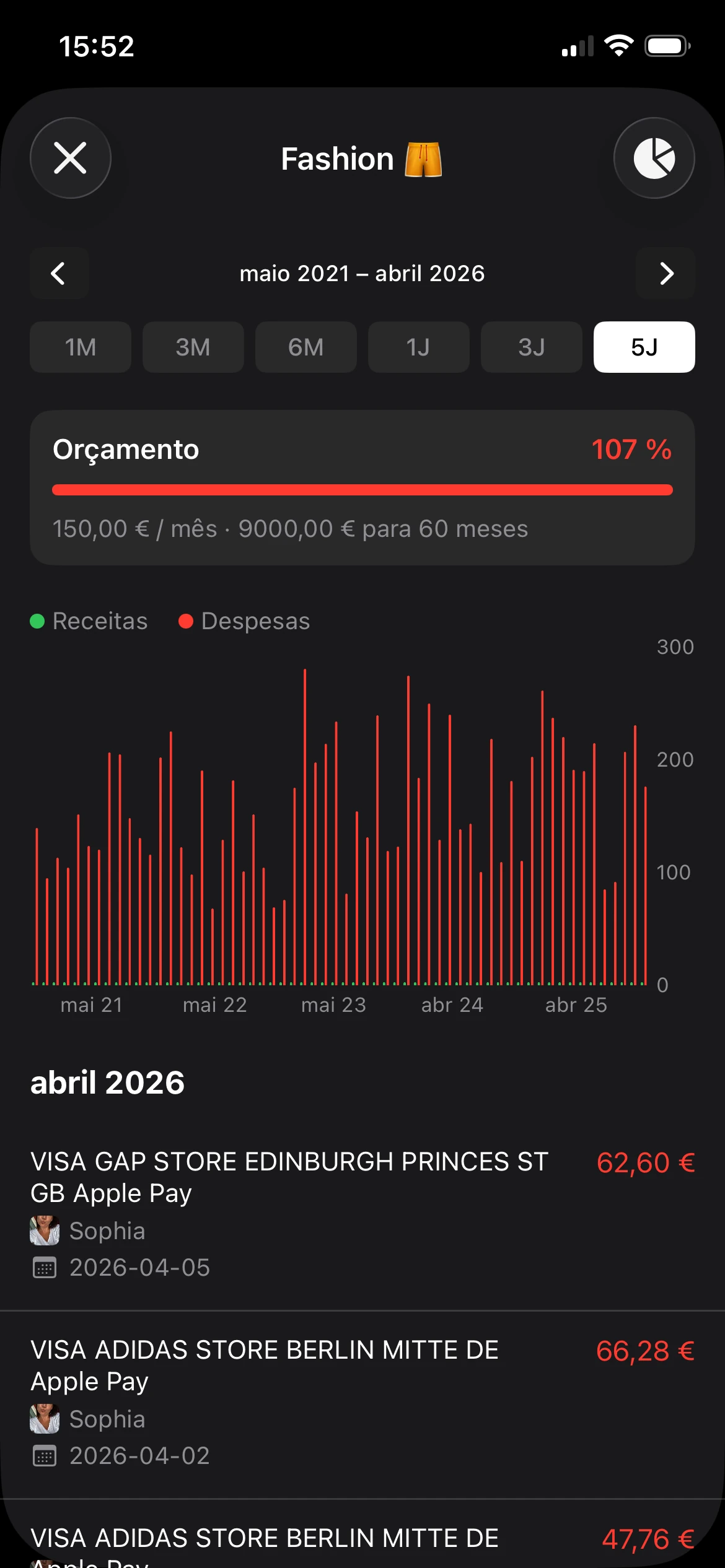
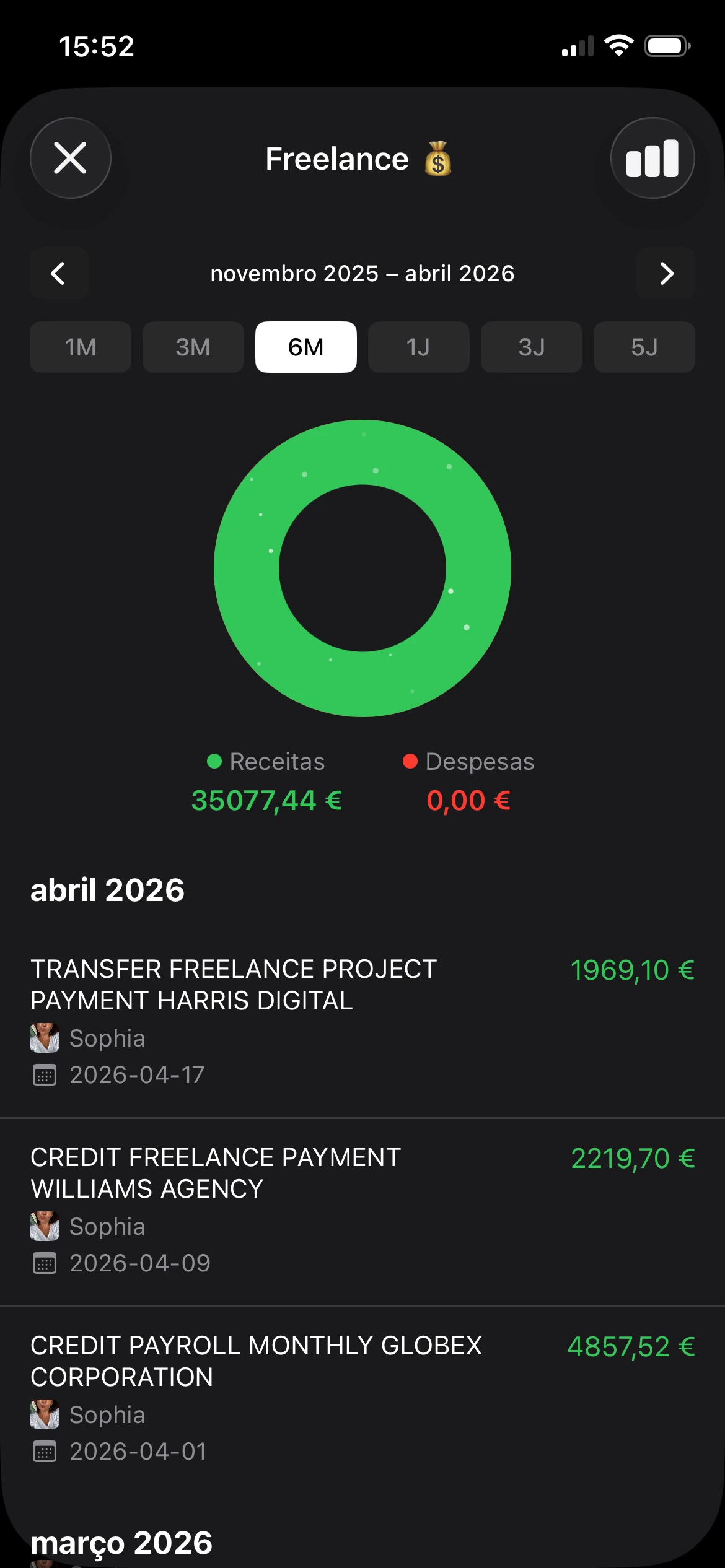
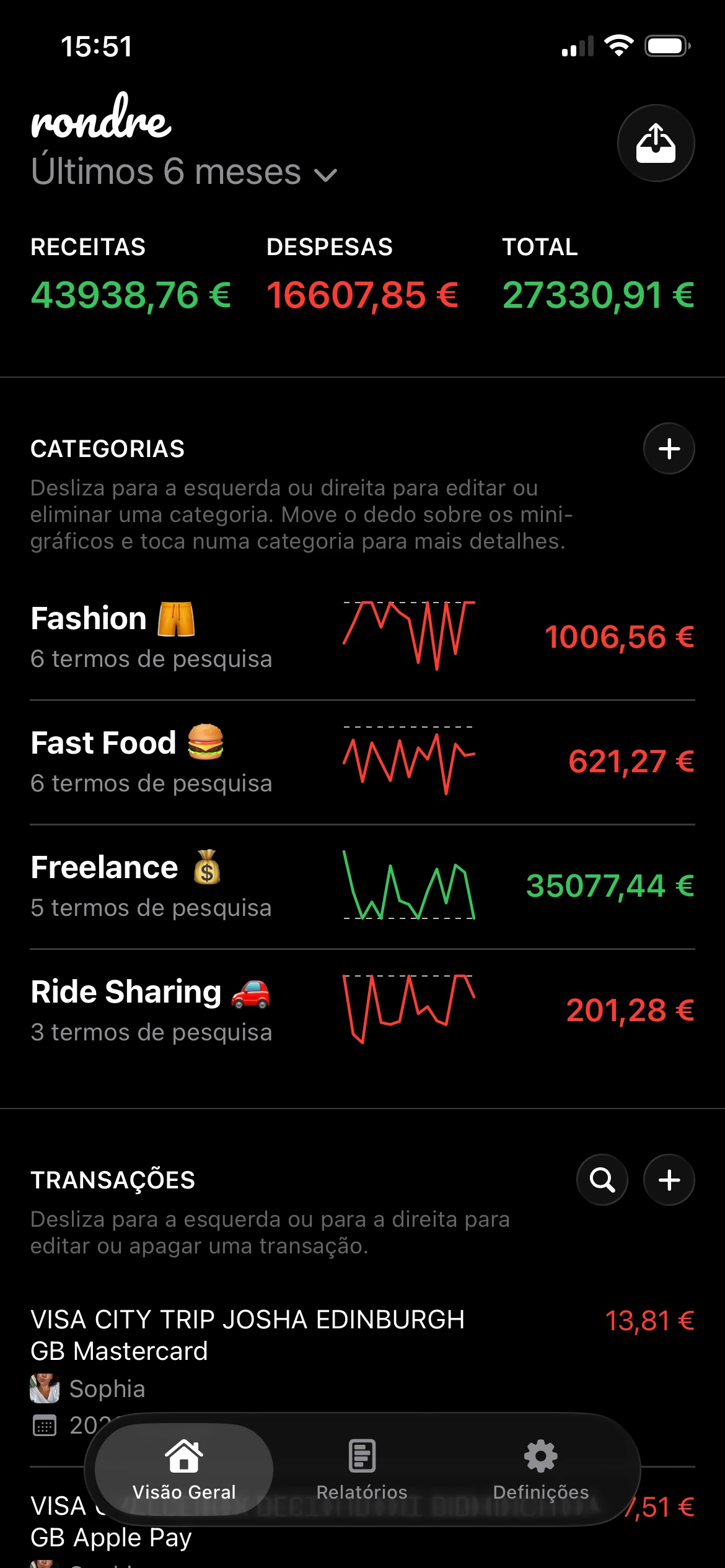
rondre serve um utilizador completamente diferente. Suporta o rastreio de receitas e despesas, categorias inteligentes com termos de pesquisa personalizados, importação de CSV e PDF, pesquisa instantânea de transações e livros partilhados, mantendo-se gratuito, sem publicidade e sem necessidade de registo. Isso torna-o mais adequado para quem não quer o seu hábito de orçamento ligado à ligação de contas ou à partilha contínua de dados.
Uma forma prática de escolher é fazer corresponder a aplicação à tarefa:
- Escolhe uma aplicação de dashboard se a prioridade é a agregação entre contas e visibilidade financeira alargada.
- Escolhe uma aplicação de registo manual se a prioridade é categorias organizadas, registo rápido e certeza sobre onde ficam os dados.
- Escolhe uma ferramenta de trabalho partilhado se o orçamento envolve um parceiro, agregado familiar ou despesas conjuntas.
A melhor aplicação de finanças pessoais gratuita não é universal. Depende de saber se conveniência significa automatização ou se significa abrir uma aplicação e registar uma transação sem atrito.
Melhores Aplicações para Finanças Partilhadas e Orçamentos Domésticos
Os orçamentos partilhados expõem rapidamente as falhas de design das aplicações. Uma ferramenta que funciona para uma pessoa torna-se frequentemente desajeitada quando a renda, as compras, os custos escolares, as viagens ou as despesas com filhos precisam de ser rastreadas entre duas pessoas ou um agregado familiar.

O que os casais realmente precisam
O Honeydue é uma boa referência para esta categoria. O NerdWallet refere que ambos os parceiros podem sincronizar contas bancárias, cartões de crédito, empréstimos e investimentos, controlar quanto cada pessoa partilha, e usar limites de categorias partilhadas com alertas à medida que os gastos se aproximam desses limites, conforme descrito na lista das melhores aplicações de orçamento do NerdWallet.
Esse referencial destaca o que importa nas aplicações de finanças partilhadas:
- Visibilidade partilhada para que ambas as pessoas vejam a mesma realidade orçamental.
- Controlo de permissões porque nem todas as contas precisam de exposição total.
- Alertas de orçamento que ajudam a prevenir a deriva das categorias antes de se tornar um problema.
O orçamento partilhado só funciona quando ambas as pessoas conseguem atualizá-lo facilmente. Se um dos parceiros se tornar o administrador de sistema não remunerado, a aplicação já falhou.
Um modelo mais simples para orçamentos partilhados
Para muitos agregados familiares, a agregação financeira total é mais sistema do que precisam. As finanças partilhadas resumem-se frequentemente a um conjunto mais pequeno de realidades recorrentes: compras, serviços, renda ou prestação da habitação, custos escolares, subscrições e transferências entre parceiros.
Uma configuração mais simples pode funcionar melhor do que uma altamente conectada porque reduz o atrito. Livros partilhados, categorias conjuntas e pesquisa rápida são frequentemente mais úteis no dia a dia do que um dashboard grande com demasiado ruído de contas. Quem estiver a comparar ferramentas para uso doméstico pode também achar útil este guia sobre a melhor aplicação de orçamento para famílias.
A melhor aplicação de finanças pessoais gratuita para um casal não é necessariamente a que tem mais ligações financeiras. É aquela que ambas as pessoas vão manter aberta, atualizar e em que vão confiar.
Porque é que o Registo Manual Oferece Mais Controlo
O mercado empurra as pessoas para a sincronização bancária como padrão. É compreensível. As importações automáticas parecem eficientes e um dashboard conectado pode parecer completo em minutos.
Mas há uma troca real. Quando uma aplicação faz toda a observação, o utilizador acaba por notar menos.
A automatização é conveniente, mas muda o hábito
O registo manual abranda os gastos o suficiente para os tornar visíveis. Registar uma compra, escolher uma categoria e vê-la aparecer nos totais do mês cria uma ligação mais forte do que rever um feed de transações importadas dias mais tarde.
Essa diferença importa para o comportamento. As pessoas identificam padrões mais cedo quando os registam diretamente. As refeições fora começam a parecer mais pesadas. As pequenas subscrições deixam de se misturar com o fundo. Os erros de categoria são corrigidos no momento do registo em vez de ficarem para uma sessão de limpeza ao fim de semana.
Porque é que o rastreio com privacidade em primeiro lugar ainda importa
A análise do College Raptor aponta para um grupo subvalorizado nas listas de aplicações de orçamento: pessoas que não querem sincronização bancária, não querem o atrito de criação de conta e querem rastreio manual no dispositivo sem publicidade, conforme discutido na análise de aplicações de orçamento gratuitas do College Raptor.
Esta lacuna existe porque as ferramentas com privacidade em primeiro lugar são frequentemente tratadas como casos de exceção. Não o são. Servem utilizadores que querem controlo sobre três coisas que os sistemas automatizados raramente gerem bem:
- Exposição de dados porque menos ligações geralmente significam menos entidades a tocar nas informações financeiras.
- Precisão das categorias uma vez que as ferramentas manuais não têm de adivinhar o significado de uma transação.
- Propriedade a longo prazo porque o hábito não depende de manter instituições ligadas ou credenciais ativas.
Para quem quer um fluxo de trabalho mais deliberado, este guia sobre como registar despesas alinha-se bem com essa abordagem.
O melhor hábito financeiro é aquele que uma pessoa consegue manter sem negociar com publicidade, erros de sincronização ou preocupações com privacidade.
O registo manual não é para toda a gente. Exige atenção. Para quem valoriza a simplicidade e o controlo, essa atenção é precisamente o ponto.
Começa a usar o rondre em menos de um minuto
Alguns utilizadores não precisam de mais uma conta financeira para gerir. Precisam de um lugar limpo para registar o que aconteceu hoje, organizá-lo corretamente e seguir em frente. É aí que uma ferramenta de registo manual faz sentido.

Uma configuração rápida que não pede muito
O rondre é um gestor de finanças para iPhone construído em torno de um uso sem atrito. Permite registar receitas e despesas, criar categorias inteligentes com termos de pesquisa personalizados, importar ficheiros CSV e extratos bancários em PDF, partilhar um livro com um parceiro ou família, e pesquisar transações instantaneamente. É gratuito, sem publicidade, sem rastreio e não requer conta nem registo.
Essa configuração muda por completo os primeiros minutos. Não há nenhum processo de registo para completar antes de a aplicação se tornar útil.
Uma forma simples de começar:
Abre a aplicação e cria um livro
Um livro pode representar um orçamento pessoal, um orçamento doméstico ou um projeto paralelo. Isto mantém diferentes fluxos de gastos separados.Adiciona a primeira transação manualmente
Começa com algo atual. Compras, uma deslocação, o pagamento de uma fatura ou um rendimento recebido hoje.Cria uma categoria que corresponda aos gastos reais
As categorias genéricas não duram. Uma categoria deve refletir a forma como o utilizador já pensa sobre o dinheiro.
A forma mais rápida de a tornar útil
O segundo passo é o que transforma um gestor em branco num sistema a funcionar.
- Usa categorias inteligentes para comerciantes recorrentes ou descrições comuns, para que as transações futuras se mantenham organizadas com menos limpeza.
- Importa o historial mais antigo através de CSV ou extratos bancários em PDF se houver necessidade de reconstruir os meses recentes sem ter de digitar cada linha.
- Partilha um livro se o orçamento pertencer a um casal ou agregado familiar em vez de uma única pessoa.
- Pesquisa com frequência para verificar se um pagamento foi processado, quanto um comerciante custa ao longo do tempo ou onde uma categoria se desviou.
Uma aplicação de registo manual torna-se valiosa rapidamente quando a estrutura é simples o suficiente para manter. Não precisa de uma longa sequência de integração. Precisa de uma primeira ação clara e de uma razão evidente para voltar amanhã.
O Teu Próximo Passo Rumo à Clareza Financeira
A pesquisa pela melhor aplicação de finanças pessoais gratuita começa normalmente pelas funcionalidades. Devia começar pela adequação.
Algumas pessoas querem agregação de contas, dashboards de patrimônio líquido e feeds automáticos de todas as instituições que utilizam. Outras querem o oposto. Querem uma ferramenta que abra rapidamente, peça pouco e lhes dê uma visão direta dos gastos sem publicidade, registos ou trocas de partilha de dados contínua.
Essa diferença é a razão pela qual não existe um vencedor universal. Existem apenas melhores correspondências para prioridades diferentes.
Uma abordagem manual com privacidade em primeiro lugar funciona especialmente bem para quem quer três coisas ao mesmo tempo: clareza, controlo e consistência. Mantém o hábito orçamental perto da vida quotidiana. Também torna a propriedade a longo prazo dos dados financeiros muito menos frágil.
O passo mais útil hoje é pequeno. Escolhe um método e regista uma transação real antes de o dia acabar. Não dez. Uma. Esse único registo é frequentemente suficiente para mostrar se uma aplicação de finanças parece uma ferramenta útil ou mais um sistema a exigir manutenção.
Se um gestor privado e sem registo te parece a escolha certa, vale a pena experimentar o rondre como um primeiro passo simples. Descarrega-o, cria um livro e introduz a despesa mais recente do dia para que o orçamento comece com algo real.