Está procurando uma ferramenta gratuita de orçamento que permaneça simples, respeite a sua privacidade e não exija acesso à sua conta bancária logo no primeiro dia?
Essa pergunta importa mais do que as tabelas de recursos sugerem. Depois de usar tanto apps com contas conectadas quanto trackers manuais, a diferença geralmente fica clara rapidamente. Algumas ferramentas economizam tempo ao importar transações automaticamente. Outras pedem que você faça mais do trabalho, mas oferecem mais controle sobre seus dados, menos conexões quebradas e uma experiência diária mais tranquila.
Para usuários focados em privacidade, essa troca não é abstrata. Ela muda se uma ferramenta parece útil ou invasiva. Se você compartilha um orçamento com um parceiro, quer importar extratos CSV ou PDF, ou simplesmente prefere uma interface limpa em vez de prompts intermináveis e incentivos de upgrade, a melhor escolha costuma ser a que tem menos automação, não mais.
O orçamento manual ainda funciona bem se o app mantém a entrada e a revisão simples. Percebi que as pessoas mantêm o hábito de controlar o orçamento por mais tempo quando a ferramenta combina com seus hábitos, em vez de tentar impor um painel financeiro completo. Um tracker leve pode superar um app mais avançado se for mais fácil confiar nele e mais fácil continuar usando toda semana.
Este guia foca no uso real, não em promessas de marketing. Ele inclui opções de orçamento compartilhado, painéis de agregação de contas e ferramentas minimalistas que funcionam bem para entrada manual e importações. Também destaca rondre como escolha editorial porque sua abordagem sem cadastro e focada em privacidade se destaca para leitores que querem uma ferramenta gratuita de planejamento financeiro que mantém a configuração leve e sai do caminho.
Índice
- 1. rondre
- 2. App NerdWallet
- 3. Empower Personal Dashboard, anteriormente Personal Capital
- 4. Versão gratuita do Goodbudget
- 5. Plano gratuito do EveryDollar
- 6. Honeydue
- 7. Versão gratuita do Rocket Money
- 8. Spendee Free Basic
- 9. Monefy gratuito
- 10. GnuCash
- As 10 melhores ferramentas gratuitas de orçamento: comparação de recursos
- Seu próximo passo: comece a acompanhar hoje
1. rondre

rondre recebe a escolha editorial porque resolve rapidamente um problema comum de orçamento: apps demais pedem coisas demais antes mesmo de oferecer algum valor. Com o app de orçamento da rondre, não é necessário ter conta, e-mail ou senha apenas para começar a acompanhar. Isso faz dele uma das poucas ferramentas desta lista que parece mais leve do que uma planilha, não mais pesada.
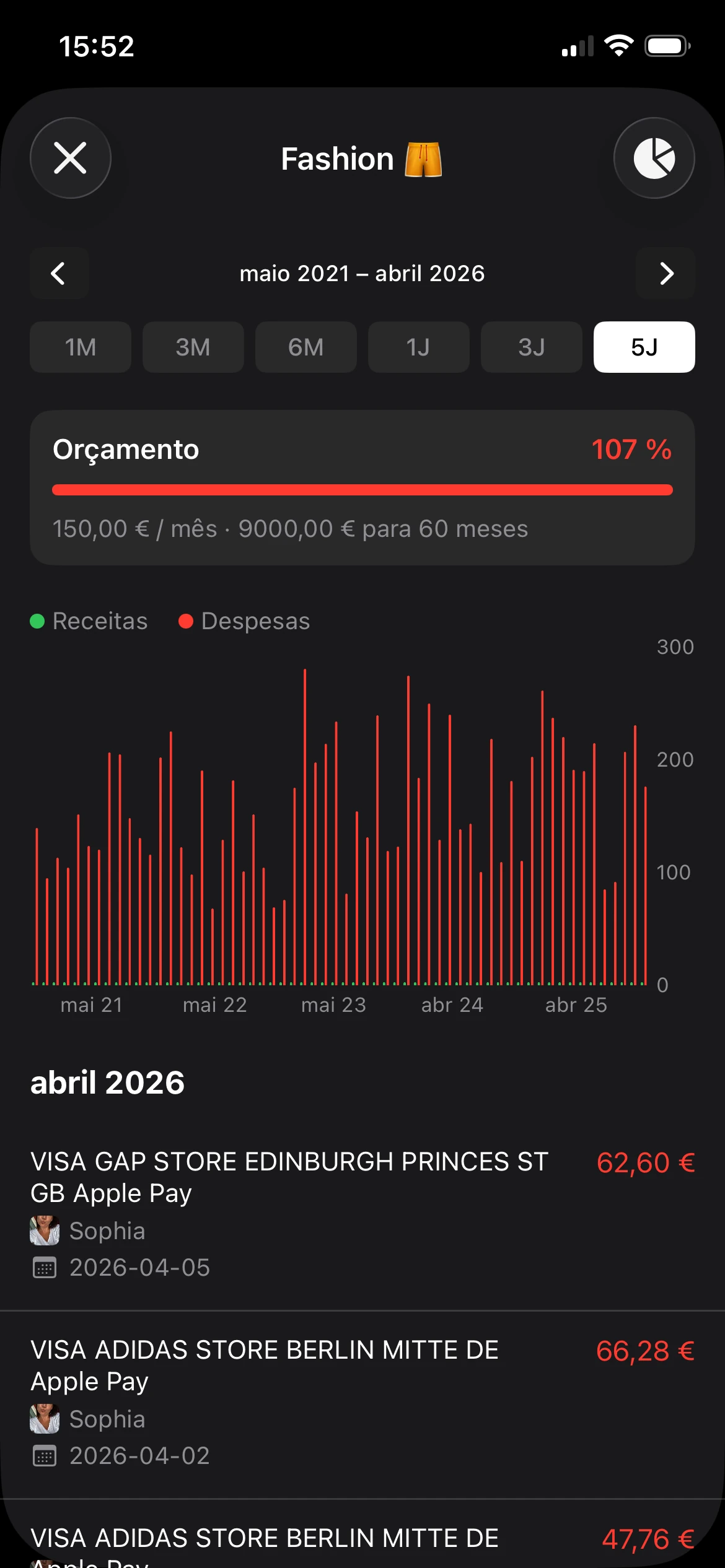
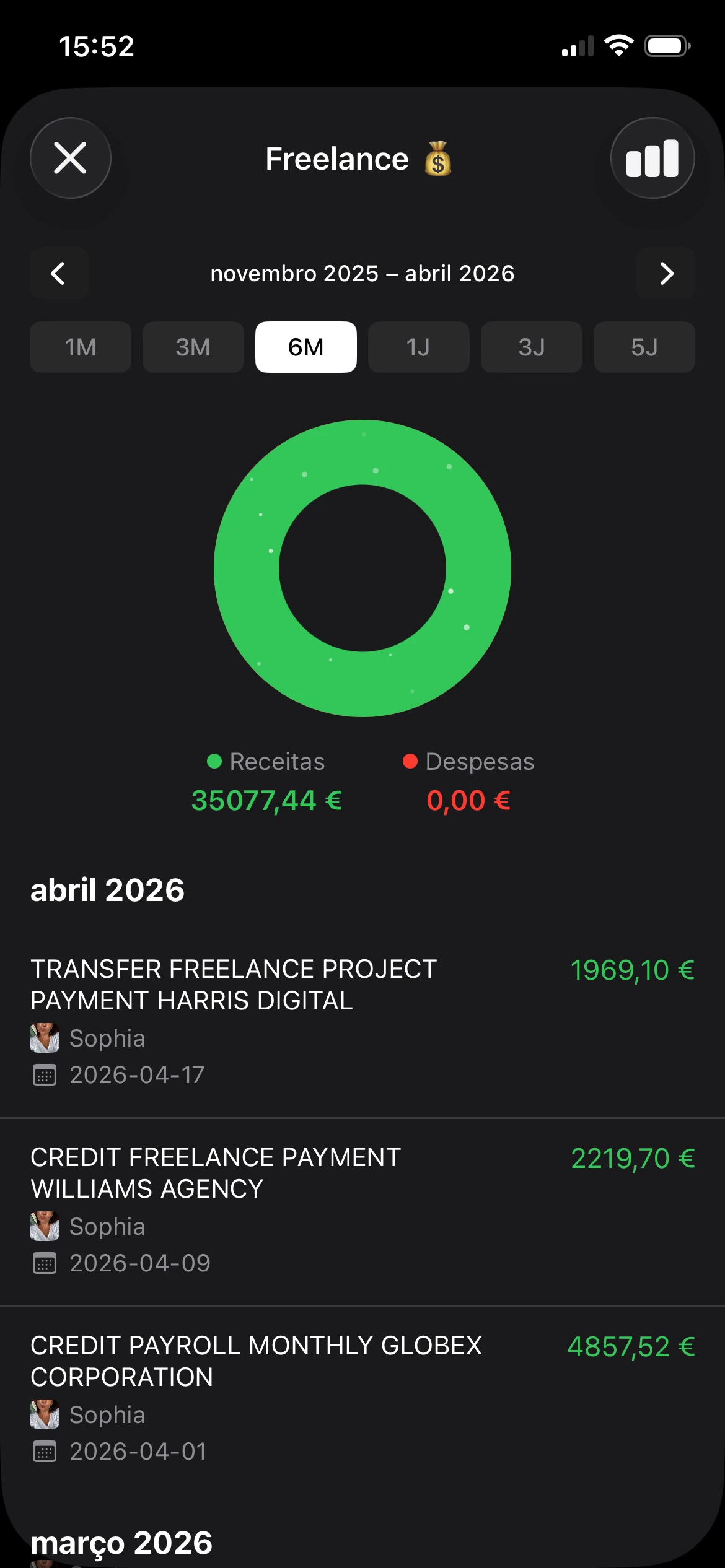
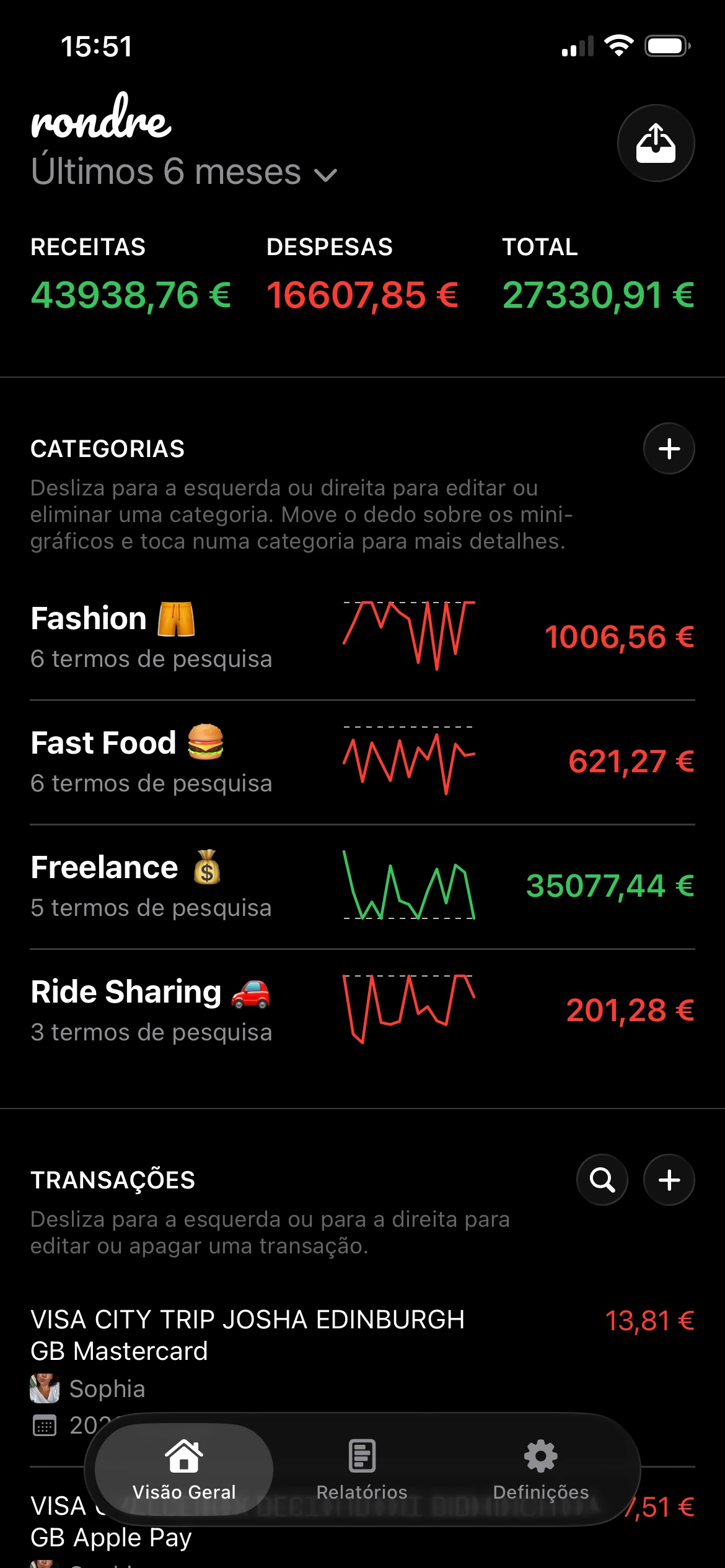
O design é minimalista, mas não limitado de forma ruim. Ele se concentra em registrar transações, organizá-las com categorias personalizadas e termos de pesquisa, e oferecer feedback visual rápido por meio de minigráficos, gráficos de barras e gráficos de rosca. Para alguém que quer saber para onde o dinheiro foi sem construir um sistema operacional financeiro inteiro, esse é um equilíbrio forte.
Por que rondre se destaca
A privacidade é o principal motivo pelo qual esta ferramenta ocupa o primeiro lugar neste guia específico. Muitos apps gratuitos de orçamento trocam conveniência por visibilidade sobre o histórico de transações, e preocupações com privacidade muitas vezes são tratadas como nota de rodapé em análises convencionais. rondre segue outro caminho: entrada manual e importações CSV ou PDF em vez de sincronização bancária automática, além de livros compartilhados para parceiros ou famílias.
Essa combinação importa para famílias que querem colaborar sem transformar o orçamento em um problema de permissões. Também ajuda freelancers que precisam de livros separados para gastos pessoais e de projetos.
Regra prática: se alguém continua abandonando apps de orçamento durante a configuração, o problema muitas vezes não é motivação. É atrito.
Alguns detalhes tornam rondre mais utilizável do que muitos apps “simples”. Múltiplos livros permitem que os usuários separem orçamentos domésticos, de viagem, de atividade paralela ou de eventos. Livros compartilhados tornam o acompanhamento conjunto muito mais fácil do que enviar capturas de tela ou atualizar uma planilha de um lado para o outro. Para leitores que querem saber mais sobre esse tipo de configuração, este guia sobre uma ferramenta gratuita de planejamento financeiro é uma próxima leitura útil.
Melhor opção para
rondre é uma opção forte para pessoas que se importam mais com clareza e privacidade do que com automação. Funciona bem para casais, famílias, pessoas que querem substituir planilhas e qualquer pessoa que queira importar extratos sem se comprometer com sincronização bancária completa.
Vantagens
- Início sem cadastro: não há barreira de conta, e-mail ou senha antes de começar o acompanhamento.
- Uso principal gratuito: sem anúncios, sem rastreamento e sem paywall premium bloqueando o fluxo principal.
- Livros compartilhados: casais e famílias podem gerenciar um orçamento juntos sem soluções improvisadas desconfortáveis.
- Visualizações úteis: os gráficos são simples o bastante para leitura rápida e detalhados o suficiente para identificar padrões de gastos.
Desvantagens
- Sem sincronização bancária automática: as transações devem ser inseridas manualmente ou importadas via CSV ou PDF.
- Dados armazenados em servidores: o app anuncia que não faz rastreamento, mas os dados financeiros ainda são armazenados em seus servidores.
- Disponibilidade da plataforma precisa ser verificada: os leitores devem confirmar a disponibilidade no dispositivo antes de baixar.
2. App NerdWallet
Quer um app de orçamento que faça a maior parte da configuração por você, mas ainda pareça utilizável depois da primeira semana? O app da NerdWallet é uma opção prática para esse tipo de usuário.
Sua força é a agregação. Conecte suas contas bancárias e de crédito, e o app reúne as transações em um só lugar, classifica gastos em categorias, destaca contas recorrentes e oferece uma leitura rápida da sua posição financeira geral. Ele também inclui acompanhamento de pontuação de crédito, o que é útil se você quer um painel financeiro mais amplo em vez de uma ferramenta limitada ao orçamento mensal.
Essa conveniência vem com uma troca. Você precisa se sentir confortável conectando contas financeiras e deixando o app categorizar por você. Na minha experiência, isso funciona bem para pessoas que querem consciência e lembretes. Funciona pior para quem quer controle rigoroso sobre categorias, fluxos compartilhados de orçamento doméstico ou uma configuração focada em privacidade como rondre.
Onde funciona melhor
NerdWallet se encaixa em alguém que quer automação primeiro e aceita um sistema de orçamento mais leve. O app é bom em mostrar para onde o dinheiro foi e sinalizar os suspeitos habituais, como assinaturas, contas e atividade de crédito. É menos útil para usuários que preferem revisão manual, orçamento em estilo dinheiro vivo ou importação de extratos sem sincronização completa de contas.
O valor está na velocidade. Um novo usuário pode conectar contas e obter rapidamente uma visão legível, o que reduz as chances de desistir durante a configuração. Isso importa se a escolha é entre uma visão automatizada imperfeita e nenhum acompanhamento.
A conveniência ajuda as pessoas a começar. Nem sempre as ajuda a mudar comportamento.
Leitores preocupados com privacidade devem pesar isso com cuidado. Se sua prioridade é manter tudo simples sem conectar bancos, esta não é a melhor opção. Se sua prioridade é obter uma visão financeira ampla e gratuita com mínimo esforço, o app de finanças pessoais da NerdWallet continua sendo um ponto de partida razoável.
3. Empower Personal Dashboard, anteriormente Personal Capital
Este painel financeiro específico é melhor entendido como uma ferramenta de visão patrimonial que também inclui orçamento, e não como um app de orçamento que também acompanha patrimônio líquido. Essa distinção importa. Se alguém quer ver contas bancárias, empréstimos, investimentos e planejamento de aposentadoria em um só lugar, este painel faz isso melhor do que muitas ferramentas gratuitas.
Ele é especialmente forte para usuários que se importam com a visão geral. Categorias de gastos, fluxo de caixa e planejamento de poupança existem, mas o principal valor está no painel financeiro mais amplo.
Melhor opção para
Esta é a ferramenta certa para pessoas cujas perguntas sobre dinheiro soam assim: “Como meu patrimônio líquido está mudando?” ou “Como essa combinação de contas aparece em conjunto?” É menos ideal para alguém que quer disciplina rigorosa de gastos mensais ou um fluxo limpo de orçamento doméstico compartilhado.
Muitos apps de orçamento reduzem tudo ao acompanhamento de despesas mês a mês. Esta ferramenta não faz isso. Ela ajuda usuários que equilibram gastos do dia a dia com investimentos e planejamento de longo prazo.
O que funciona bem
- Visibilidade geral: contas bancárias, dívidas e investimentos ficam em um só painel.
- Análises gratuitas: o conjunto gratuito de ferramentas é generoso para acompanhar patrimônio líquido.
- Força no desktop: ferramentas de poupança e aposentadoria são mais fáceis de usar em uma tela maior.
O que não funciona tão bem
- Orçamento é secundário: apps dedicados a orçamento oferecem mais controle prático.
- As conexões podem variar: ferramentas de agregação são tão boas quanto as conexões de conta que as sustentam.
Para usuários que querem um lugar gratuito para monitorar tanto fluxo de caixa quanto investimentos, Empower Personal Dashboard vale testar. Para usuários que precisam principalmente criar um hábito de orçamento, pode parecer mais amplo do que o necessário.
4. Versão gratuita do Goodbudget
E se a melhor ferramenta gratuita de orçamento para você for a que faz menos?
Goodbudget funciona bem para pessoas que querem um plano claro para seu dinheiro sem conectar contas bancárias ou encarar um painel carregado. Ele segue o método dos envelopes. Você atribui dinheiro a categorias de gastos antes que o mês fuja do controle e depois acompanha as compras em relação a esses limites conforme avança.
Essa abordagem ainda se sustenta porque muda o comportamento no momento da decisão. Se o envelope de comer fora está quase vazio, a troca fica visível imediatamente. Muitos apps de orçamento são melhores em relatar o que aconteceu. Goodbudget é melhor em colocar limites diante de você antes de passar o cartão.
A versão gratuita é uma opção prática para casais, colegas de casa e qualquer pessoa que compartilhe um orçamento doméstico. A sincronização entre dispositivos é um de seus pontos mais fortes, e o design de entrada manual agradará usuários focados em privacidade que não querem entregar credenciais bancárias. Esse mesmo design também é o principal custo. Se a entrada manual parece irritante agora, continuará parecendo irritante daqui a três semanas.
O plano gratuito tem um limite relativamente apertado de envelopes. Para alguns usuários, isso parecerá restritivo. Para outros, especialmente pessoas tentando simplificar, é uma pressão útil. Menos categorias muitas vezes levam a um orçamento que você realmente mantém.
Algumas pessoas se saem melhor com menos categorias, limites mais claros e nenhuma sincronização de contas.
Goodbudget também ocupa um meio-termo interessante neste guia. É mais estruturado do que trackers minimalistas de despesas como Monefy, mas menos privado e menos leve do que a abordagem sem cadastro de rondre. Se você quer orçamento compartilhado e um sistema de envelopes familiar, essa troca pode fazer sentido.
Goodbudget é uma escolha forte para quem controla o orçamento de forma ativa e quer planejamento compartilhado simples, controle manual e menos dados financeiros circulando por conexões de terceiros.
5. Plano gratuito do EveryDollar

Quer um app de orçamento que diga ao seu dinheiro para onde ir antes que o mês fuja do controle?
O plano gratuito do EveryDollar é construído em torno do orçamento de base zero. Você cria um plano mensal, atribui renda a categorias e insere transações manualmente. Isso dá uma sensação muito diferente de apps que mostram principalmente os gastos depois que aconteceram. Se você quer mais estrutura do que análise, essa diferença importa.
Eu geralmente recomendo EveryDollar para pessoas que já sabem que precisam de um sistema mais rígido, não apenas de um painel mais bonito. Funciona bem para alguém focado em planejamento do salário, pagamento de dívidas ou redução em algumas categorias problemáticas. O reinício mensal também combina com usuários que gostam de uma página em branco em vez de um orçamento contínuo.
A principal troca é óbvia. A versão gratuita continua manual, então a conveniência diminui. Algumas pessoas mantêm isso porque a entrada manual as mantém envolvidas. Outras param de usar o app depois da primeira semana corrida. Seja honesto sobre em qual grupo você está.
Para usuários preocupados com privacidade, EveryDollar fica no meio deste guia. O plano gratuito não força sincronização bancária, o que é um ponto positivo se você quer mais controle sobre seus dados. Ao mesmo tempo, ele não é tão enxuto nem tão focado em privacidade quanto uma ferramenta sem cadastro como rondre. Trata-se mais de disciplina orçamentária do que de acompanhamento minimalista.
Melhor caso de uso
EveryDollar combina com pessoas que querem um hábito simples de planejamento mensal e estão dispostas a trocar automação por clareza. Se você quer ferramentas de orçamento compartilhado, importações CSV ou PDF flexíveis, ou um design mais leve, outras opções deste guia farão mais sentido.
Pontos fortes
- Modelo de planejamento claro: você atribui renda de forma intencional em vez de deixar as despesas se resolverem sozinhas.
- Boa opção para iniciantes: o método principal é fácil de aprender e dá uma estrutura clara ao mês.
- Útil para pagamento de dívidas: o app incentiva trocas planejadas, que é o que a redução de dívidas geralmente exige.
Pontos fracos
- Trabalho manual no plano gratuito: a entrada de transações exige consistência, e nem todo mundo mantém isso.
- Recursos pagos são difíceis de ignorar: sincronização bancária e conveniência extra ficam atrás do upgrade.
- Atratividade limitada para usuários minimalistas: o método é focado e prático, mas a experiência geral é menos leve do que a de algumas ferramentas focadas em privacidade.
EveryDollar é uma boa ferramenta gratuita de orçamento para usuários que querem um plano mensal firme e não se importam em inserir compras por conta própria.
6. Honeydue
Honeydue tem um foco mais estreito do que a maioria dos apps desta lista, e é por isso que funciona. Ele foi criado para casais. Em vez de forçar duas pessoas em um fluxo genérico de orçamento, reconhece que finanças compartilhadas normalmente incluem uma mistura de gastos conjuntos e individuais.
Isso significa que parceiros podem acompanhar gastos como Meus, Seus e Conjuntos, compartilhar apenas contas selecionadas e coordenar contas sem fundir completamente cada detalhe. Para muitos casais, isso parece mais realista do que um único login compartilhado e uma promessa vaga de “ficar na mesma página”.
Melhor caso de uso
Honeydue funciona melhor quando a tensão no orçamento vem da visibilidade, não da falta de recursos. Uma pessoa quer mais transparência. A outra quer alguma privacidade. A estrutura do app lida com isso melhor do que muitas ferramentas generalistas.
A maior troca é a profundidade dos relatórios. Casais que querem gráficos avançados, fluxos de importação personalizados ou categorização mais flexível podem superá-lo. É aí que uma ferramenta como rondre pode ser uma opção mais limpa para livros compartilhados e extratos importados, especialmente se conectar bancos não for prioridade.
Orçamento compartilhado só funciona quando as duas pessoas realmente abrem o app.
Honeydue merece um lugar em qualquer lista das melhores ferramentas gratuitas de orçamento para casais porque reduz um tipo específico de atrito. Ele não tenta virar uma central financeira completa. Tenta tornar “quem pagou o quê” menos cansativo.
7. Versão gratuita do Rocket Money
A força do Rocket Money é a detecção de padrões. É uma das melhores ferramentas gratuitas para identificar cobranças recorrentes, assinaturas e contas que se acumulam em segundo plano. Se alguém já olhou um extrato bancário e se perguntou por que tantas pequenas cobranças mensais continuam existindo, Rocket Money foi feito para esse momento.
O plano gratuito é utilizável, mas é difícil ignorar que o app frequentemente direciona usuários para recursos pagos. Isso não o torna ruim. Significa apenas que a integração pode parecer mais orientada a vendas do que alternativas minimalistas ou focadas em privacidade.
Onde o plano gratuito ajuda mais
Este é o app para pessoas que querem visibilidade sobre assinaturas mais do que controle detalhado do orçamento. Seu acompanhamento de gastos e relatórios de tendências são úteis, mas o foco em cobranças recorrentes é o principal motivo para usá-lo.
Essa conveniência vem com trocas. Usuários preocupados com privacidade devem prestar atenção ao que qualquer app financeiro sincronizado pode ver, e problemas de cancelamento trouxeram escrutínio sobre o gerenciamento de assinaturas nessa categoria. Essa preocupação importa porque a desconfiança em relação à privacidade é uma das maiores razões pelas quais as pessoas abandonam ferramentas financeiras gratuitas.
Para usuários que ainda querem a conveniência de contas conectadas e visibilidade sobre contas recorrentes, Rocket Money pode ser útil. Para usuários que não querem conectar contas, desejam controle local ou importações CSV/PDF, esta não será a opção mais limpa.
8. Spendee Free Basic

O principal apelo do Spendee é a clareza visual. Ele parece amigável, e isso importa mais do que alguns usuários avançados admitem. Um app de orçamento que parece pesado pode virar tarefa rapidamente. Spendee torna o acompanhamento manual e os orçamentos por categoria mais leves, especialmente para pessoas que pensam em carteiras separadas para finalidades separadas.
A abordagem por carteiras é útil para fundos de viagem, gastos pessoais, despesas compartilhadas ou projetos paralelos. Alguém que vem de envelopes de dinheiro ou planilhas simples pode achar essa estrutura intuitiva.
Melhor opção para
Spendee combina com pessoas que querem um tracker manual visualmente polido e não se importam com os limites de um plano básico gratuito. Seus gráficos e visualizações de tendências são agradáveis sem exigir muita configuração. Isso o torna acessível para novos usuários de orçamento.
O porém é familiar. Recursos que muitas pessoas acabam querendo, como sincronização e funcionalidades mais avançadas, são colocados em planos pagos. Portanto, a versão gratuita funciona melhor se alguém já sabe que prefere acompanhamento manual.
Spendee é um bom meio-termo entre registro ultrassimples e sistemas de orçamento mais rígidos. Por design, é menos privado do que uma ferramenta sem cadastro como rondre, mas visualmente mais refinado do que muitos trackers antigos.
9. Monefy gratuito

Monefy é um dos trackers manuais mais rápidos do grupo. Essa é sua maior vantagem. Se alguém quer registrar um café, uma compra no mercado ou uma despesa em dinheiro em segundos e seguir em frente, Monefy faz isso bem.
Seu fluxo de um toque e os resumos por categoria o tornam um tracker diário prático para pessoas que odeiam administração. Também é útil para usuários que preferem não conectar contas bancárias e gostam da ideia de trabalhar offline.
Onde ele se destaca
Este app combina com pessoas que se importam menos com planejamento financeiro completo e mais com manter um registro contínuo de gastos. Ele não tenta ser uma ferramenta de patrimônio líquido, um sistema de orçamento familiar compartilhado ou um motor profundo de relatórios. Ele tenta tornar o acompanhamento indolor.
Esse foco estreito é exatamente o motivo pelo qual algumas pessoas continuarão usando. A desvantagem é que as opções de personalização e sincronização são mais limitadas na versão gratuita, e não há sincronização bancária automática.
Para registro simples e rápido com uma interface de baixo atrito, Monefy continua fácil de recomendar. É melhor vê-lo como uma ferramenta de hábito, não como uma plataforma completa de orçamento doméstico.
10. GnuCash

GnuCash é o ponto fora da curva nesta lista porque parece mais um software de contabilidade do que um app moderno de orçamento. Essa também é sua força. É open source, baseado em desktop e criado para pessoas que querem controle local completo e muitos detalhes.
Para o usuário certo, GnuCash é excelente. Ele oferece suporte a contabilidade de partidas dobradas, transações agendadas, orçamento e relatórios extensos. Para o usuário errado, parecerá software demais para um orçamento de supermercado.
Quem vai apreciá-lo
É melhor para usuários que já pensam em livros contábeis, categorias, relatórios e registros históricos. Freelancers, pessoas meticulosas com orçamento doméstico e usuários que não gostam de design cloud-first costumam apreciá-lo.
A curva de aprendizado é a desvantagem óbvia. GnuCash não atrairá alguém que quer um app móvel elegante com gráficos rápidos e livros compartilhados. Mas se controle total importa mais do que conveniência, poucas ferramentas gratuitas se igualam a ele.
Por que as pessoas o escolhem
- Modelo open source: sem anúncios, sem caminho oculto de upsell e forte apelo para controle local de dados.
- Relatórios detalhados: a análise histórica é muito mais profunda do que na maioria dos apps gratuitos.
- Potência desktop-first: melhor para usuários que preferem sentar e reconciliar cuidadosamente suas finanças.
Por que outros não vão escolhê-lo
- Curva de aprendizado mais acentuada: ele exige mais do usuário no início.
- Não é mobile-first: a experiência é menos conveniente para acompanhamento diário rápido.
GnuCash não é a ferramenta gratuita de orçamento mais fácil desta lista, mas pode ser a mais capaz para usuários que preferem precisão a polimento visual.
As 10 melhores ferramentas gratuitas de orçamento: comparação de recursos
Qual ferramenta gratuita de orçamento permanece simples o bastante para ser usada toda semana, sem pedir mais dados pessoais do que você quer compartilhar?
A forma mais rápida de escolher é comparar trocas, não promessas de marketing. Algumas dessas ferramentas economizam tempo com conexões bancárias. Outras pedem entrada manual, mas oferecem mais privacidade, fluxos mais limpos ou melhor orçamento compartilhado.
No celular, uma tabela densa é fácil de ignorar. Esta versão mantém o foco nos poucos detalhes que afetam o uso diário.
| Produto | Recursos principais | UX / Configuração | Melhor para (público-alvo) | Preço & USP |
|---|---|---|---|---|
| rondre (recomendado) | Entrada manual, importação CSV/PDF, categorias inteligentes personalizáveis, minigráficos/gráficos de barras/gráficos de rosca, múltiplos livros e livros compartilhados | Não exige conta, e-mail ou senha. Interface rápida e minimalista. Observação de privacidade: os dados são armazenados nos servidores da rondre, mas o modelo sem cadastro reduz a exposição de dados pessoais | Indivíduos, casais, famílias, freelancers, orçamentos de projetos | Gratuito, sem anúncios, sem rastreamento, sem paywalls. Verdadeiro modelo sem cadastro e focado em privacidade |
| App NerdWallet | Conexão bancária, categorias de gastos, próximas contas, visão de patrimônio líquido, pontuação TransUnion gratuita | Configuração fácil se seu banco conectar corretamente. A qualidade da conexão varia conforme a instituição | Usuários dos EUA que querem consolidação rápida de contas e orçamento básico | Gratuito. Forte agregação de contas mais acompanhamento de pontuação de crédito |
| Personal Dashboard by E*TRADE | Agregação de contas, incluindo investimentos, orçamento, ferramentas de fluxo de caixa, calculadoras de aposentadoria | Análises fortes com sensação voltada para portfólio. A experiência no desktop é melhor do que no celular para revisão mais profunda, e as conexões de contas podem ser inconsistentes | Investidores e usuários que querem insights profundos sobre patrimônio líquido e portfólio | Gratuito. Forte análise de investimentos e patrimônio líquido, recursos de orçamento mais leves |
| Goodbudget (versão gratuita) | Orçamento por envelopes, orçamentos compartilhados, upload CSV, relatórios | A entrada manual o mantém simples e amigável à privacidade. O método dos envelopes funciona bem se você quer que os limites de gastos pareçam rígidos | Casais ou parceiros usando orçamento por envelopes, trackers manuais | Versão gratuita com envelopes limitados. Fluxo claro de orçamento compartilhado sem conexão bancária |
| EveryDollar (plano gratuito) | Orçamentos mensais de base zero, transações manuais, categorias de metas | Configuração amigável para iniciantes baseada em orçamento de base zero. O plano gratuito continua manual | Iniciantes seguindo um método de orçamento de base zero | Plano básico gratuito. Planejamento mensal direto |
| Honeydue | Visões de contas conjuntas e individuais, divisão de gastos Meus/Seus/Conjuntos, lembretes de contas | Criado primeiro para casais. Os controles de compartilhamento são úteis, mas a confiabilidade das conexões bancárias pode variar | Casais coordenando contas e finanças compartilhadas | Gratuito. Uma das melhores opções para orçamento baseado em relacionamento |
| Rocket Money (versão gratuita) | Categorias de gastos, orçamentos, Safe-to-Spend, detecção de assinaturas | Bom para identificar cobranças recorrentes. A configuração pode empurrar cedo para serviços premium | Usuários focados em assinaturas e otimização de contas | Plano principal gratuito. Serviços pagos adicionam ajuda em estilo concierge |
| Spendee (Free Basic) | Acompanhamento manual de despesas, carteiras, orçamentos por categoria, gráficos visuais | Design amigável e acompanhamento manual fácil. Sincronização bancária e carteiras compartilhadas são complementos pagos | Usuários visuais que preferem controle manual e várias carteiras | Plano Basic gratuito. Visualizações claras para orçamento individual |
| Monefy (gratuito) | Entrada de receitas e despesas com um toque, resumos por categoria, dados locais offline | Muito rápido para registro diário. Boa opção para pessoas que querem um tracker de hábitos offline-first | Trackers manuais em movimento que preferem armazenamento local | Gratuito. Acompanhamento offline simples, com mais sincronização e personalização no Premium |
| GnuCash | Contabilidade de partidas dobradas, orçamento, transações agendadas, relatórios extensos | Software de desktop com curva de configuração mais acentuada. Melhor para reconciliação cuidadosa do que para acompanhamento rápido pelo celular | Usuários avançados, contadores, controle local focado em desktop | Totalmente gratuito e open source. Controle total de dados locais e sem anúncios |
Alguns padrões se destacam.
Se privacidade e simplicidade importam mais, rondre, Monefy e GnuCash são as opções mais claras, mas resolvem problemas diferentes. rondre mantém a configuração quase instantânea e adiciona importação CSV/PDF mais livros compartilhados. Monefy é mais rápido para registro pessoal rápido. GnuCash oferece o máximo controle, mas pede mais tempo e atenção.
Se orçamento compartilhado importa, Honeydue e Goodbudget são mais fáceis de recomendar do que apps generalistas. Honeydue se encaixa em casais que querem coordenar contas e faturas. Goodbudget funciona melhor para famílias que preferem limites manuais por envelopes em vez de automação conectada ao banco.
Se automação importa mais do que privacidade, NerdWallet, Rocket Money e Personal Dashboard by E*TRADE podem economizar tempo. A troca é familiar. Você ganha conveniência e uma visão mais ampla das contas, mas também aceita mais conexão de contas, mais compartilhamento de dados e, em alguns casos, mais pressão de upsell.
Seu próximo passo: comece a acompanhar hoje
Qual ferramenta gratuita de orçamento você ainda estará usando daqui a um mês?
Essa é a pergunta que importa. Um app de orçamento só ajuda se combinar com seus hábitos, sua tolerância a conectar contas e a quantidade de configuração que você está disposto a fazer numa terça-feira à noite. Para leitores que se importam com privacidade e simplicidade, as opções mais fortes aqui são aquelas que saem do caminho e tornam o acompanhamento leve o bastante para continuar.
Comece pela sua restrição real, não pela lista de recursos. Se você quer um lugar compartilhado para acompanhar gastos com um parceiro, Honeydue e Goodbudget fazem sentido, mas resolvem problemas diferentes. Honeydue é melhor para casais que querem coordenação em torno de contas conectadas e faturas. Goodbudget é melhor para famílias que preferem limites manuais por envelopes. Se você quer orçamento compartilhado sem entregar credenciais bancárias, rondre se destaca por outro motivo. Livros compartilhados, importação CSV e PDF, e ausência de cadastro removem muito atrito para pessoas que, de outra forma, voltariam para uma planilha.
Privacidade é um filtro prático, não uma preferência abstrata.
A sincronização bancária economiza tempo, e para algumas pessoas essa conveniência vale a troca. Para outras, cria exposição demais das contas, prompts demais ou bagunça demais. No uso real, ferramentas mais simples costumam se sustentar melhor porque há menos para configurar, menos para solucionar e menos para ignorar. É por isso que opções minimalistas como rondre, Monefy e GnuCash podem ser melhores do que painéis maiores, especialmente para pessoas que querem controle local ou um fluxo diário mais limpo.
O próximo passo deve ser pequeno e específico. Escolha uma ferramenta hoje. Crie duas ou três categorias que você realmente vai usar. Registre uma transação ou importe um extrato recente se o app permitir. Um orçamento que funciona geralmente começa com uma semana honesta de acompanhamento, não com uma configuração perfeita.
Se uma configuração focada em privacidade parece melhor do que outro painel conectado ao banco, rondre vale testar. É gratuito, não tem anúncios nem rastreamento, oferece suporte a importações CSV e PDF e torna o orçamento compartilhado simples para casais ou famílias sem exigir uma conta.