Revisas la aplicación de tu banco mientras haces cola en el supermercado. El saldo está ahí, pero el botón de transferencia requiere tres toques para encontrarlo, la configuración de la tarjeta está enterrada en menús y los análisis de gasto parecen útiles hasta que la app te pide más acceso a la cuenta del que estás dispuesto a conceder.
Esa es la búsqueda de fondo detrás de "beste banking app". La gente, en general, quiere una app bancaria que sea rápida, clara y fiable en los momentos que importan. Consultar un saldo. Mover dinero. Bloquear una tarjeta. Encontrar un pago antiguo sin tener que perderse por un laberinto de menús.
El problema es que un diseño cuidado y una lista de funciones larga no siempre se traducen en una mejor experiencia diaria. Hay apps que gestionan bien los pagos, pero cuya búsqueda de transacciones deja mucho que desear. Otras añaden presupuestos, suscripciones y alertas, pero esa comodidad extra tiene un coste en privacidad, porque más funciones suelen depender de una recopilación de datos más amplia o de la agregación por terceros.
Por eso muchas personas separan la banca del seguimiento del dinero. Una app bancaria debería gestionar el acceso y las transacciones. Una herramienta de finanzas privada debería ayudarte a revisar tus gastos en tus propios términos. Para quienes quieren esa segunda capa sin tener que ceder más datos de cuenta a otro servicio todo-en-uno, una app de finanzas personalizadas pensada para el registro manual y la privacidad puede ser la opción más adecuada.
Una buena elección parte de los compromisos, no del hype. Decide qué necesita hacer la app cada semana, qué controles de seguridad vas a utilizar y cuántos datos financieros estás dispuesto a compartir a cambio de mayor comodidad.
Índice
- Cansado de buscar la app bancaria perfecta
- Los cinco pilares de una gran app bancaria
- Lista de comprobación práctica de funciones
- El precio de la privacidad que casi ninguna app menciona
- Encuentra la app que encaja con tu vida financiera
- Tu app bancaria y tu centro financiero privado
Cansado de buscar la app bancaria perfecta
La búsqueda suele comenzar con una molestia concreta. Una transferencia requiere demasiados toques. Un ingreso no se confirma con claridad. Las notificaciones llegan tarde. Entonces abres la tienda de apps, se acumulan los artículos de comparación y de repente todas las opciones se proclaman la beste banking app.
La mayoría de esas listas no ayudan demasiado porque mezclan necesidades muy distintas en un mismo ranking. Alguien que quiere consultar el saldo rápido, bloquear la tarjeta y buscar transacciones con facilidad necesita algo diferente de quien gestiona depósitos de empresa o quiere visibilidad sobre los gastos del hogar. Tratar esas necesidades como iguales es lo que lleva a acabar con una app que impresiona en una reseña y resulta incómoda en el uso diario.
Empieza por la fricción que ya sufres
Un proceso de selección más acertado comienza identificando el problema que se repite.
- Problema de acceso diario: El saldo se ve fácil, pero las transacciones recientes son confusas o llegan tarde.
- Problema de acción: Los pagos y las transferencias funcionan, pero las acciones clave están enterradas en menús.
- Problema de confianza: La app tiene muchas funciones, pero no queda claro cómo gestiona la seguridad y los datos.
- Problema de visibilidad: La app bancaria muestra la actividad del banco, pero no el panorama completo del dinero: efectivo, gastos compartidos o extractos importados.
La app bancaria adecuada debe eliminar la fricción habitual. Si añade incertidumbre a las tareas rutinarias, no es la opción correcta aunque su lista de funciones parezca impresionante.
La mayoría no necesita más funciones
Una demo cuidada puede hacer que cada herramienta extra parezca imprescindible. En la práctica, la gente vuelve una y otra vez a un puñado de acciones. Las apps más sólidas resuelven esas acciones con limpieza y dejan al usuario con menos dudas abiertas al terminar cada tarea.
Ese enfoque cambia la búsqueda. En lugar de preguntar qué app gana una comparación genérica, pregunta cuál resuelve el trabajo repetido sin confusión. Así es como se encuentra la beste banking app para la vida real, no para las tablas de comparación.
Los cinco pilares de una gran app bancaria
Una app bancaria sólida no se construye sobre una función estrella. Se sostiene sobre cinco fundamentos que tienen que funcionar conjuntamente. Si uno de los pilares falla, la app se vuelve molesta o peligrosa sin importar lo moderna que parezca.

Empieza por el trabajo que la app debe hacer
Antes de valorar cualquier interfaz, conviene pensar en la app bancaria como una herramienta de operaciones diarias. Debe permitir consultar el estado, tomar una acción y confirmar el resultado. Ese es el punto de partida.
Mucha gente también quiere planificación y análisis del gasto por encima de eso. Esa es una necesidad distinta. Quienes comparan herramientas bancarias junto a una app de finanzas personalizadas suelen tomar mejores decisiones porque dejan de esperar que una sola app haga igual de bien todos los trabajos relacionados con el dinero.
Qué significa realmente cada pilar
1. Experiencia de usuario
No se trata de pantallas bonitas. Se trata de velocidad, claridad y confianza. Una buena interfaz hace que las acciones principales sean obvias, mantiene las etiquetas sencillas y muestra suficiente detalle para confirmar lo que acaba de ocurrir.
2. Funciones básicas
Las funciones importan, pero solo si son relevantes. Consultar saldos, ver el historial de transacciones, hacer transferencias, gestionar pagos de facturas y administrar tarjetas deben sentirse fluidos. Si un banco publicita herramientas avanzadas mientras las acciones básicas resultan torpes, las prioridades están al revés.
3. Seguridad
La seguridad debe ser visible en los momentos adecuados y discreta en los demás. La protección del inicio de sesión, las alertas de fraude, las comprobaciones del dispositivo y una autenticación robusta deben proteger al usuario sin hacer que cada acción inofensiva resulte más complicada de lo necesario.
Regla práctica: Si una app hace que el comportamiento seguro sea sencillo, la gente realmente usará las protecciones que ofrece.
4. Comisiones y transparencia
La app debe hacer que los costes sean fáciles de entender. Las condiciones ocultas, los costes de transferencia poco claros o las funciones bloqueadas detrás de un lenguaje de planes confuso erosionan la confianza rápidamente. Aunque el banco tenga precios razonables, la app puede generar confusión si no explica claramente los límites y las condiciones.
5. Atención al cliente
El soporte no es un extra agradable. Importa en el momento en que una tarjeta queda bloqueada, una transferencia se queda parada o un desafío de inicio de sesión falla en un dispositivo nuevo. Las mejores experiencias de soporte son fáciles de alcanzar desde dentro de la app y no obligan a los usuarios a recorrer un laberinto de páginas de ayuda genéricas.
Una forma rápida de evaluar estos pilares es probar una tarea habitual de cada categoría. Abre la app y consulta un saldo. Busca una transacción pasada. Bloquea y desbloquea una tarjeta si esa función existe. Encuentra la vía de soporte. Comprueba cómo se autentica una acción sensible. Esa prueba breve revela más que cualquier página de inicio.
Lista de comprobación práctica de funciones
Una app bancaria demuestra su valor en los momentos pequeños e incómodos. Estás en la caja, intentando confirmar un saldo. Un cargo en la tarjeta te resulta desconocido y necesitas bloquearla rápido. Una transferencia no ha llegado y quieres el estado real, no un spinner vago. Ese es el contexto adecuado para comparar apps.

Comprueba las funciones que usas cada semana
Sáltate la página de marketing y haz una prueba práctica breve. Abre la app y ejecuta las tareas que más importan en la banca diaria: consulta saldos, revisa transacciones recientes, mueve dinero, paga una factura, ingresa un cheque y gestiona una tarjeta. Como se ha mencionado antes, esas tareas rutinarias son las que impulsan el uso de la banca móvil. Si alguna de ellas resulta lenta o confusa, la app acabará siendo frustrante mucho antes de que sus herramientas avanzadas lleguen a importar.
Presta especial atención a estas áreas:
- Resumen de cuenta: Las buenas apps muestran el saldo disponible, la actividad pendiente y las transacciones recientes sin que la pantalla de inicio se sienta saturada. Cambiar entre cuentas debe ser rápido y evidente.
- Historial de transacciones: La búsqueda es una de las formas más fáciles de detectar una app floja. Debes poder encontrar un comercio, una fecha o un importe rápido, especialmente cuando revisas suscripciones o impugnas un cargo.
- Transferencias y pago de facturas: Cuenta los pasos. Los mejores flujos hacen que los límites, los plazos de entrega y la confirmación queden claros antes de que envíes nada. Editar o cancelar un pago programado no debería ser una búsqueda del tesoro.
- Depósito de cheques por móvil: Si todavía ingresas cheques, prueba el flujo de la cámara y las instrucciones. La app debe indicarte qué calidad de imagen necesita y qué pasa después del envío.
- Controles de tarjeta: Bloquear y desbloquear debe ser fácil de encontrar bajo presión. Las alertas de gasto, las opciones de bloqueo de tarjeta y los controles por viaje o comercio solo son útiles si el usuario puede localizarlos en segundos.
- Alertas y notificaciones: Las alertas sólidas son específicas y ajustables. Demasiadas notificaciones acostumbran a la gente a ignorarlas. Muy pocas hacen que el fraude o el saldo bajo se detecten demasiado tarde.
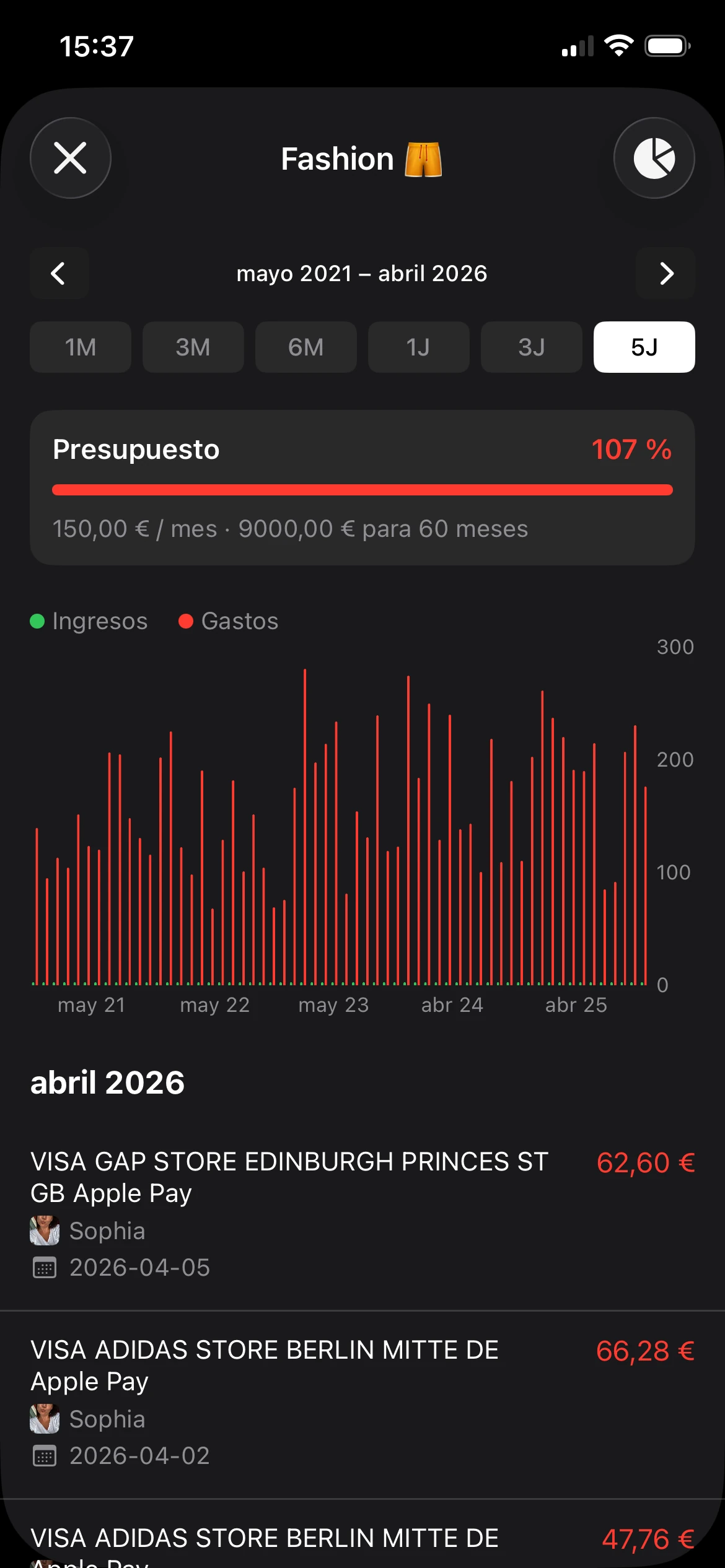
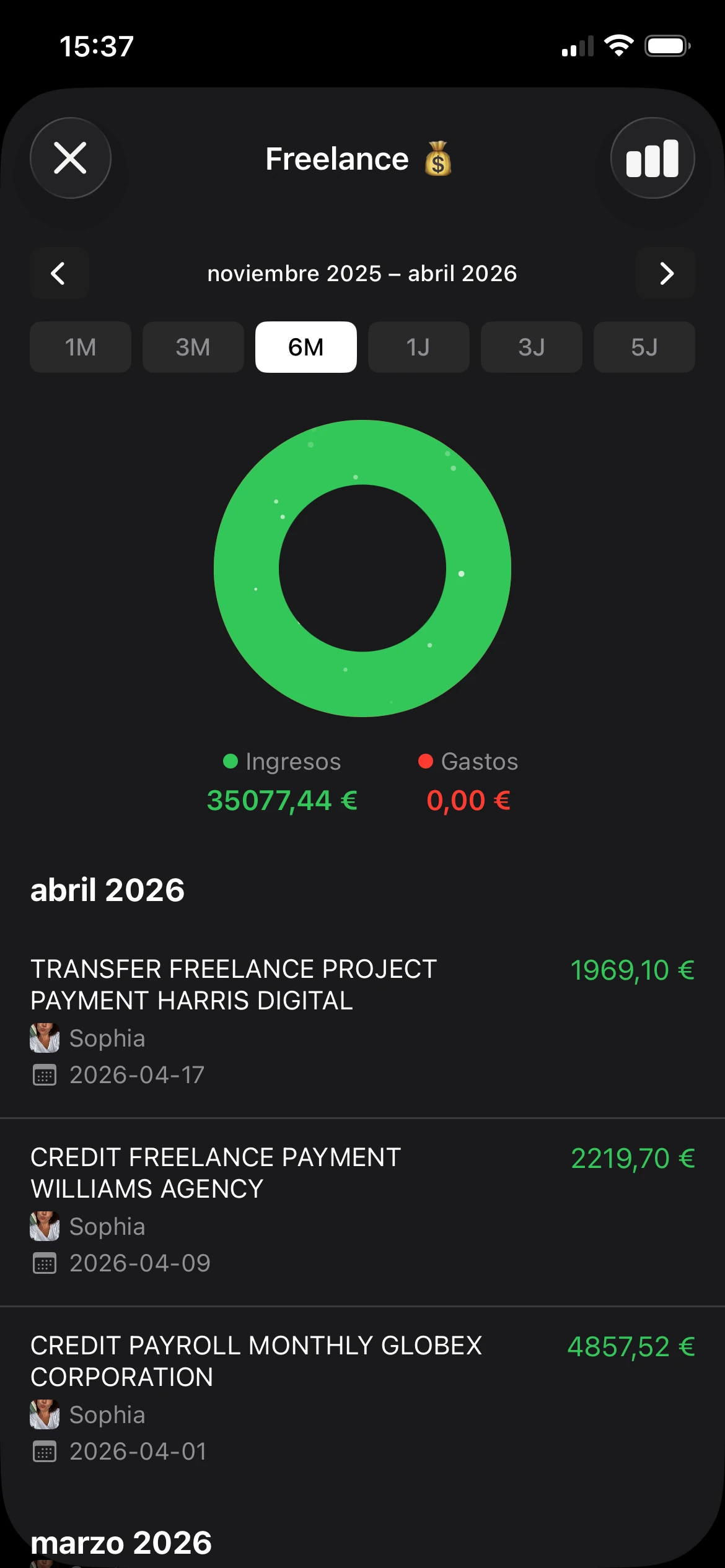
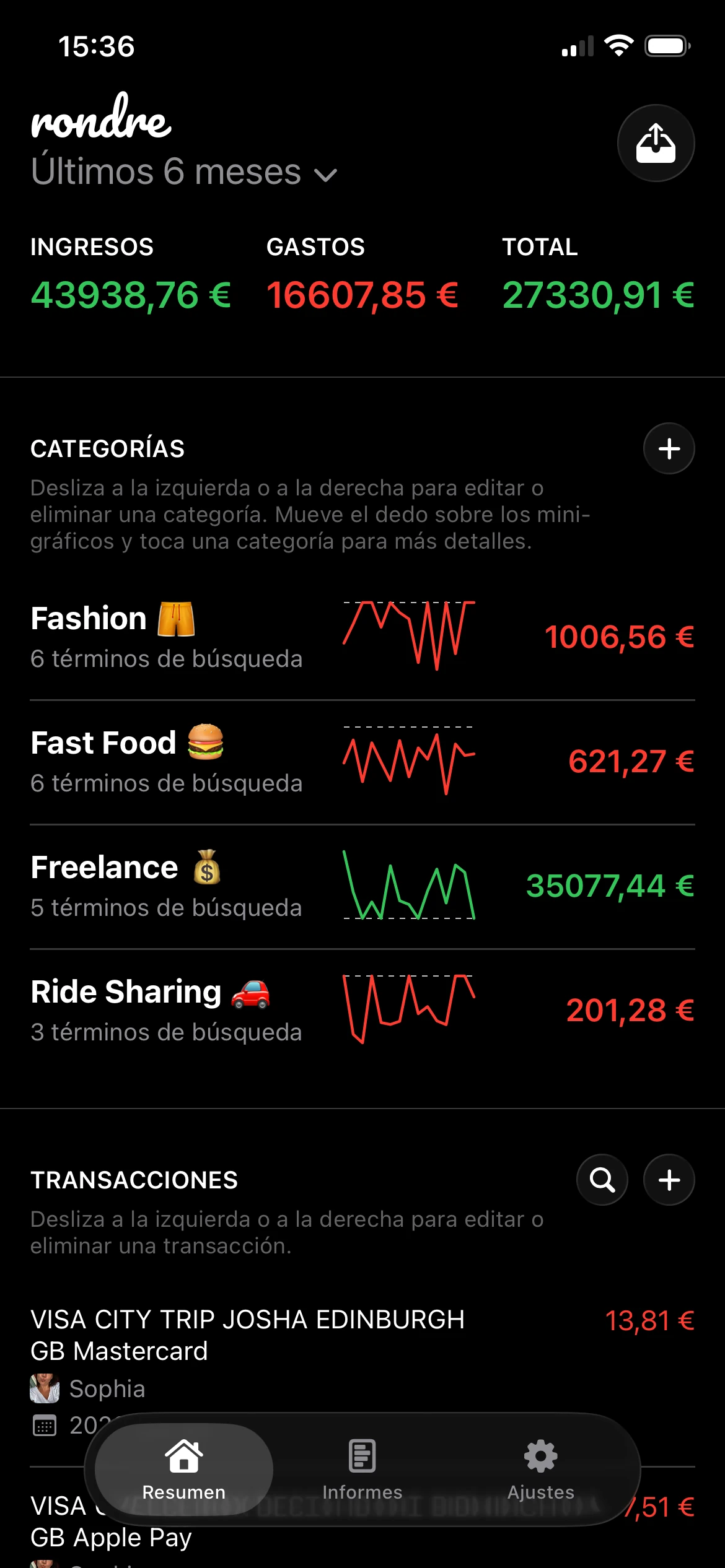
- Herramientas financieras: Los presupuestos, las reglas de ahorro, las categorías de gasto y los análisis basados en IA pueden ayudar. También es donde muchas apps empiezan a pedir un acceso a datos más amplio, más seguimiento o más procesamiento por terceros del que algunos usuarios quieren. Para quien prefiere una privacidad más estricta, la app bancaria puede encargarse de la banca mientras un rastreador privado independiente como rondre gestiona la revisión manual del gasto sin una agregación continua de cuentas.
Este último punto es fácil de pasar por alto en los resúmenes de reseñas. Más funciones pueden significar más comodidad. También pueden significar ceder más datos financieros a más sistemas.
Pon a prueba la seguridad en términos prácticos
El texto sobre seguridad tiende a ser abstracto, pero la experiencia de usuario suele revelar si la app está haciendo el trabajo correcto en segundo plano. La guía de banca móvil de Guardsquare destaca protecciones como comprobaciones de integridad de la app, SSL pinning, anti-hooking y defensas en tiempo de ejecución diseñadas para reducir la manipulación, la interceptación y el abuso en dispositivos rooteados o con jailbreak (Guardsquare mobile banking app best practices).
Para el usuario, las preguntas prácticas son más sencillas:
- ¿La app detecta condiciones inusuales? Una app bancaria debería responder de forma diferente en un dispositivo comprometido que en uno normal.
- ¿Protege bien el tráfico de red? Las salvaguardas adicionales importan especialmente en redes públicas o con control deficiente.
- ¿Vuelve a comprobar el riesgo durante acciones sensibles? Iniciar sesión de forma segura es solo una parte del trabajo. Los nuevos beneficiarios, las transferencias grandes y los cambios de dispositivo deberían activar una verificación adicional.
- ¿La fricción de seguridad tiene sentido? Tener que volver a autenticarse para bloquear una tarjeta es un mal diseño. Hacerlo para cambiar datos de contacto o enviar dinero a una cuenta nueva es razonable.
Una buena seguridad es visible en los momentos que implican riesgo real y prácticamente invisible en los demás.
Usa esta tabla de comparación rápida
| Qué comparar | Cómo es cuando funciona bien | Qué suele salir mal |
|---|---|---|
| Pantalla de inicio | Saldos claros, actividad pendiente y transacciones recientes | Diseño saturado o actualizaciones de cuenta retrasadas |
| Búsqueda | Búsqueda rápida por comercio, fecha o importe | Filtros pobres y etiquetas de transacción poco claras |
| Transferencias | Plazos, límites, confirmación y edición fácil | Límites ocultos y escaso feedback de estado |
| Controles de tarjeta | Bloqueo, desbloqueo y alertas fáciles de encontrar | Controles enterrados en menús |
| Flujo de seguridad | Comprobaciones extra en acciones de riesgo, poca fricción en las rutinarias | Solicitudes en los sitios equivocados o verificaciones débiles donde importan |
| Acceso al soporte | Vía directa a chat, teléfono o mensajería segura | Bucles de FAQ interminables y sin una ruta de escalado clara |
Una lista de comprobación práctica supera a la reputación de la marca. La beste banking app suele ser la que gestiona bien la banca ordinaria, muestra buen criterio en seguridad y no te obliga a compartir datos adicionales solo para conseguir unos pocos extras vistosos.
El precio de la privacidad que casi ninguna app menciona
Muchos análisis de apps bancarias tratan la comodidad como una victoria automática. Más conexiones, más sincronización, más análisis, más automatización. Suena bien hasta que el usuario plantea una pregunta más difícil. ¿Cuánto acceso financiero se está cediendo para obtener esas funciones adicionales?
Esa pregunta suele faltar en los rankings de "la mejor app". La diferencia importa porque seguridad y privacidad no son lo mismo.

Seguridad y privacidad no son lo mismo
Una app segura protege el acceso. Intenta evitar la apropiación de cuentas, el fraude y la interceptación.
Una configuración privada limita quién puede ver, almacenar o reutilizar los datos financieros desde el principio.
Una app puede ser sólida en seguridad y aun así pedir un acceso continuo y amplio a la información bancaria, los flujos de transacciones o los patrones de gasto. Eso no la hace automáticamente mala. Sí significa que el usuario debería tratar la comodidad como un compromiso, no como una mejora gratuita.
El ángulo que más se descuida en el contenido sobre beste banking app es precisamente esta demanda de seguimiento del dinero que prioriza la privacidad sin conceder a apps de terceros acceso continuado a las credenciales bancarias. Las reseñas suelen premiar la profundidad de funciones y las integraciones mientras prestan mucha menos atención a si una persona podría preferir un rastreador local y rápido en su lugar (Finanzguru on banking apps and the privacy-first gap).
Cuándo menos conexión es la mejor opción
Para muchas personas, la configuración ideal no es una superapp financiera todo-en-uno. Es una app bancaria para la banca, más un método de seguimiento privado y separado para la planificación y la revisión.
Ese enfoque tiene sentido cuando alguien quiere:
- Mantener las credenciales acotadas: Menos servicios vinculados significa menos lugares donde hay que confiar accesos sensibles.
- Rastrear el dinero sin una agregación completa: Algunos usuarios solo necesitan gasto categorizado, registros del hogar compartidos o extractos importados.
- Reducir el intercambio de datos en segundo plano: Más herramientas conectadas puede significar una exposición continua mayor del comportamiento financiero.
- Mantener la flexibilidad: Un rastreador privado puede seguir funcionando en distintas cuentas e instituciones sin depender de un único ecosistema bancario.
Un ejemplo útil es un flujo de trabajo local basado en el registro manual o la importación de extractos. No encajará con todo el mundo. Hay quien quiere categorización automática y sincronización unificada. Pero para los usuarios que valoran la privacidad, una herramienta separada puede ser la opción más limpia. Una guía sobre cómo registrar tus gastos suele ser más relevante que otro ranking de apps bancarias repletas de funciones, porque se centra en el trabajo real de entender el gasto y no en la vinculación de cuentas.
Estar más conectado no siempre significa tener más control. A veces solo significa estar más conectado.
Encuentra la app que encaja con tu vida financiera
Te das cuenta de lo que importa en una app bancaria cuando la vida se complica. Un pago del alquiler vence, un cargo en la tarjeta te resulta extraño, una transferencia tiene que salir ya, y la app o se aparta de en medio o lo ralentiza todo.
El ajuste adecuado depende menos de una lista de funciones y más de cómo gestionas el dinero semana a semana. Un usuario en solitario que consulta saldos en el metro, una pareja que organiza los gastos compartidos y un autónomo que separa los cobros de clientes del gasto personal pueden usar la banca móvil todos los días y aun así necesitar comportamientos muy diferentes de la app.
El usuario en solitario
Un usuario en solitario suele querer velocidad, claridad y el mínimo ruido posible. La app debe abrirse rápido, mostrar el estado de la cuenta de inmediato y permitir terminar las tareas rutinarias con una sola mano.
Las señales de que encaja bien incluyen:
- Resumen de cuenta claro: La actividad reciente, el saldo disponible y los próximos pagos deben ser fáciles de localizar.
- Alertas útiles: Las notificaciones de actividad con la tarjeta y de saldo bajo ayudan a detectar problemas pronto.
- Transferencias sencillas: Mover dinero entre cuentas debería ser cuestión de pocos toques, no de explorar menús.
- Recuperación de acceso fiable: Cambiar de móvil o que falle el reconocimiento biométrico no debería convertirse en una odisea con el soporte.
Este tipo de usuario suele notar primero el desorden. Si la app pone por delante los widgets de presupuesto, las ofertas y los mensajes de venta cruzada antes que las tareas bancarias básicas, la experiencia empeora aunque la lista de funciones parezca impresionante sobre el papel.
La pareja o la familia
Las finanzas compartidas exigen más al historial de transacciones que a las herramientas de pago. Lo difícil casi nunca es enviar dinero. Lo difícil es recordar quién pagó qué, detectar duplicados y revisar el mes sin confusiones.
El mejor ajuste de app aquí suele incluir:
- Detalles de transacciones legibles: Los nombres de comercios, las marcas de tiempo y la distinción entre pendiente y liquidado deben ser fáciles de entender.
- Notificaciones rápidas: Las tarjetas compartidas dan menos sustos cuando las alertas llegan al momento.
- Extractos o exportaciones accesibles: Las revisiones mensuales son más fáciles cuando los registros se pueden consultar fuera de la app.
- Espacio para un método de seguimiento separado: Algunos hogares quieren la app bancaria para los pagos y un rastreador privado para la planificación compartida.
Este último punto importa. Una familia puede querer visibilidad sin conceder a otra app financiera todo-en-uno acceso a todas las credenciales de cuenta y los patrones de gasto. En la práctica, muchos hogares funcionan mejor con una app bancaria para la banca y un sistema manual o basado en importaciones separado para el panorama financiero compartido.
El autónomo o el pequeño empresario
Los autónomos suelen encontrar los puntos débiles más rápido porque usan las apps bancarias bajo una presión operativa real. Necesitan confirmar el cobro de un cliente, mover dinero para impuestos, encontrar una transferencia antigua y obtener un extracto sin fricciones.
Estos son los detalles que merece la pena comprobar:
- Flujo de depósito: El depósito de cheques por móvil sigue siendo relevante para algunos clientes y casos puntuales.
- Calidad de la búsqueda: Encontrar un pago por importe, comercio o fecha ahorra tiempo durante la facturación y la declaración de impuestos.
- Separación de cuentas: La actividad profesional y la personal deben ser fáciles de revisar sin mezclarlo todo.
- Acceso a extractos y exportaciones: Unos registros limpios reducen el trabajo de ordenar datos más adelante.
La privacidad suele convertirse aquí en una cuestión práctica, no abstracta. Un autónomo puede querer la comodidad de la banca móvil pero no querer que todas las cuentas y categorías de gasto fluyan hacia un agregador muy conectado. Eso hace que una configuración más simple resulte atractiva: usar la app bancaria para los movimientos de dinero y mantener el análisis en una herramienta privada como rondre, u otro rastreador manual, donde las importaciones y los registros introducidos a mano pueden permanecer bajo el control del usuario.
Una buena app bancaria se adapta al trabajo que necesitas hacer. La mejor para tu vida puede ser la que gestiona bien los pagos y deja el resto a un sistema más privado.
Tu app bancaria y tu centro financiero privado
Una app bancaria no necesita hacerlo todo. Necesita gestionar transacciones, acceso a cuentas, controles de tarjeta y los movimientos de dinero habituales de forma segura y con la menor fricción posible.
El panorama financiero más amplio es un trabajo diferente. El análisis del gasto, los extractos importados, los registros del hogar compartidos, la organización por categorías y los registros manuales suelen funcionar mejor en un rastreador dedicado que dentro de la app del banco.

Una herramienta para banca y otra para tener claridad
Esta configuración en dos partes es práctica porque respeta los compromisos en lugar de fingir que no existen.
La app bancaria se encarga de:
- Acceso seguro a las cuentas
- Transferencias y actividad de facturas
- Gestión de tarjetas
- Monitorización del fraude y alertas
Un centro financiero privado se encarga de:
- Revisión completa del gasto de todas las fuentes
- Registro manual de efectivo o movimientos fuera del banco
- Categorías personalizadas
- Libros compartidos para el seguimiento del hogar
- Importación de extractos en CSV y PDF
Esa división suele ser más limpia que forzar a una app bancaria a convertirse en un centro de comando financiero de uso general.
Una configuración sencilla que te mantiene al mando
Para usuarios de iPhone que quieren un rastreador privado independiente, rondre es una opción que registra ingresos y gastos, admite categorías personalizadas con términos de búsqueda, importa archivos CSV y extractos bancarios en PDF, permite libros compartidos para parejas o familias, y funciona sin necesidad de cuenta, registro, anuncios ni seguimiento. Eso la hace relevante para quienes quieren visibilidad sobre su dinero sin vincular las credenciales bancarias a otro servicio.
El paso práctico es sencillo. Elige una app bancaria para las tareas bancarias. Luego mantén los presupuestos y las revisiones más amplias en una herramienta diseñada para el seguimiento, no para el acceso a cuentas.
Quien busca la beste banking app suele obtener mejores resultados bajando las expectativas. La app bancaria debe ser excelente en la banca básica. El rastreador privado debe ser excelente para entender el dinero. Son trabajos distintos, y separarlos suele producir menos fricción, menos confusión y más control.
Un siguiente paso práctico es probar rondre con un extracto bancario reciente. Importa un mes de datos en CSV o PDF, crea unas pocas categorías personalizadas y compara esa vista privada con lo que muestra la app bancaria por sí sola. Esa prueba única suele ser suficiente para saber si un centro de seguimiento separado facilitará la gestión del dinero día a día.