Te descargas una app de presupuestos, la abres en tu iPhone y te topas con el mismo muro en el primer minuto. Conecta tu banco. Comparte tu correo. Activa el seguimiento. Empieza una prueba gratuita. Para mucha gente, ese es el momento en que gestionar las finanzas deja de parecer útil y empieza a sentirse como otra cuenta más que administrar.
Una buena app de presupuestos gratuita debería adaptarse al nivel de implicación que quieres tener. Hay quien prefiere importar transacciones automáticamente y clasificarlas rápido, aunque eso signifique compartir datos financieros con otro servicio. Otros prefieren una configuración más sencilla, registro manual y mayor control sobre lo que sale de su teléfono. Ambos enfoques pueden funcionar. La mejor opción depende de si la comodidad o la privacidad te importan más en tu día a día.
Ese equilibrio es el criterio de esta lista. Incluye apps que ahorran tiempo mediante sincronización bancaria, apps que siguen siendo útiles sin ella, y algunas que están a medio camino. He comprobado que las apps de registro manual suelen exigirte un poco más cada día, pero también hacen que los patrones de gasto sean más fáciles de detectar porque los introduces tú mismo. Las apps con sincronización reducen el esfuerzo, pero la configuración es más pesada y la renuncia a la privacidad es real.
Si ya sabes que quieres la opción manual y minimalista, esta guía sobre una app de presupuestos simple y gratuita para usuarios de iPhone es un buen punto de partida. Explica por qué apps como rondre atraen a quienes buscan claridad sin tener que vincular todas sus cuentas. Las herramientas gratuitas y freemium siguen dominando esta categoría, pero resuelven problemas muy distintos.
Índice
- 1. rondre
- 2. Rocket Money formerly Truebill
- 3. NerdWallet app
- 4. Empower Personal Dashboard
- 5. Goodbudget
- 6. EveryDollar
- 7. Honeydue
- 8. Wallet by BudgetBakers
- 9. Money Manager Expense and Budget Realbyte
- 10. PocketGuard
- Comparativa de las 10 mejores apps de presupuestos gratuitas para iPhone
- Tu plan de acción: registra tus gastos durante una semana
1. rondre
Para quien quiera una app de presupuestos privada, sencilla y gratuita, rondre es la mejor opción de esta lista. Se salta el coste de configuración habitual. No hay cuenta, ni correo electrónico, ni contraseña, ni anuncios ni rastreo. Eso hace que se parezca menos a registrarse en un servicio financiero y más a abrir un cuaderno de cuentas limpio y listo para usar.
Muchas apps de presupuestos para iPhone empujan a los usuarios a conectar el banco primero. Eso funciona para algunos, pero no para todos. Las reseñas independientes de herramientas de presupuesto gratuitas siguen señalando el valor de las apps de registro manual como Monefy, porque reducen la fricción en la configuración y evitan problemas con la conexión bancaria —una ventaja real para los usuarios de iPhone que priorizan la privacidad y solo quieren un seguimiento fiable sin vincular cuentas, como se comenta en la reseña de National Debt Relief sobre las mejores apps de presupuesto gratuitas.
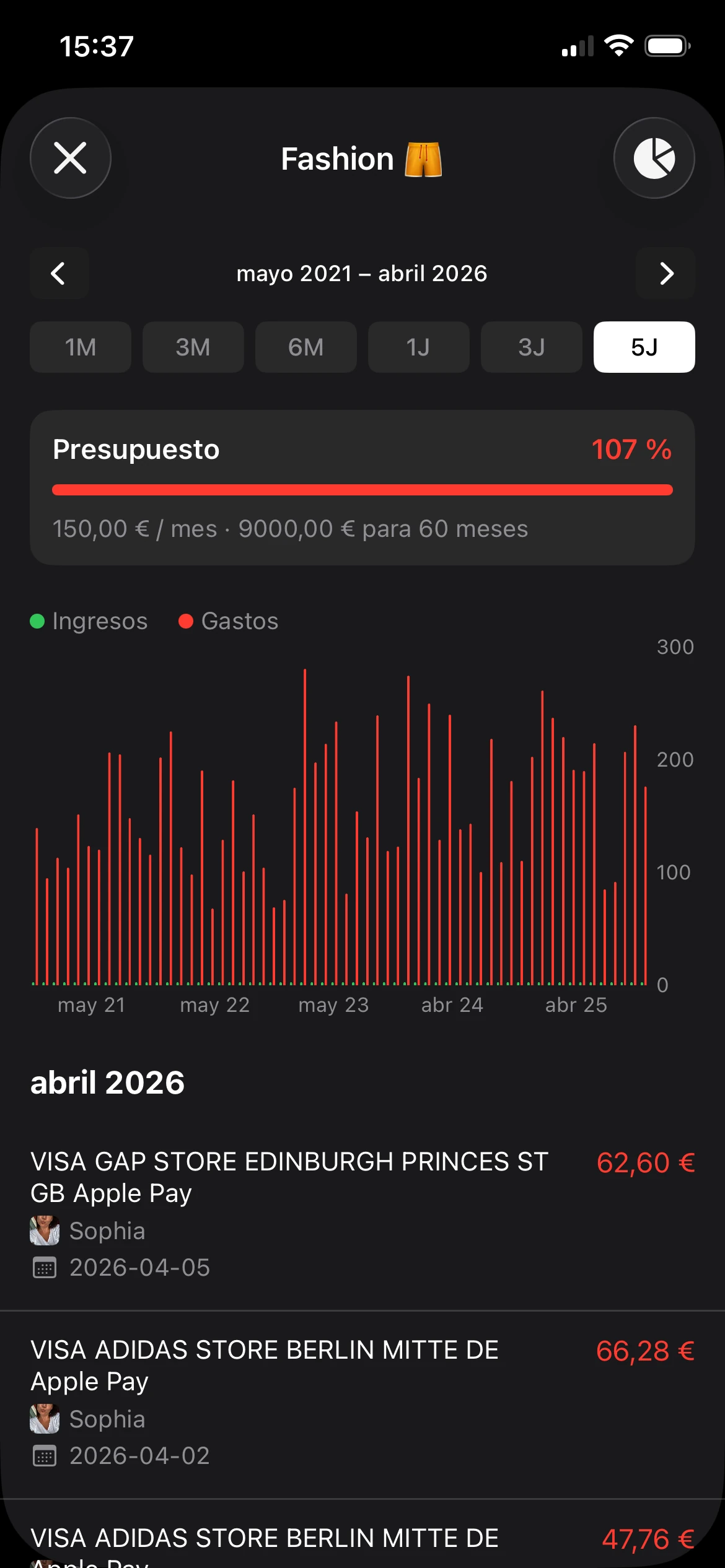
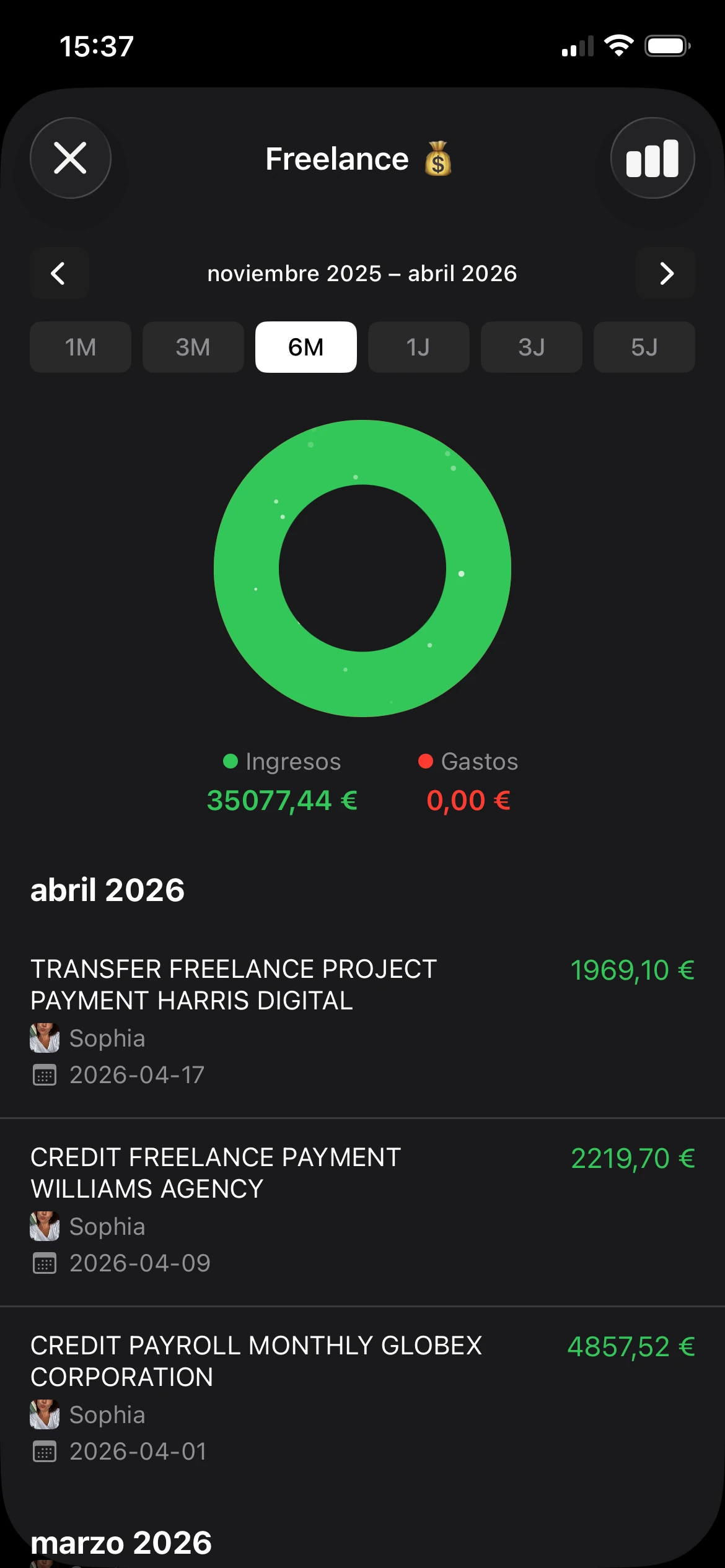
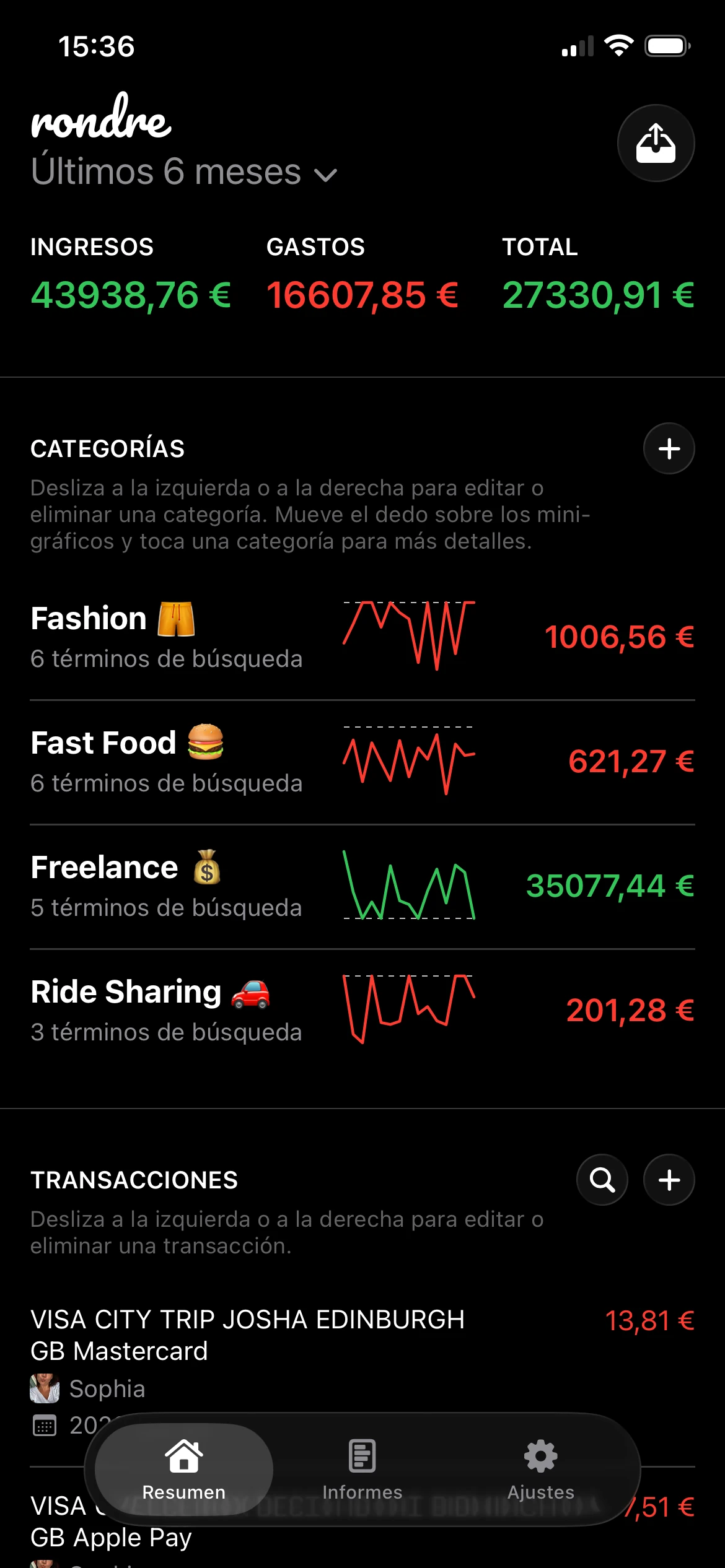
Aquí tienes un vistazo a la interfaz de la app.

Por qué destaca
rondre está diseñada para el uso cotidiano rápido. Las transacciones se pueden añadir manualmente o importar con archivos CSV y extractos bancarios en PDF. Las categorías son flexibles y los términos de búsqueda inteligentes pueden organizar automáticamente los comercios recurrentes en los apartados correctos. Esa configuración funciona muy bien para quienes quieren sustituir notas, hojas de cálculo o apps financieras sobrecargadas.
También gestiona los presupuestos compartidos mejor que muchas apps minimalistas. Se pueden crear libretas independientes para gastos personales, proyectos paralelos, viajes o presupuestos del hogar, y compartirlas con la pareja o un familiar. La búsqueda es instantánea y los resúmenes visuales son compactos en lugar de llenar la pantalla de widgets.
Regla práctica: Si una app de presupuestos pide más datos de los necesarios antes de registrar la primera transacción, la fricción en la configuración suele convertirse en un problema de hábito a largo plazo.
El primer paso es sencillo. Descarga la app, crea una libreta nueva y añade un gasto y un ingreso. Para empezar más rápido, importa un extracto CSV o PDF y organiza las categorías después. La guía para elegir una app de presupuestos simple y gratuita encaja bien con ese flujo de trabajo.
- La mejor configuración para la privacidad: Sin registro, sin anuncios y sin rastreo.
- La mejor flexibilidad de importación: El registro manual funciona, pero los imports de CSV y PDF agilizan mucho el cambio desde hojas de cálculo o exportaciones bancarias.
- La mayor sencillez para compartir: Las libretas compartidas son útiles para parejas y familias sin convertir la app en un panel financiero pesado.
Para quién es ideal
rondre es la mejor app de presupuestos gratuita para iPhone para quienes valoran más la privacidad, el control y una interfaz tranquila que los feeds bancarios automáticos. El compromiso es claro: no hay sincronización bancaria directa, así que los usuarios deben introducir las transacciones manualmente o importar archivos. Para muchas personas eso es una limitación. Para otras, es exactamente la razón por la que la app es más fácil de confiar y de mantener.
Los usuarios que quieran sustituir el registro en papel o una hoja de cálculo probablemente sacarán el mayor partido aquí. Los que busquen análisis de inversiones o funciones financieras amplias deberían mirar en otro sitio.
Para descargar la app, visita rondre.
2. Rocket Money formerly Truebill
Rocket Money funciona mejor para quienes pierden dinero con suscripciones, cargos recurrentes y una visibilidad mensual irregular. Es menos una app de presupuestos minimalista y más un panel de control del dinero. Esa distinción importa.
Su experiencia gratuita es lo suficientemente útil como para merecer una prueba. El seguimiento de suscripciones, los recordatorios de facturas, los presupuestos básicos y la categorización automática cubren lo esencial para los usuarios que prefieren la agregación de cuentas al registro manual. La app es especialmente práctica para quien no quiere introducir transacciones a mano.
Dónde más ayuda
El punto fuerte de Rocket Money es sacar a la luz los cargos recurrentes que a menudo pasan desapercibidos. Los servicios de streaming, las renovaciones de apps y las facturas mensuales más pequeñas son más fáciles de ver cuando las transacciones se recopilan automáticamente. Eso la convierte en una opción sólida para los usuarios que se preocupan más por reducir el gasto innecesario que por construir un sistema de categorías detallado.
El compromiso está en la flexibilidad. El nivel gratuito es funcional, pero algunas de las herramientas más atractivas de la app están detrás de su oferta de pago. Eso significa que puedes empezar gratis, pero es posible que pronto te topes con los límites de funciones si quieres un control más profundo.
Las apps centradas en suscripciones son útiles cuando los cargos recurrentes son el problema principal. Son menos útiles cuando el verdadero problema es un gasto diario inconsistente.
Rocket Money encaja bien para los usuarios que priorizan la comodidad, no les importa conectar cuentas y quieren una visión general clara de sus costes recurrentes. Los usuarios que prefieren un flujo de trabajo sin cuentas o con importación de archivos probablemente la encontrarán menos atractiva.
Para la página oficial del producto, visita Rocket Money.
3. NerdWallet app
Abres tu app de presupuestos para revisar el gasto en restaurantes y, de repente, ves tu puntuación crediticia, los saldos de tus cuentas y consejos financieros en el mismo feed. Esa es la experiencia de NerdWallet. Funciona bien para usuarios que quieren una sola app para varias tareas financieras, no solo para el presupuesto mensual.
Esa comodidad tiene un coste claro. NerdWallet está construida en torno a cuentas sincronizadas y una visión financiera personal más amplia, por lo que es adecuada para usuarios que se sienten cómodos compartiendo datos de sus cuentas a cambio de automatización. Las personas que prefieren la privacidad y el control del registro manual —que es el atractivo de una app como rondre— pueden encontrarla más recargada de lo que necesitan.
Mejor caso de uso
NerdWallet tiene más sentido para usuarios que presupuestan de forma casual y quieren una instantánea gratuita de su gasto sin construir un sistema detallado. Las importaciones automáticas de transacciones, las vistas por categorías y la monitorización del crédito son útiles cuando el objetivo es tomar conciencia primero. La app es fácil de consultar unos minutos y cerrar.
Su conjunto de funciones más amplio es también su limitación. Los usuarios que quieren llevar un presupuesto base cero estricto, el método de los sobres en efectivo o un plan de categorías muy personalizado pueden quedarse cortos bastante rápido. La app da una buena visión general, pero no es especialmente enfocada.
Hay algunos compromisos prácticos que merece la pena destacar:
- Buena para la comodidad: Las cuentas vinculadas reducen el trabajo manual y facilitan detectar patrones de gasto.
- Buena para una supervisión financiera ligera: La actividad presupuestaria y la información crediticia están en un mismo lugar.
- Menos ideal para usuarios que priorizan la privacidad: La sincronización bancaria es el eje central de la experiencia.
- Menos ideal para un control presupuestario detallado: Los usuarios avanzados pueden querer más estructura y menos sugerencias financieras extra.
Recomendaría NerdWallet a alguien que quiera automatización gratuita y una marca conocida, y que principalmente necesite tener más visibilidad sobre adónde va su dinero. No la recomendaría a alguien que quiera un flujo de trabajo de presupuesto minimalista con mayor control sobre el uso compartido de datos.
Para el sitio oficial, visita NerdWallet.
4. Empower Personal Dashboard
Personal Dashboard es la app para quienes piensan en el dinero a nivel global primero. Es potente para el patrimonio neto, la agregación de cuentas y la visibilidad del flujo de caja. Para algunos usuarios, es perfecta. Para otros, es demasiado.
Esta app tiene más sentido cuando el presupuesto es solo una parte de una imagen financiera más amplia. Alguien con varias cuentas bancarias, cuentas de jubilación e inversiones generalmente sacará más partido a esta app que a un simple gestor de gastos.
Aquí tienes un vistazo al estilo de la app, orientado a las inversiones.

Cuándo tiene sentido
El punto fuerte de esta app es la agregación. Las herramientas de gasto y presupuesto están ahí, pero se integran dentro de un panel más amplio orientado a entender activos, deudas y flujo de caja de forma conjunta. Eso es útil para los usuarios que quieren contexto alrededor de su presupuesto en lugar de simplemente totales por categoría.
El lado negativo resulta evidente tras unas cuantas sesiones. Los usuarios que solo quieren saber cuánto han gastado en alimentación, transporte y suscripciones pueden sentirse abrumados por una interfaz muy orientada a las inversiones. Es capaz, pero no especialmente sencilla.
Un panel grande no es automáticamente una mejor herramienta de presupuesto. Si la app muestra más complejidad financiera de la que el usuario necesita, el seguimiento rutinario suele abandonarse.
La app es mejor para usuarios que quieren visibilidad financiera de alto nivel de forma gratuita y no les importa una interfaz más pesada. No es la mejor app de presupuestos gratuita para iPhone si el objetivo es la mínima fricción o el seguimiento manual con privacidad.
Para el sitio del producto, visita Empower Personal Dashboard.
5. Goodbudget
Goodbudget sigue ganándose un lugar porque enseña disciplina mejor que muchas apps más vistosas. Se basa en el método de los sobres, de modo que el dinero se asigna a apartados de gasto antes de usarlo. Eso crea claridad rápidamente.
La app tiene un aire clásico en el buen sentido. No intenta hacer de todo. Intenta que los usuarios sean más conscientes. Para las personas que gastan de más porque necesitan límites más firmes, esa simplicidad es muy valiosa.
Quién debería elegirla
Goodbudget funciona mejor para hogares que quieren un presupuesto compartido sin depender de la sincronización bancaria. Las parejas pueden mantenerse alineadas en alimentación, salidas a cenar, regalos y gastos del hogar porque los sobres hacen visibles los límites. Es un enfoque más conductual que el de la mayoría de los rastreadores.
Su debilidad es el esfuerzo. El registro manual requiere constancia, y la versión gratuita tiene límites que algunos hogares superarán. Aun así, quienes quieren una rutina mensual estructurada pueden encontrar esa limitación más útil que frustrante.
- Ideal para el presupuesto clásico por sobres: Perfecta para quienes prefieren asignar el dinero antes de gastarlo.
- Ideal para planes mensuales compartidos: Las parejas pueden trabajar con la misma lógica presupuestaria.
- No es ideal para los amantes de la automatización: Sin sincronización automática en el nivel gratuito significa más mantenimiento manual.
Goodbudget es menos vistosa que las apps más recientes, pero puede ser más eficaz para quienes necesitan guardarraíles. Eso suele importar más que el acabado visual.
Para el sitio oficial, visita Goodbudget.
6. EveryDollar
Te sientas el primer día del mes, asignas el alquiler, la compra, la gasolina y el ahorro antes de que empiece el gasto, y quieres que la app se mantenga al margen. Ese es el tipo de presupuesto para el que encaja bien EveryDollar.
EveryDollar está diseñada en torno al presupuesto base cero, de modo que cada euro tiene un propósito antes de que empiece el mes. Si prefieres un método de planificación más estricto en lugar de una lista corriente de transacciones, esa estructura puede resultarte muy útil. A quienes les gusta un sistema práctico suelen captarlo enseguida.

En qué destaca
La versión gratuita es principalmente una herramienta de presupuesto manual. Ese compromiso importa. El registro manual requiere más constancia, pero también da a los usuarios más control y menos dependencia de la sincronización de cuentas. Para quienes están valorando privacidad frente a comodidad, EveryDollar se acerca más al lado de la privacidad y la sencillez que las apps conectadas al banco, aunque rondre sigue ofreciendo una experiencia más minimalista para quienes quieren ese enfoque manual con menos complicaciones.
Su caso de uso más fuerte es construir un plan mensual antes de que el dinero se derive hacia categorías por accidente. Si ya te gusta la lógica detrás del presupuesto base cero para la planificación mensual, EveryDollar te da un lugar claro donde aplicarlo en iPhone sin demasiado desorden.
La limitación es fácil de prever. Los usuarios que quieren importaciones automáticas de transacciones y menos mantenimiento pueden encontrar la versión gratuita demasiado manual después de las primeras semanas. En la práctica, EveryDollar funciona mejor para quienes quieren que el presupuesto sea intencional, repetitivo y estructurado, no automático.
Para la página oficial del producto, visita EveryDollar.
7. Honeydue
Honeydue es una de las recomendaciones más fáciles para parejas que quieren gestionar el dinero juntas sin adoptar una plataforma de finanzas domésticas pesada. Su diseño gira en torno a la visibilidad compartida y la comunicación.
Ese enfoque importa porque muchas apps tratan el presupuesto compartido como una función secundaria. Honeydue lo trata como el objetivo principal. Las parejas pueden ver las transacciones, separar el gasto individual del conjunto y mantener las conversaciones cerca de las propias transacciones.
Aquí tienes una vista del estilo de la app para parejas.

Puntos fuertes para gestionar el dinero en pareja
Honeydue funciona mejor para parejas que quieren claridad más que una metodología de presupuesto avanzada. No intenta ser el planificador de presupuestos más profundo del mercado. Intenta reducir la confusión, especialmente en torno a las facturas y los gastos compartidos.
Eso la hace útil para parejas recientes, compañeros de piso con obligaciones compartidas o parejas de larga duración que necesitan un único lugar para mantenerse alineadas. Para los hogares que prefieren un sistema más estricto, combinar este tipo de seguimiento compartido con un método como el presupuesto base cero para parejas e individuos puede añadir más estructura.
El presupuesto compartido falla menos por la falta de funciones y más porque una de las partes deja de usar la app.
El lado negativo es la profundidad. Honeydue no sustituirá a una suite completa de presupuesto para los usuarios que quieran informes avanzados o una planificación financiera más amplia. Es mejor para la comunicación y el conocimiento del dinero compartido del día a día.
Para el sitio oficial, visita Honeydue.
8. Wallet by BudgetBakers
Wallet by BudgetBakers ocupa el terreno intermedio entre las apps manuales ligeras y los paneles financieros más grandes. Ese equilibrio es la razón por la que muchos usuarios se quedan con ella. Ofrece más profundidad en los informes que los rastreadores más básicos, pero no tiene un peso tan orientado a las inversiones como las apps financieras más amplias.
La experiencia gratuita es sólida para el seguimiento manual. Los usuarios a los que les gustan las categorías, los informes y el acceso multidispositivo suelen encontrar aquí suficiente antes de plantearse actualizaciones de pago.
Aquí tienes el estilo de la app y la vista de informes.

Por qué algunos usuarios la prefieren
Wallet encaja bien para quienes quieren informes más ricos sin comprometerse con una filosofía de presupuesto muy rígida. Da a los usuarios margen para llevar su gasto a su manera. Esa flexibilidad puede ser un punto fuerte, especialmente para quienes no les gustan los sistemas de sobres ni los marcos base cero estrictos.
También funciona razonablemente bien para la planificación financiera compartida, aunque los usuarios que buscan específicamente flujos de trabajo en pareja pueden querer compararlo con enfoques más especializados para hacer el presupuesto en pareja con categorías compartidas claras.
- Informes potentes: Más detalle visual que la mayoría de los rastreadores manuales gratuitos.
- Enfoque flexible: Útil para quienes quieren construir su propio sistema.
- Existe presión para actualizar: La automatización avanzada generalmente requiere pasar del plan gratuito.
Wallet by BudgetBakers es una buena opción intermedia. No es la app más sencilla de esta lista, ni la más automatizada tampoco. Para muchos usuarios, ese punto intermedio es exactamente lo que necesitan.
Para el sitio oficial, visita Wallet by BudgetBakers.
9. Money Manager Expense and Budget Realbyte
Money Manager de Realbyte es un rastreador manual sencillo que sigue haciendo bien lo básico. Se abre rápido, se registran los gastos rápido y es fácil de entender sin un largo proceso de configuración.
Eso la convierte en una opción sólida para quienes todavía piensan en términos de un libro de cuentas. En lugar de intentar predecir el gasto o conectar todas las cuentas, se centra en el seguimiento manual rápido con resúmenes y gráficos.
Qué esperar
El atractivo aquí es la velocidad. Alguien en la cola del supermercado o saliendo de una cafetería puede registrar un gasto en unos pocos toques. Eso puede parecer un detalle menor, pero importa. La mejor app de registro manual es a menudo la que tiene menos resistencia a la entrada.
El lado negativo también está claro. Los usuarios que quieren sincronización bancaria gratuita no la encontrarán aquí. Algunas funciones avanzadas también empujan hacia compras dentro de la app o actualizaciones de pago. Aun así, esta app sigue siendo una buena elección para los usuarios que valoran el control manual y no necesitan un ecosistema financiero más amplio.
Money Manager es mejor para usuarios que quieren un rastreador de gastos clásico con suficiente retroalimentación visual para mantenerse motivados. No intenta convertirse en un centro de mando financiero, y esa contención es parte de su valor.
Para el sitio oficial, visita Money Manager by Realbyte.
10. PocketGuard
Miras el saldo de tu cuenta antes de pedir comida a domicilio, ves que hay suficiente dinero y aun así te preguntas si ese dinero está libre para gastar. PocketGuard está diseñada para ese momento. Su valor principal es simple: intenta responder a cuánto queda después de tener en cuenta facturas, objetivos y gastos habituales.
Ese enfoque funciona bien para usuarios que no quieren mantener un presupuesto detallado a mano. PocketGuard recopila los datos de las cuentas conectadas en un solo lugar y los convierte en un límite de gasto más claro para las decisiones del día a día que suelen descarrilar un presupuesto.
Aquí tienes la vista de la app y la distribución del presupuesto.

Para quién es mejor
PocketGuard está en el lado de la comodidad de esta lista. Si el objetivo es menos trabajo manual y más visibilidad entre cuentas, lo hace mejor que un simple rastreador de gastos. La colocaría en el mismo grupo que otras apps que dependen mucho de la sincronización y que intercambian algo de privacidad y control por automatización.
Ese compromiso importa. Para tener una imagen completa, los usuarios deben conectar sus cuentas financieras y confiar en un tercero con ese flujo de datos. Algunas personas se sienten cómodas con eso porque ahorra tiempo. Otras preferirán una app como rondre u otro rastreador manual donde los datos de gasto queden bajo un control personal más estricto y la configuración sea mínima.
PocketGuard es una buena elección para los usuarios que quieren un presupuesto guiado y de poco esfuerzo y les tranquiliza tener un número de «dinero libre para gastar» en tiempo real. Es menos convincente para los usuarios que quieren personalización detallada en el nivel gratuito, o para cualquiera que prefiera introducir las transacciones manualmente antes que compartir el acceso bancario.
Para el sitio oficial, visita PocketGuard.
Comparativa de las 10 mejores apps de presupuestos gratuitas para iPhone
| App | Funciones principales | Privacidad y configuración | Ideal para | Propuesta de valor única | Precio / niveles |
|---|---|---|---|---|---|
| rondre | Registro manual + imports CSV/PDF, categorías inteligentes personalizables, gráficos mini/barra/donut, múltiples «libretas» compartidas | Sin registro, sin correo/contraseña, datos en local, listo en <1 min | Usuarios que priorizan la privacidad, parejas/familias, sustitutos de hojas de cálculo o papel | Rastreador minimalista sin cuenta y con privacidad, con libretas colaborativas | Gratuita (completamente funcional), soporte voluntario; sin anuncios ni muros de pago |
| Rocket Money (Truebill) | Seguimiento de suscripciones, recordatorios de facturas, presupuestos, categorización automática, puntuación crediticia | Cuenta obligatoria, agregación y sincronización bancaria | Usuarios que quieren gestión de suscripciones/facturas y ayuda en la negociación | Detección potente de cargos recurrentes y negociación de facturas opcional | Nivel gratuito funcional; Premium añade automatización/funciones |
| NerdWallet app | Sincronización de cuentas, categorización de gastos, presupuestos básicos, herramientas de puntuación crediticia | Cuenta y sincronización obligatorias | Usuarios que quieren herramientas financieras básicas gratuitas e información sobre productos | Conjunto de funciones básicas gratuitas vinculado a los consejos y herramientas de NerdWallet | Gratuita |
| Empower Personal Dashboard | Seguimiento de patrimonio neto e inversiones, agregación multicuenta, presupuestos, flujo de caja | Cuenta obligatoria, vincula cuentas bancarias y de inversión | Inversores y usuarios que gestionan sus finanzas a nivel global | El mejor panel de patrimonio neto e inversiones gratuito del mercado | Panel gratuito; servicios de asesoramiento opcionales de pago |
| Goodbudget | Presupuesto por sobres, sincronización en tiempo real, exportación/importación CSV | Cuenta obligatoria, centrada en el registro manual | Parejas/familias y usuarios que practican el presupuesto por sobres | Enseña la disciplina clásica del método de los sobres con presupuestos compartidos | Nivel gratuito con límite de sobres; Premium elimina los límites |
| EveryDollar | Presupuestos mensuales base cero, registro manual de transacciones, planificación por nómina (Premium) | Cuenta obligatoria; plan manual gratuito, Premium para sincronización bancaria | Seguidores del método de presupuesto base cero | Flujo de trabajo base cero sencillo al estilo Dave Ramsey | Básico gratuito; Premium añade sincronización bancaria y planificación |
| Honeydue | Vista para parejas, seguimiento/recordatorios de facturas, chat integrado, vinculación de cuentas o manual | Cuenta y links bancarios opcionales para vistas compartidas | Parejas que gestionan finanzas conjuntas y comunicación | App centrada en parejas con chat integrado y vistas conjuntas/individuales | Gratuita |
| Wallet by BudgetBakers | Seguimiento manual, informes detallados, sincronización multidispositivo, conexión bancaria opcional | Cuenta para sincronización multidispositivo; planes de pago para conexiones bancarias | Usuarios multiplataforma que quieren informes detallados | Amplias opciones de informes y automatización; compatible con iOS Shortcuts | Nivel gratuito; planes de pago para sincronización bancaria/automatización |
| Money Manager (Realbyte) | Registro manual rápido, presupuestos por categorías, gráficos semanales/mensuales, exportaciones | Local/manual por defecto; compras dentro de la app/actualizaciones opcionales | Usuarios que quieren registro rápido en movimiento y privacidad | Registro ligero y rápido con resúmenes claros | Gratuita + compras dentro de la app opcionales / actualizaciones de pago |
| PocketGuard | Dinero libre para gastar («In My Pocket»), categorización de gastos, conectividad bancaria | Cuenta y sincronización bancaria obligatorias | Usuarios que quieren información automática al estilo de una paga | Marco claro de dinero libre para gastar para el presupuesto diario | Gratuita limitada; suscripción Premium para funciones completas |
Tu plan de acción: registra tus gastos durante una semana
El lunes empiezas con buenas intenciones. Para el jueves, un café, una tarifa de envío y un Uber rápido ya son un recuerdo borroso. Por eso la mejor app de presupuestos para iPhone suele ser la que seguirás abriendo al final de una semana ajetreada.
Una prueba de una semana te dice más que otra hora comparando capturas de pantalla. Elige una app de esta lista y registra cada gasto durante siete días. Comidas, suscripciones, transporte, compras impulsivas, todo. El objetivo no es tener un presupuesto perfecto todavía. El objetivo es ver si la app encaja con tus hábitos.
La decisión clave es sencilla. ¿Quieres comodidad o quieres control?
La comodidad generalmente significa vincular cuentas bancarias y dejar que la app importe las transacciones automáticamente. Eso ahorra tiempo y, para algunas personas, es la única manera de que el presupuesto se mantenga. El compromiso es un mayor intercambio de datos, más configuración de cuentas y a menudo una interfaz más recargada construida en torno a la sincronización, las ofertas o las funciones del panel de control.
El control generalmente significa registro manual, importación de archivos y menos conexiones con servicios externos. Eso requiere más esfuerzo al principio, pero da una supervisión más clara de qué se rastrea y adónde van los datos. Los usuarios que priorizan la privacidad suelen hacerlo mejor aquí porque el sistema es lo suficientemente simple como para confiar en él y mantenerlo.
Esa brecha sigue pasando desapercibida en los consejos financieros del mercado. Muchos rankings se centran en la automatización, la categorización por IA y los paneles financieros completos, mientras que las opciones sin cuenta o con datos en local reciben menos atención. Esa diferencia queda bien reflejada en este comentario en vídeo sobre las opciones de apps de presupuesto privadas para iPhone.
Para los lectores que quieran la configuración más ligera con los menores compromisos de privacidad, rondre es un punto de partida práctico. No requiere crear una cuenta personal, evita los anuncios y admite tanto el registro manual como la importación de CSV y PDF. Señalaría a los usuarios que priorizan la privacidad hacia allí primero porque mantiene el trabajo acotado. Registra el gasto, revísalo y sigue adelante.
Si la sincronización automática importa más que la privacidad o la sencillez, Rocket Money, NerdWallet y PocketGuard probablemente se sentirán más cómodas en el día a día. Reducen el trabajo manual y pueden detectar patrones de gasto rápidamente. El compromiso es menos control sobre las conexiones de datos y más posibilidades de que la app empiece a parecerse a un portal financiero en lugar de una herramienta de presupuesto.
Las apps de presupuesto más antiguas moldearon esas expectativas. Mint enseñó a muchos usuarios de iPhone a esperar presupuesto, vistas de gasto y comodidad móvil en un solo lugar, y las comparativas posteriores siguieron reforzando la idea de que las herramientas gratuitas o freemium dominan esta categoría, incluyendo apps como PocketGuard y EveryDollar, tal y como se resume en la reseña de Oklahoma Central Credit Union sobre apps de presupuesto para móvil.
Empieza poco a poco. Elige la app que encaje con cómo quieres gestionar tu dinero y registra cada euro durante una semana. Si el proceso es lo suficientemente fácil como para repetirlo, has encontrado tu app.
Si una app de presupuesto privada y sin registro suena como la opción adecuada, rondre merece la pena probarla. Es gratuita, sin anuncios ni rastreo, admite registro manual más importaciones de CSV y PDF, y facilita el seguimiento en solitario o compartir una libreta con la pareja o la familia.