Viele Menschen öffnen eine Budget-App mit guten Absichten und stoßen dann auf dieselbe Hürde. Die Kategorien passen nicht. Die Einrichtung dauert zu lange. Gemeinsame Ausgaben werden unübersichtlich. Einkommen aus freiberuflicher Arbeit passt nicht in die monatliche Vorlage. Statt zu helfen, beginnt die App ihnen vorzuschreiben, wie ihr finanzielles Leben funktionieren soll.
Diese Frustration erklärt, warum diese Kategorie weiter wächst. Der weltweite Markt für Personal-Finance-Apps wurde 2023 auf 101,75 Milliarden US-Dollar geschätzt und soll bis 2032 auf 675,08 Milliarden US-Dollar wachsen, wobei Ausgabenverfolgung und Budgetierung laut dem Marktbericht zu Personal-Finance-Apps von Zion Market Research als schnell wachsendes Segment innerhalb dieses Marktausblicks identifiziert wurden. Menschen suchen nicht einfach nach noch mehr Finanz-Apps. Sie suchen nach Tools, die besser zum echten Leben passen.
Eine personalisierte Finanz-App sollte einer Person helfen, ihr Geld klar zu überblicken, ohne sie in das System einer anderen Person zu zwingen. Das ist wichtig, egal ob das Ziel darin besteht, Lebensmittelkäufe zu verfolgen, Geschäftsausgaben zu trennen oder herauszufinden, was mit dem Gehalt des letzten Monats passiert ist.
Inhaltsverzeichnis
- Dein Geld, deine Regeln
- Was eine Finanz-App wirklich personalisiert macht
- Die Bausteine finanzieller Flexibilität
- Wie du die richtige personalisierte App für dich auswählst
- Personalisiere deine Finanzen in weniger als 5 Minuten
- Personalisierte Finanzen in der Praxis: Beispiele aus dem echten Leben
Dein Geld, deine Regeln
Die meisten Geld-Apps bezeichnen sich als flexibel, aber viele gehen trotzdem von derselben Geschichte aus. Ein Einkommen. Eine Person. Ein sauberer Monatszyklus. Echte Finanzen sehen meist ganz anders aus.
Eine Person teilt sich vielleicht die Miete mit einem Partner, bezahlt eine Schulaktivität für ein Kind, bekommt Arbeitsessen erstattet und verdient am Wochenende zusätzliches Einkommen. Eine starre App behandelt das als chaotisches Verhalten. Eine nützliche App behandelt es als normales Leben.
Genau hier wird die Idee einer personalisierten Finanz-App wichtig. Personalisierung ist nicht einfach ein Dashboard mit bunten Diagrammen. Es ist die Fähigkeit, das System an tatsächliche Gewohnheiten, Verpflichtungen und Ziele anzupassen.
Warum Einheitslösungen immer wieder scheitern
Manche Apps sind um eine feste Budgetmethode herum aufgebaut. Andere drängen auf die Verknüpfung von Konten, bevor eine Person überhaupt versteht, wie sie ihre Ausgaben organisieren möchte. Viele bieten Kategorien an, die auf dem Papier ordentlich klingen, aber nicht dazu passen, wie Menschen denken.
Eine Kategorie wie „Lebensmittel & Essen gehen“ mag technisch korrekt sein, hilft aber nicht besonders, wenn jemand Lebensmittel, Arbeitsessen, Kaffee unterwegs und Wochenend-Takeout trennen möchte. Deshalb suchen viele Menschen irgendwann nach einer kostenlosen einfachen Budget-App, die sich leichter und anpassbarer anfühlt.
Ein Geldsystem funktioniert besser, wenn es zu der Art passt, wie eine Person bereits Entscheidungen trifft.
Wie Kontrolle in der Praxis aussieht
Eine personalisierte Einrichtung gibt dem Nutzer Raum zu entscheiden:
- Was als Kategorie zählt: Lebensmittel und Restaurants können zusammenbleiben oder getrennt werden.
- Was zusammengehört: Ein Haushalt kann gemeinsame Kosten getrennt von persönlichen Ausgaben verfolgen.
- Was Aufmerksamkeit verdient: Ein Freelancer interessiert sich vielleicht mehr für den Zeitpunkt von Rechnungen als für allgemeine Spartipps.
Diese Veränderung klingt klein, aber sie verändert die gesamte Erfahrung. Die App hört auf, wie ein Richter zu wirken, und beginnt, wie ein Werkzeug zu funktionieren.
Was eine Finanz-App wirklich personalisiert macht
Eine Finanz-App fühlt sich persönlich an, wenn sie dazu passt, wie eine Person bereits über Geld denkt. Das klingt einfach, aber viele Apps definieren Personalisierung viel enger. Sie sammeln mehr Kontodaten, erkennen Muster und erstellen auf Basis dieser Muster Vorschläge.
Das kann hilfreich sein. Es deckt aber nur einen Teil der Aufgabe ab.
Für jemanden, der gemeinsame Rechnungen mit einem Partner, unregelmäßiges Einkommen aus freiberuflicher Arbeit oder ein Budget verwaltet, das sich von Monat zu Monat ändert, braucht Personalisierung auch eine Struktur, die der Nutzer selbst formen kann. Eine gute App sollte eher wie verstellbare Regale funktionieren als wie eine geschlossene Box. Das System muss sich dem Haushalt anpassen, nicht der Haushalt dem System.
Zwei Bedeutungen von Personalisierung
Ein Ansatz stellt die App in den Mittelpunkt. Die App lernt mehr, sagt mehr voraus und organisiert mehr im Namen des Nutzers.
Der andere Ansatz stellt den Nutzer in den Mittelpunkt. Der Nutzer wählt die Kategorien, entscheidet, was verfolgt wird, und kontrolliert, wie Geld gruppiert, geteilt und überprüft wird.

Hier ist der Unterschied in einfachen Worten:
| Ansatz | Hauptidee | Typische Erfahrung |
|---|---|---|
| Standard-Personalisierung der Branche | Die App zieht Konten ein, beobachtet Muster und erzeugt Einblicke | Schnelle Automatisierung, aber oft weniger Kontrolle über Struktur und Datenfreigabe |
| Nutzergesteuerte Personalisierung | Der Nutzer entscheidet über Kategorien, Eingaben, Bücher und Freigaberegeln | Bewusstere Einrichtung, aber viel näher am echten Leben |
Dieses zweite Modell ist wichtig für Menschen, deren Finanzen nicht in eine Standardvorlage passen. Ein Paar möchte vielleicht die gemeinsame Miete an einem Ort und persönliche Ausgaben an einem anderen verwalten. Ein Freelancer interessiert sich vielleicht mehr für Rechnungszeitpunkte, Steuerrücklagen und Projektausgaben als für automatisierte „smarte Tipps“. Wer ein flexibles Budget für wechselnde monatliche Ausgaben testet, braucht eine App, die sich ohne ständige Reibung anpassen kann.
Auch Datenschutz prägt diese Erfahrung. Manche Menschen bevorzugen eine App, mit der sie manuell starten können, ohne zuerst jedes Konto zu verknüpfen oder ein detailliertes Identitätsprofil aufzubauen. Der Entwicklerbericht über eine Personal-Finance-App, die Nutzerdaten nicht berührt zeigt, dass Privacy-first-Design oft als getrennt von Personalisierung betrachtet wird, obwohl Kontrolle über Daten Teil dessen ist, was ein System persönlich wirken lässt.
Warum Datenschutz und Kontrolle die Erfahrung verändern
Eine App mit starkem Tracking kann trotzdem nützlich sein, aber sie verlangt vom Nutzer viel, bevor die Einrichtung das echte Leben widerspiegelt. Kategorien können fest vorgegeben sein. Gemeinsame Finanzen lassen sich möglicherweise nur umständlich organisieren. Die App kann gut darin sein, Verhalten vorherzusagen, aber schwach darin, Kontext zu respektieren.
Ein datenschutzorientierter, nutzergesteuerter Ansatz beginnt mit einer anderen Annahme. Persönliche Finanzen gehören der Person, die die App nutzt.
Das verändert die Fragen, die die App beantworten sollte:
- Können Kategorien echte Entscheidungen abbilden? Bezeichnungen wie „Tierbedarf“, „Kinderaktivitäten“ und „Kundenessen“ sind leichter nutzbar als breite Standardgruppen.
- Kann die Struktur zu einem echten Haushalt passen? Eine Einzelperson, ein Paar oder ein Freelancer mit geschäftlichen und privaten Ausgaben sollte Bücher und Freigaberegeln sinnvoll einrichten können.
- Kann jemand einfach anfangen? Manuelle Eingabe, selektive Importe und klare Organisation geben Menschen oft mehr Vertrauen als eine Alles-oder-nichts-Datensynchronisierung.
rondre ist dafür ein nützliches Beispiel. Es behandelt Personalisierung als etwas, das der Nutzer aufbaut, nicht als etwas, das die App errät. Es geht nicht darum, Automatisierung vollständig zu vermeiden. Es geht darum, Automatisierung an die richtige Stelle zu setzen: als Helfer innerhalb eines Systems, das der Nutzer kontrolliert.
Eine personalisierte Finanz-App analysiert nicht nur Ausgaben. Sie gibt Menschen Raum zu definieren, wie ihr finanzielles Leben aussieht, und unterstützt diese Struktur dann mit Datenschutz, Flexibilität und klaren Entscheidungen.
Die Bausteine finanzieller Flexibilität
Eine personalisierte Finanz-App bleibt nützlich, wenn das Leben nicht mehr in eine saubere Vorlage passt.
In einem Monat teilt sich ein Paar Lebensmittel und Miete. Im nächsten beginnt ein Partner freiberuflich zu arbeiten, Kinderbetreuungskosten verschieben sich, und eine Familienreise braucht ihr eigenes Budget. Wenn die App nur eine flache Transaktionsliste verwalten kann, arbeitet der Nutzer am Tool vorbei, statt es zu nutzen. Finanzielle Flexibilität beginnt mit einer Struktur, die sich verändern kann, wenn sich das echte Leben verändert.

Kategorien, die zu echten Ausgaben passen
Der erste Baustein sind benutzerdefinierte Kategorien.
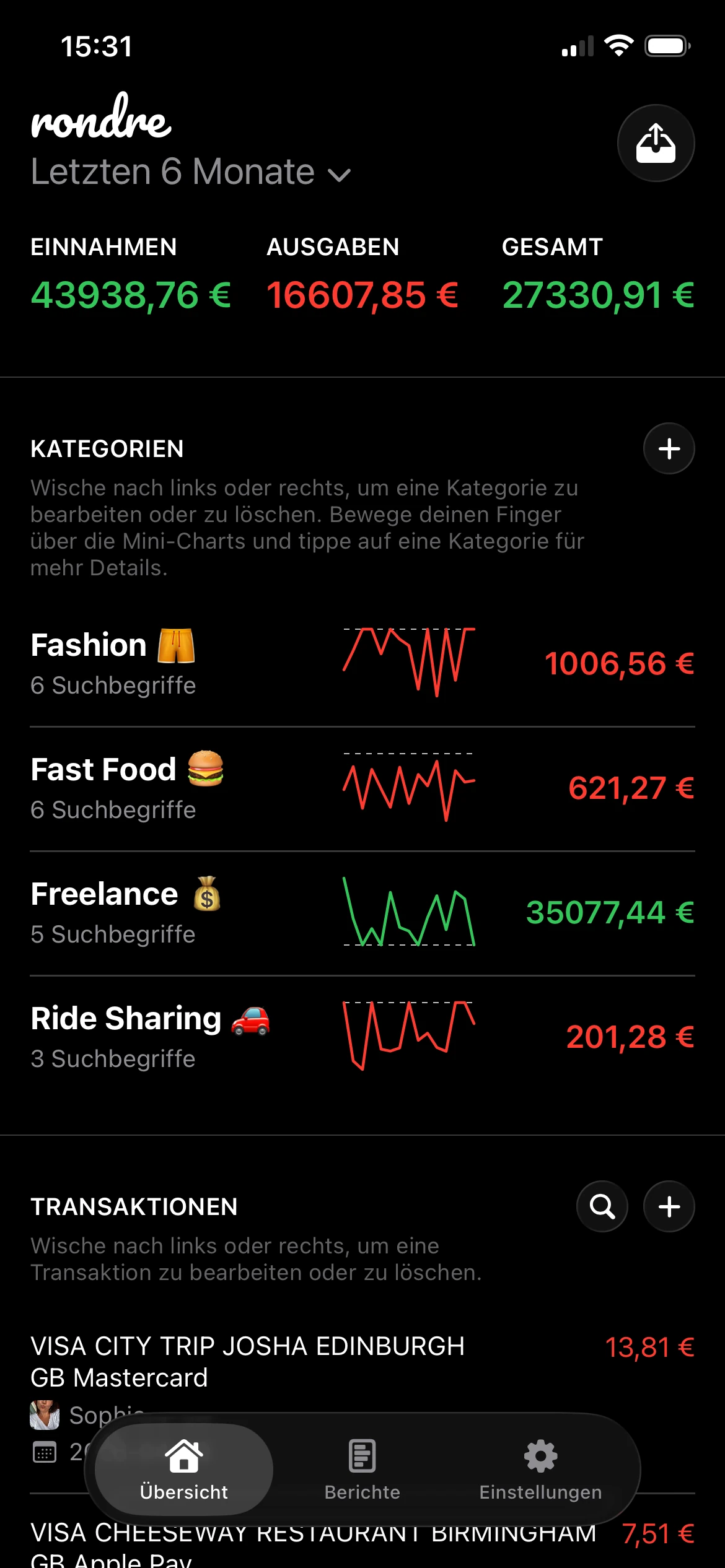
Kategorien sind die Labels, die aus einem Haufen Transaktionen etwas machen, das eine Person nutzen kann. Breite Standards wie „Essen“ oder „Transport“ können für eine schnelle Zusammenfassung ausreichen, scheitern aber oft, wenn jemand eine echte Entscheidung treffen möchte. „Lebensmittel“, „Schulessen“ und „Takeout“ erzählen eine klarere Geschichte als ein übergroßer Sammelbereich.
Das ist in Haushalten mit konkurrierenden Prioritäten noch wichtiger. Ein Elternteil muss „Kinderbetreuung“ möglicherweise von „Kinderaktivitäten“ trennen. Ein Freelancer braucht vielleicht „Software“, „Kundenessen“ und „Steuerrücklage“. Ein Paar möchte „Haushaltsgrundbedarf“ vielleicht von „persönlichen Ausgaben“ trennen, damit gemeinsame Kosten nicht verschwimmen.
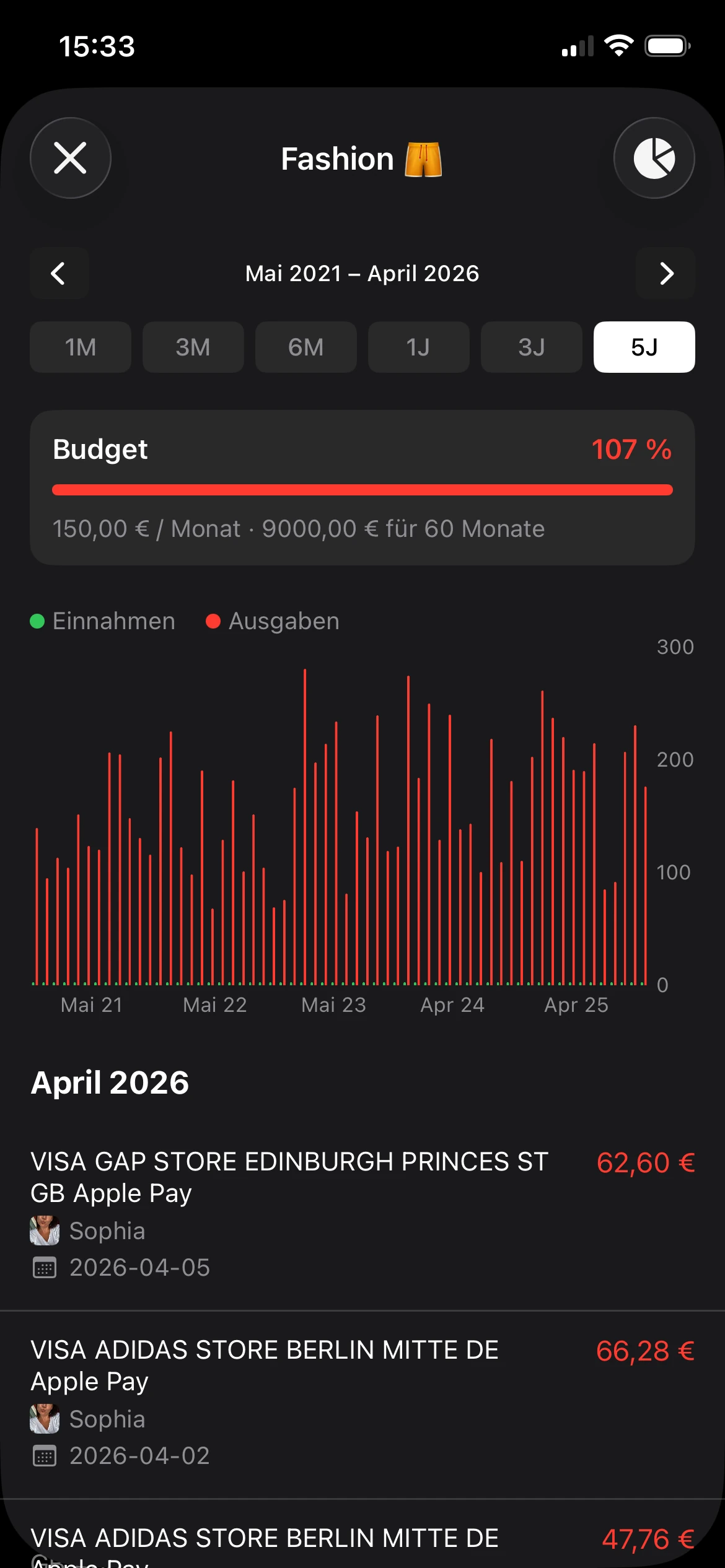
Regeln machen benutzerdefinierte Kategorien leichter zu pflegen. Wenn ein Nutzer wiederkehrende Coffee-Shop-Käufe anhand von Händlernamen automatisch in „Kaffee-Gewohnheit“ einordnet, spart die App Zeit, ohne die Kontrolle zu übernehmen. Der Nutzer entscheidet weiterhin, was die Kategorie bedeutet. Die App übernimmt nur die Wiederholung.
Eine Kategorie verdient ihren Platz, wenn sie später hilft, eine Frage zu beantworten, nicht wenn sie am Tag der Einrichtung ordentlich aussieht.
Deshalb passt Kategorienflexibilität auch gut zu einem flexiblen Budgetansatz. Ausgaben verändern sich. Gute Kategorien lassen das Budget mitgehen, ohne dass jeder chaotische Monat einen kompletten Neuaufbau erzwingt.
Bücher, Importe und gemeinsames Tracking
Der zweite Baustein ist Trennung nach Kontext.
Das funktioniert wie verschiedene Ordner für unterschiedliche Lebensbereiche. Persönliche Ausgaben, freiberufliche Arbeit und gemeinsame Haushaltskosten können alle zu derselben Person gehören, aber sie gehören nicht in dieselbe Ansicht. Wenn alles in einem einzigen Strom landet, wird die Überprüfung schwieriger, gemeinsame Budgets werden unübersichtlich, und Geschäftsausgaben verstecken sich in den täglichen Ausgaben.
Separate Bücher lösen dieses Problem sauber:
- Persönliches Buch: Gehalt, Abos, Besorgungen, Alltagsausgaben
- Freelance- oder Nebenjob-Buch: Rechnungen, Tools, Reisen, steuerbezogene Kosten
- Gemeinsames Haushaltsbuch: Miete, Lebensmittel, Nebenkosten, Kinderbetreuung
- Projektbuch: Urlaubsplanung, Umzug, Reparaturen am Zuhause, Feiertagsausgaben
Das ist wichtig für Menschen, die viele Finanz-Apps übersehen. Paare brauchen oft gemeinsame Sichtbarkeit, ohne jeden Kauf zusammenzuführen. Freelancer brauchen oft geschäftliche Struktur, ohne gleich eine vollständige Buchhaltungssoftware zu öffnen. Gute Personalisierung gibt beiden Gruppen Raum, Geld so zu organisieren, wie es zu ihrem Leben passt.
Der dritte Baustein sind Importoptionen, die keine Kontoverknüpfung erzwingen. CSV- und PDF-Importe helfen Nutzern, ihre Historie zu ihren eigenen Bedingungen einzubringen. Das gibt Menschen mehr Kontrolle über Datenschutz, lässt sie eine App testen, bevor sie sich festlegen, und macht eine teilweise Migration möglich. Jemand kann zuerst ein Konto, einen Monat oder ein Projekt importieren und von dort aus weiter aufbauen.
rondre ist ein Beispiel für diesen Ansatz. Es unterstützt manuelles Tracking, benutzerdefinierte Smart-Kategorien, CSV- und PDF-Importe, sofortige Transaktionssuche, mehrere Bücher und gemeinsame Bücher, ohne ein Konto zu erfordern.
Diagramme, die eine echte Frage beantworten
Der vierte Baustein sind Visualisierungen mit einer Aufgabe.
Ein Diagramm sollte Verwirrung reduzieren, nicht den Bildschirm dekorieren. Wenn ein Nutzer die App öffnet und sich fragt, warum sich der Monat finanziell eng angefühlt hat, sollte das Diagramm helfen, die Antwort schnell zu erkennen. Wenn ein Paar prüfen möchte, ob die Ausgaben für Essen steigen, sollte die Ansicht das offensichtlich machen. Wenn ein Freelancer Einkommen mit Software- und Steuerkosten vergleichen möchte, sollte die Visualisierung diese Prüfung ohne zusätzlichen Aufwand unterstützen.
Nützliche Diagramme beantworten meist Fragen wie diese:
- „Warum hat sich dieser Monat teurer angefühlt?“
- „Wie viel geben wir für gemeinsame Bedürfnisse im Vergleich zu persönlichen Entscheidungen aus?“
- „Deckt das Freelance-Einkommen die Geschäftskosten?“
- „Welche Kategorie wächst unbemerkt weiter?“
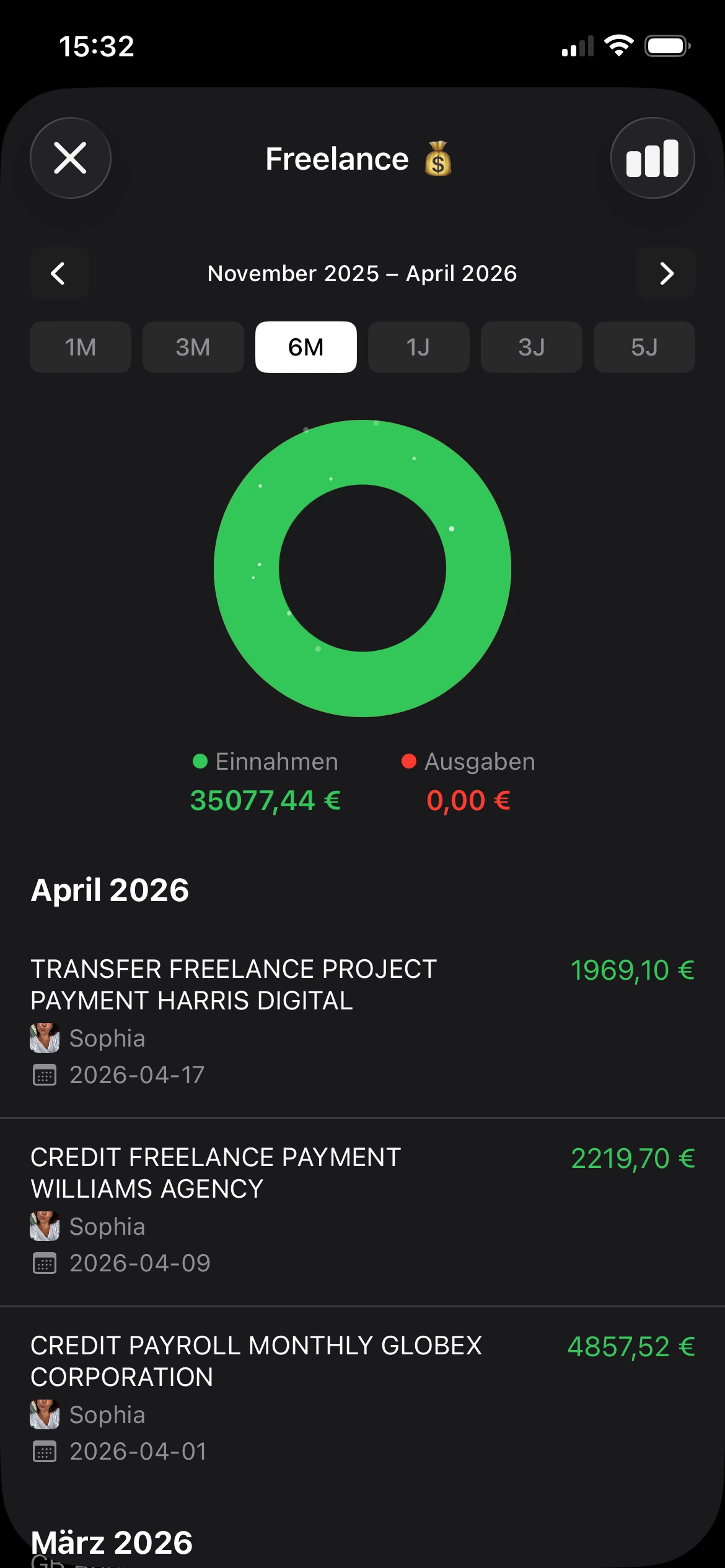
Die besten Visualisierungen bleiben mit dem System verbunden, das der Nutzer aufgebaut hat. Ein Donut-Diagramm ist nur hilfreich, wenn die Segmente Kategorien widerspiegeln, die der Nutzer wiedererkennt. Eine Trendlinie ist nur hilfreich, wenn ein Tippen darauf zurück zu den Transaktionen führt, die hinter der Veränderung stehen.
Finanzielle Flexibilität entsteht, wenn diese Grundlagen zusammenarbeiten. Klare Kategorien. Separate Bücher. Importmöglichkeiten, die Datenschutz respektieren. Visualisierungen, die mit echten Entscheidungen verbunden sind. Genau das lässt eine Finanz-App in der Praxis persönlich wirken, besonders für Menschen, deren finanzielles Leben nicht in eine Standardvorlage passt.
Wie du die richtige personalisierte App für dich auswählst
Die Auswahl einer personalisierten Finanz-App wird einfacher, wenn der Vergleich über App-Store-Screenshots hinausgeht. Schicke Automatisierung kann schwache Datenschutzentscheidungen, langsame Workflows oder Kategoriesysteme verbergen, die überhaupt nicht zum Nutzer passen.
Bei jeder App, die Finanzdaten verarbeitet, gehört Sicherheit ganz nach oben auf die Checkliste. Entwicklungsempfehlungen für Finanz-Apps nennen Kontrollen wie Verschlüsselung, Biometrie, Zwei-Faktor-Anmeldung, Datenschutz bei der Übertragung und starke lokale Schutzmaßnahmen für Produkte ohne Konto, wie in diesem Sicherheitsüberblick zur Entwicklung von Personal-Finance-Apps beschrieben.

Eine bessere Checkliste als reine Feature-Suche
Eine bessere Bewertung beginnt mit Passung, nicht mit Hype. Eine Person, die Tools vergleicht, kann Fragen wie diese nutzen, statt nach der längsten Feature-Liste zu suchen.
- Datenschutz zuerst: Erfordert die App ein Konto, bevor sie nützlich wird? Minimiert sie unnötige Datenerfassung?
- Einrichtungsgeschwindigkeit: Kann jemand schnell mit dem Tracking beginnen, oder verlangt die App am ersten Tag eine vollständige Finanzmigration?
- Kontrolle über die Struktur: Können Kategorien, Bücher und gemeinsame Ansichten an das tatsächliche Leben des Nutzers angepasst werden?
- Suche und Überprüfung: Ist es einfach, Transaktionen später wiederzufinden, oder wird die Historie schwer nachvollziehbar?
- Klarheit des Geschäftsmodells: Wenn die App kostenlos ist, wie finanziert sie sich? Werbung, Upsells, Datennutzung oder etwas Einfacheres?
Wer einen breiteren Vergleichskontext möchte, kann sich auch Leitfäden zu Apps für persönliche Finanzen ansehen und dabei diese Prinzipien im Hinterkopf behalten.
Was du fragen solltest, bevor du dich festlegst
Nicht jeder Nutzer braucht dieselbe Einrichtung. Ein einzelner Nutzer legt vielleicht am meisten Wert auf Geschwindigkeit und geringe Reibung. Ein Paar legt vielleicht am meisten Wert auf gemeinsame Sichtbarkeit. Ein Freelancer legt vielleicht am meisten Wert darauf, Bücher zu trennen und Abrechnungen sauber zu importieren.
Diese kurze Tabelle hilft, die Auswahl einzugrenzen:
| Wenn der Nutzer braucht... | Sollte eine starke App bieten... |
|---|---|
| Datenschutz und Einfachheit | Keine verpflichtende Registrierung, minimales Tracking, möglichst lokale Verarbeitung |
| Gemeinsames Budgetieren | Klare gemeinsame Bücher oder Zusammenarbeit ohne verwirrende Kontostrukturen |
| Nachträgliches Tracking | Unterstützung für CSV- oder PDF-Importe statt nur Live-Bankverbindungen |
| Flexible Organisation | Benutzerdefinierte Kategorien, bearbeitbare Labels und schnelle Suche |
| Tägliche Nutzung | Schnelle Eingabe, verständliche Diagramme und reibungsarme Navigation |
Sicherheit ist bei Finanzsoftware kein Bonus-Feature. Sie ist Teil davon, ob die App überhaupt nutzbar ist.
Die richtige App sollte dafür sorgen, dass sich eine Person nach dem Öffnen ruhiger fühlt. Wenn die Einrichtung invasiv, überladen oder merkwürdig starr wirkt, ist das eine wichtige Information.
Personalisiere deine Finanzen in weniger als 5 Minuten
Personalisierung klingt größer, als sie ist. Eine einfache Einrichtung kann fast sofort funktionieren, wenn der Nutzer die erste Sitzung fokussiert hält.
Eine schnelle Einrichtung, die sich sofort nützlich anfühlt
Ein Fünf-Minuten-Start kann so aussehen:
Erstelle ein Buch mit einem klaren Zweck.
Ein einfacher Name funktioniert am besten. „Persönlich“, „Haushaltsbudget“ oder „Freelance 2026“ reicht aus. Der Punkt ist, Transaktionen ein klares Zuhause zu geben, statt alles in einen generischen Bereich zu werfen.Ignoriere perfekte Standardkategorien.
Beginne nur mit einigen Kategorien, die bereits zu deinem Alltag passen. Beispiele sind „Lebensmittel“, „Rechnungen“, „Kaffee“, „Transport“ oder „Kundenarbeit“. Ein kleines Set ist leichter zu vertrauen und zu verfeinern.Füge einen Import oder eine Handvoll manueller Einträge hinzu.
Eine CSV-Datei, ein PDF-Kontoauszug oder auch mehrere aktuelle Käufe reichen aus, damit sich die App real anfühlt. Sobald Transaktionen sichtbar sind, werden Muster schnell erkennbar.Erstelle eine benutzerdefinierte Regel.
Wenn mehrere Transaktionen denselben Händlerbegriff enthalten, gruppiere sie unter einer Kategorie, die Sinn ergibt. „Mittagessen nahe Büro“ kann nützlicher sein als „Restaurants“.Prüfe ein Diagramm und eine Suche.
Sieh dir eine visuelle Zusammenfassung an und suche dann nach einem Händler oder einer Kategorie. So bestätigst du, dass die Einrichtung praktisch ist und nicht nur dekorativ.
Eine Person braucht am ersten Tag kein perfektes Budget. Das erste Ziel ist Klarheit.
So kann man hilfreich darüber nachdenken: Die App sollte eine unmittelbare Frage beantworten, bevor sie versucht, jedes Geldproblem zu lösen. Diese Frage könnte lauten: „Wohin gehen kleine tägliche Ausgaben?“ oder „Was gehört zum Haushalt und was zu persönlichen Ausgaben?“
Beginne mit Sichtbarkeit, nicht mit Optimierung. Ein System wird intelligenter, nachdem der Nutzer vertrauen kann, was er sieht.
Dieser kleine Erfolg schafft Momentum. Sobald die Struktur passt, wird die Gewohnheit leichter.
Personalisierte Finanzen in der Praxis: Beispiele aus dem echten Leben
Eine personalisierte Finanz-App beweist ihren Wert, wenn echte Menschen sie an echtes Leben anpassen können. Dieselbe App sollte für einen Solo-Freelancer, ein Paar mit gemeinsamen Rechnungen oder einen Haushalt funktionieren, der persönliche und gemeinsame Ausgaben klar getrennt halten möchte.
Analysten bei Luminix weisen auf eine Lücke in dieser App-Kategorie hin. Menschen mit variablem Einkommen und gemeinsamen finanziellen Verantwortlichkeiten brauchen oft klarere Strukturen und bessere Sichtbarkeit, als generische Budget-Tools bieten.

Vier alltägliche Workflows
Die Einzelperson mit einem Nebenverdienst
Ein Vollzeitangestellter verkauft am Wochenende Kunstwerke. Persönliche Ausgaben bleiben in einem Buch. Nebeneinkommen und Materialkosten bleiben in einem anderen. Benutzerdefinierte Kategorien sortieren Materialien, Versand und Marktgebühren, damit der geschäftliche Teil nicht mehr in den Alltagsausgaben untergeht.
Das Paar, das gemeinsam einen Haushalt verwaltet
Jeder Partner hält persönliche Ausgaben getrennt, während ein gemeinsames Buch Miete, Lebensmittel, Nebenkosten und andere Haushaltskosten enthält. Es funktioniert wie eine gemeinsame Schublade für Haushaltsbelege, statt alles auf einen Haufen zu werfen. Dadurch lässt sich eine häufige Frage schnell beantworten: War das eine gemeinsame Ausgabe oder eine persönliche?
Der Freelancer mit ungleichmäßigem Einkommen Ein Monat bringt mehrere Kundenzahlungen. Der nächste Monat ist ruhiger. Ein festes Monatsbudget kann sich hier zu starr anfühlen. Deshalb erstellt der Freelancer ein Buch für geschäftliche Aktivitäten und verfolgt Zahlungseingänge, Softwarekosten, steuerbezogene Kategorien und Projektausgaben so, wie es zum Arbeitsalltag passt. Suche und Kategoriefilter helfen bei der Überprüfung, besonders wenn Cashflow-Zeitpunkte unübersichtlich werden.
Die Familie, die Haushaltsausgaben koordiniert
Eine Familie erstellt Kategorien für Lebensmittel, Schulkosten, Transport, Aktivitäten und Rechnungen. Die Einrichtung spiegelt den Haushalt so wider, wie er tatsächlich existiert: mit gemeinsamen Verantwortlichkeiten, wiederkehrenden Kosten und wechselnden Prioritäten. Das ist wichtig, weil Familienfinanzen selten in die Vorlage passen, die für eine Person mit vorhersehbarem Gehalt gebaut wurde.
Warum diese Beispiele wichtig sind
Das Muster ist einfach. Personalisierung funktioniert, wenn die App Menschen entscheiden lässt, wie Geld gruppiert, getrennt und überprüft werden soll.
Das ist besonders wichtig für Paare, Freelancer und gemischte Haushalte. Diese Nutzer brauchen oft manuelle Kontrolle, bevor sie Automatisierung brauchen. Wenn die Struktur falsch ist, sind auch die Einblicke falsch, egal wie ausgefeilt die Diagramme aussehen.
Ein gutes personalisiertes System gibt jedem Lebensbereich seinen eigenen Container. Gemeinsame Rechnungen können an einem Ort liegen. Freelance-Arbeit kann an einem anderen liegen. Persönliche Ausgaben können privat bleiben. Diese Flexibilität sorgt für ein klareres Bild davon, was wohin gehört, was sich verändert hat und was als Nächstes Aufmerksamkeit braucht.
Ein praktischer Startpunkt ist klein. Wähle das Beispiel, das deinem Leben am nächsten kommt, und erstelle dann ein Buch und drei passende Kategorien. In rondre kann das bereits ausreichen, um aus einem verwirrenden Strom von Transaktionen eine Einrichtung zu machen, die verständlich wirkt und unter deiner Kontrolle steht.