Menschen suchen normalerweise nicht nach einer Ausgaben-Tracker-App, weil sie persönliche Finanzen lieben. Sie beginnen damit, weil der Überblick über das Geld verschwommen ist. Belege werden in eine Tasche gestopft. Kartenzahlungen kommen einem bekannt vor, aber nicht bekannt genug. Der Kontoauszug sagt, der Monat sei „in Ordnung“ gewesen, doch der Kontostand erzählt etwas anderes.
Genau an diesem Punkt beginnen Tabellenkalkulationen meist zu scheitern. Sie können funktionieren, aber nur, wenn jemand sie aktuell hält, alles konsequent beschriftet und daran denkt, sie nach jedem Kauf zu öffnen. Im echten Leben ist das eine hohe Hürde. Mobile Tools passen besser in den Alltag, weil sie genau dann zur Stelle sind, wenn eine Zahlung passiert.
Dieser Wandel ist nicht nur eine persönliche Gewohnheit. Mehr als 65% der Verbraucher bevorzugen mobile Ausgaben-Tracker-Apps wegen ihrer Bequemlichkeit und Echtzeit-Einblicke, und das weltweite Volumen digitaler Transaktionen erreichte 2024 1,3 Billionen, laut Future Market Insights zum Markt für Ausgaben-Tracker-Apps. Der Reiz ist einfach. Smartphones sind dort, wo Transaktionen stattfinden, Benachrichtigungen erscheinen und finanzielle Entscheidungen getroffen werden.
Eine Ausgaben-Tracker-App wird das Ausgabeverhalten nicht über Nacht korrigieren. Zuerst macht sie etwas Nützlicheres. Sie verwandelt verstreute Geldbewegungen in ein Bild, das Sinn ergibt.
Inhaltsverzeichnis
- Vom finanziellen Nebel zu finanzieller Klarheit
- Was eine Ausgaben-Tracker-App tatsächlich macht
- Unverzichtbare Funktionen eines modernen Trackers
- Warum Datenschutz und Sicherheit am wichtigsten sind
- Die richtige App für Ihr Leben auswählen
- Ihre erste Woche: Ein praktischer Arbeitsablauf
- Umstieg von Tabellenkalkulationen oder Kontoauszügen
- Häufig gestellte Fragen
Vom finanziellen Nebel zu finanzieller Klarheit
Ein häufiges Muster sieht so aus. Jemand bezahlt Lebensmittel mit einer Karte, ein Streaming-Abo mit einer anderen, teilt das Abendessen über eine Zahlungs-App auf und vergisst dann alles wieder bis zum Monatsende. Für sich genommen wirkt nichts davon übertrieben. Zusammen entsteht daraus eine ständige, unterschwellige Unsicherheit.
Diese Unsicherheit ist teuer. Nicht immer in Form von Gebühren oder Schulden, sondern in Form von Aufmerksamkeit. Menschen zögern, bevor sie etwas Kleines kaufen, weil sie dem Gesamtbild nicht vertrauen. Dann vermeiden sie es, Transaktionen zu prüfen, weil die Liste unübersichtlich wirkt. Dieser Kreislauf setzt sich fort.
Eine gute Ausgaben-Tracker-App durchbricht diesen Kreislauf, indem sie Geld wieder sichtbar macht. Sie gibt jedem Kauf einen Platz, jedem Einnahmeeintrag einen Kontext und jedem Monat eine erkennbare Form. Statt zu fragen: „Wo ist das alles geblieben?“, wird die bessere Frage: „Welche Kategorien übernehmen unbemerkt die Kontrolle?“
Der Moment, in dem Klarheit meist entsteht
Klarheit entsteht selten durch einen einzigen großen Bericht. Meist zeigt sie sich in kleinen Entdeckungen:
- Doppelte Gewohnheiten: Zwei Lieferdienst-Bestellungen in einer Woche wirkten harmlos, bis sie nebeneinanderstanden.
- Undichte Abos: Eine wiederkehrende Abbuchung blieb unbemerkt, weil sie zu klein war, um Sorge auszulösen.
- Ungleichmäßige Ausgaben: Wochentage waren stabil, Wochenenden nicht.
- Falsche Annahmen: „Transport ist günstig“ bedeutete am Ende eigentlich: „Transport wurde nie vollständig erfasst.“
Praktische Regel: Wenn jemand eine Transaktion suchen, schnell kategorisieren und den Monat ohne Reibung überprüfen kann, bleibt die Gewohnheit meist bestehen.
Eine Ausgaben-Tracker-App ist dann am wichtigsten, wenn sie Aufwand reduziert. Wenn sich das Erfassen einer Transaktion wie Verwaltungsarbeit anfühlt, hören Menschen auf. Wenn es sich wie eine kurze Notiz anfühlt, bleiben sie dabei. Genau dieser Unterschied ist der Punkt, an dem sich finanzieller Nebel zu lichten beginnt.
Was eine Ausgaben-Tracker-App tatsächlich macht
Eine Ausgaben-Tracker-App lässt sich am besten als digitales Finanz-Tagebuch verstehen. Sie ist nicht dafür da, jemanden mit Diagrammen zu beeindrucken. Sie ist dafür da, festzuhalten, was mit dem Geld passiert ist, solange die Details noch frisch genug sind, um nützlich zu sein.

Ein digitales Finanz-Tagebuch
Drei Aufgaben sind wichtiger als alles andere.
Transaktionen erfassen
Jeder Tracker beginnt hier. Geld kommt herein, Geld geht hinaus, und die App zeichnet beides auf. Je einfacher der Eingabeprozess ist, desto genauer wird die Aufzeichnung mit der Zeit.Ausgaben kategorisieren
Eine rohe Transaktionsliste ist besser als nichts, aber sie verbirgt weiterhin das Muster. Kategorien verwandeln „zehn Kartenzahlungen“ in „Lebensmittel, Transport, Miete, Abos, Geschenke“.Muster visualisieren
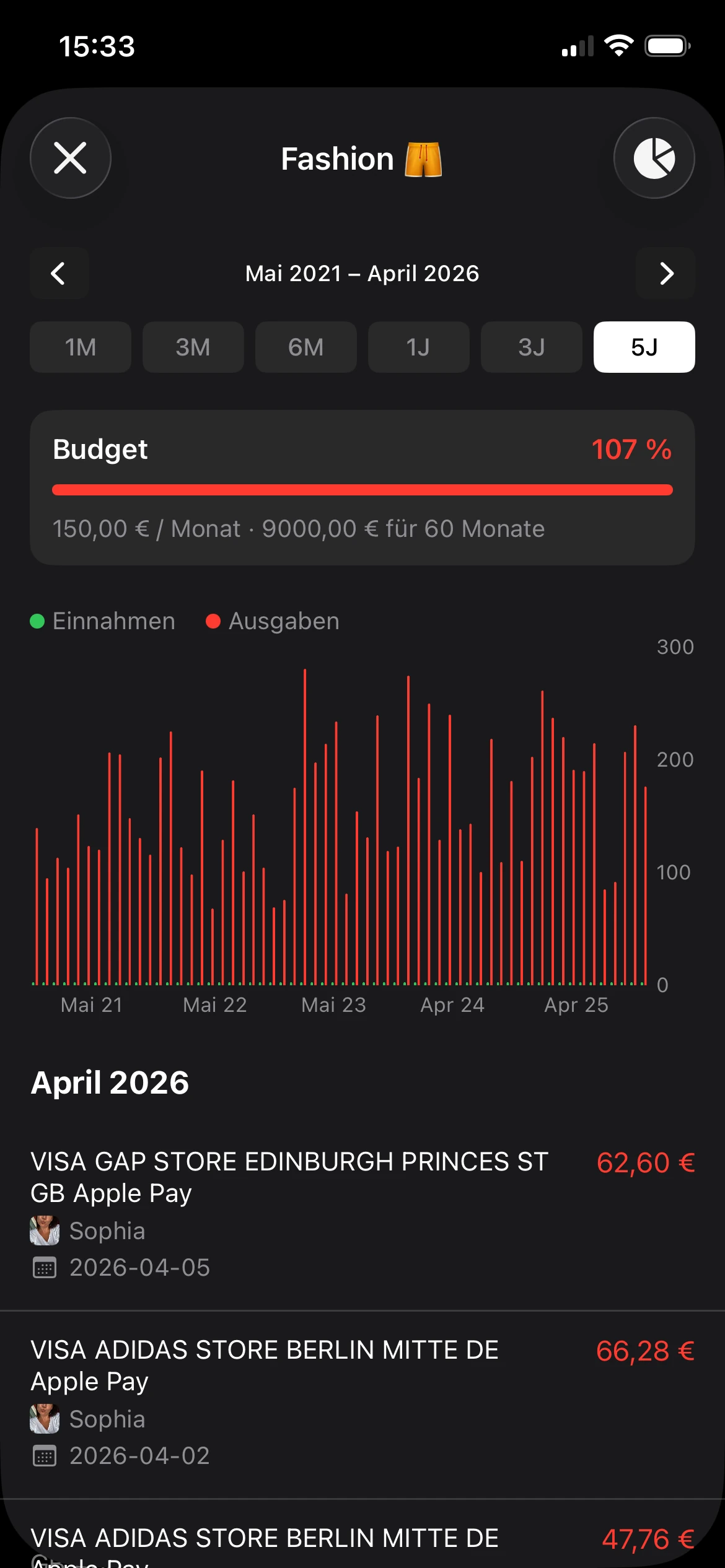
Diagramme sind nützlich, wenn sie schnell eine Frage beantworten. Welche Kategorie wächst? Welche Woche war teuer? Welche Einnahmequelle ist unregelmäßig? Gute Visualisierungen verkürzen den Weg zwischen Daten und Handlung.
Tracking ist nicht dasselbe wie Budgetierung
Viele Menschen bleiben stecken, weil sie glauben, sie bräuchten zuerst eine komplette Budget-Philosophie, bevor sie anfangen können. Das stimmt nicht. Tracking kommt zuerst.
Budgetierung sagt dem Geld, wohin es gehen soll. Tracking zeigt, wohin es gegangen ist.
Das klingt klein, verändert aber das Verhalten. Wer Ausgaben konsequent verfolgt, gewinnt Bewusstsein, ohne sich am ersten Tag auf starre Umschläge, Ziele oder Regeln festlegen zu müssen. Deshalb funktioniert Tracking oft dort, wo strenge Budgetierung scheitert. Es beginnt mit Beobachtung, nicht mit Druck.
Die nützlichste Finanzgewohnheit ist oft die unspektakulärste. Transaktion erfassen, gut beschriften und später überprüfen.
Eine solide Ausgaben-Tracker-App macht das beinahe automatisch. Der Nutzer gibt weniger ein, sieht mehr und erkennt Ausgabemuster, bevor sie zu Problemen werden. Das ist ihre Hauptaufgabe. Nicht Komplexität. Nicht endlose Anpassungsmöglichkeiten. Nur klare, wiederholbare Aufmerksamkeit.
Unverzichtbare Funktionen eines modernen Trackers
Ein moderner Ausgaben-Tracker verdient seinen Platz in den ersten Tagen. Wenn das Erfassen eines Kaffees, das Aufteilen eines Lebensmitteleinkaufs oder das Korrigieren einer falschen Kategorie zu viele Fingertipps erfordert, hören Menschen auf, ihn zu nutzen. Ich habe funktionsreiche Apps ausprobiert, die überall Automatisierung versprachen, und viele davon erzeugten mehr Aufräumarbeit als Klarheit.
Die Grundlage ist einfach. Die App sollte das tägliche Erfassen schnell machen, die Überprüfung erleichtern und keine Bankverbindung oder Kontoerstellung erzwingen, nur um Ausgaben festzuhalten.

Die Funktionen, die Hürden abbauen
Nützliche Funktionen reduzieren wiederholte Arbeit und stehen nicht im Weg.
- Schnelle manuelle Eingabe: Das ist besonders wichtig bei datenschutzorientierten Apps. Ein guter Tracker sollte Nutzer in Sekunden einen Betrag, eine Kategorie und eine Notiz hinzufügen lassen, ohne dass sie sich durch Menüs kämpfen müssen.
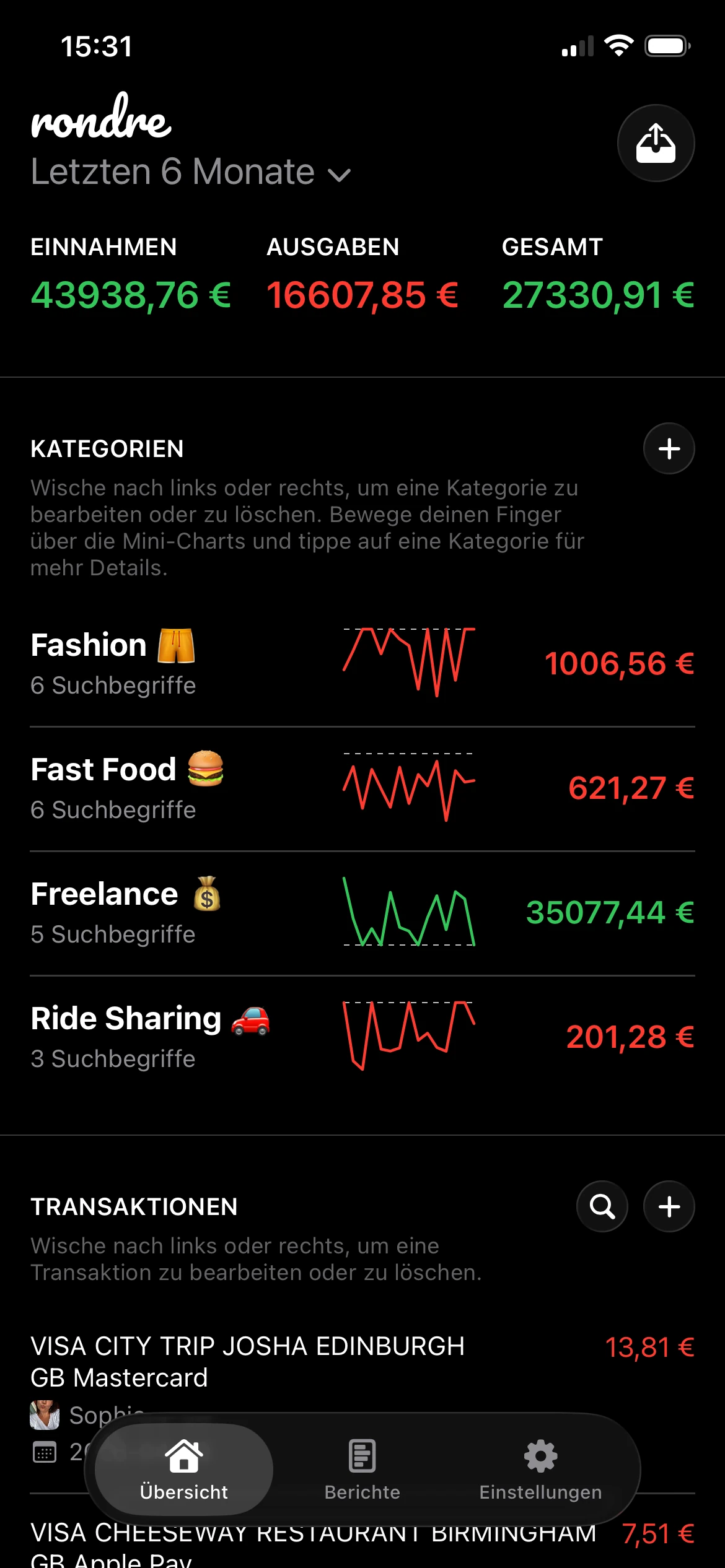
- Intelligente Kategorien: Kategorieregeln sparen Zeit, wenn sie leicht einzurichten und leicht zu korrigieren sind. Wenn „Uber“ einmal Transport zugeordnet wird, sollte es dort bleiben, bis der Nutzer es ändert.
- Effektive Suche: Die Suche macht aus einem Tracker mehr als nur ein Protokoll. Händlernamen, Notizen, Beträge und Kategorien sollten ohne Verzögerung durchsuchbar sein.
- Klare Mini-Diagramme und Zusammenfassungen: Kleine visuelle Zusammenfassungen helfen beim wöchentlichen Check-in. Ziel ist schnelle Mustererkennung, nicht ein Dashboard, das sich wie Buchhaltungssoftware anfühlt.
- Importe für CSV und Kontoauszüge: Importe sind wichtig für Aufholwochen, Tabellenmigrationen und alle, die manuelle Kontrolle möchten, ohne alte Transaktionen erneut einzutippen.
- Mehrere Bücher oder getrennte Kassenbücher: Persönliche Ausgaben, gemeinsame Haushaltskosten und Nebeneinkünfte getrennt zu halten, verhindert Kategorienchaos und unübersichtliche Berichte.
Eine datenschutzorientierte Option wie rondre passt zu diesem einfacheren Modell. Sie unterstützt manuelles Tracking, intelligente Kategorien mit individuellen Suchbegriffen, CSV- und PDF-Importe, geteilte Bücher und sofortige Suche, ohne ein Konto zu verlangen.
Was nützlich klingt, aber oft für Unordnung sorgt
Einige Funktionen sehen auf Screenshots beeindruckend aus und werden im Alltag störend.
Lange Onboarding-Prozesse sind ein häufiges Beispiel. Wenn eine App zehn Minuten Ziele, Einkommensannahmen und Vorlagenauswahl verlangt, bevor die erste Ausgabe erfasst ist, fordert sie bereits zu viel. Dasselbe gilt für überladene Dashboards voller Widgets, die Fragen beantworten, die niemand gestellt hat.
Automatische Bank-Synchronisierung kann für einen bestimmten Nutzertyp ebenfalls überschätzt sein. Sie reduziert den Eingabeaufwand, bringt aber Abhängigkeit, sensibleren Zugriff und mehr Zeitaufwand mit sich, wenn Duplikate oder falsche Kategorien korrigiert werden müssen, sobald der Datenfeed unübersichtlich wird. Für jemanden, der klare Aufzeichnungen ohne ein weiteres zu verwaltendes Konto möchte, hält ein schnelles manuelles System oft besser durch.
Ein praktischer Filter funktioniert hier gut. Behalten Sie die Funktionen, die Nutzern helfen, schneller zu erfassen, Transaktionen schneller zu finden oder Ausgaben mit weniger Aufwand zu überprüfen. Streichen Sie diejenigen, die hauptsächlich Einrichtungsarbeit erzeugen.
| Funktionstyp | Meist lohnenswert | Oft überschätzt |
|---|---|---|
| Tägliche Erfassung | Schnelle Eingabe, intelligente Standardwerte | Lange Formulare |
| Überprüfung | Suche, Kategorie-Zusammenfassungen, Diagramme | Überladene Dashboards |
| Pflege | CSV- oder PDF-Import, einfache Bearbeitung | Komplizierte Regeln, die viele Nutzer nie pflegen |
Der beste Ausgaben-Tracker fühlt sich nach einer Woche Nutzung leichter an. Er sollte ein wenig Disziplin verlangen und viel Klarheit zurückgeben.
Warum Datenschutz und Sicherheit am wichtigsten sind
Viele Finanz-Apps verlangen einen Tausch. Kontozugriff gewähren, ein Login erstellen, Tracking akzeptieren und dafür Bequemlichkeit erhalten. Viele Menschen akzeptieren diesen Tausch, ohne über die langfristigen Kosten nachzudenken.
Diese Zurückhaltung ist längst keine Nische mehr. Eine Umfrage aus dem Jahr 2025 ergab, dass 68% der Erwachsenen über den Datenschutz ihrer Finanz-App besorgt sind, und Suchanfragen nach „privacy-focused expense tracker no signup“ stiegen im Jahresvergleich um 150%, laut AfroTechs Diskussion über Finanz-Apps und Datenschutzbedenken.
Der Kompromiss, den die meisten Menschen zu schnell akzeptieren
Bankverknüpfte Apps können nützlich sein. Sie reduzieren die Dateneingabe und ziehen Transaktionen automatisch ein. Für einige Nutzer ist diese Bequemlichkeit es wert.
Aber die Kompromisse sind real:
- Mehr sensible Daten an mehr Orten: Logins, Kontoverbindungen und synchronisierte Finanzdaten vergrößern die Angriffsfläche für Offenlegung.
- Weniger Kontrolle über Datenweitergabe: Einige Apps setzen auf werbefinanzierte oder trackinglastige Modelle.
- Mehr Abhängigkeit: Wenn der Zugriff abbricht, Kategorien versagen oder die Synchronisierung fehlerhaft ist, versteht der Nutzer möglicherweise nicht, was fehlt.
Für jemanden, der hauptsächlich Bewusstsein und keine vollständige Finanzautomatisierung möchte, ist das oft zu viel Maschinerie.
Warum Tracking ohne Konto die Erfahrung verändert
Eine datenschutzorientierte Ausgaben-Tracker-App funktioniert anders. Sie beginnt mit lokaler Kontrolle. Transaktionen manuell eingeben. Dateien bei Bedarf importieren. Nur teilen, was geteilt werden soll. Die Einrichtung klein halten.
Dieses Modell hat praktische Vorteile über die Sicherheit hinaus. Es fühlt sich oft ruhiger an. Es gibt kein Passwort, an das man denken muss, keinen langen Berechtigungsbildschirm und kein ständiges Drängen in Richtung Premium-Zusätze, nur um grundlegende Funktionen zu erhalten. Die App wird zu einer einfachen Geldaufzeichnung, nicht zu einem weiteren Konto, das verwaltet werden muss.
Datenschutz ist eine Funktion, wenn er sowohl Risiko als auch Reibung reduziert.
Das ist besonders nützlich für Menschen, die bereits wissen, dass sie keinen Tracker nutzen werden, der sich aufdringlich anfühlt. Wenn die App zu viel im Voraus verlangt, geben sie sie auf. Wenn sie Grenzen respektiert, bleiben sie dabei. Bei persönlichen Finanzen schlägt Beständigkeit jedes Mal Raffinesse.
Die richtige App für Ihr Leben auswählen
Die richtige Ausgaben-Tracker-App hängt weniger von App-Store-Rankings ab als von der Form des finanziellen Alltags einer Person. Ein Solo-Nutzer braucht etwas anderes. Ein Paar braucht etwas anderes. Ein Freelancer braucht oft eher Trennung als Automatisierung.
Suchanfragen nach gemeinsamen Budgetlösungen für Paare stiegen in den letzten 12 Monaten um 220%, laut ExpenseVisors Übersicht über Ausgaben-Tracker-Apps. Das passt zu dem, was viele Haushalte ohnehin spüren. Ausgaben zu teilen ist üblich. Sie sauber zu teilen, ist schwieriger, als es sein sollte.
Für eine Person, die persönliche Ausgaben verwaltet
Ein Solo-Nutzer braucht normalerweise drei Dinge: schnelle Eingabe, flexible Kategorien und eine Übersichtsansicht, die Ausgaben offensichtlich macht. Komplexe Haushaltstools können dabei im Weg stehen.
Die ideale Einrichtung ist schlank. Der Nutzer sollte einen Kaffee erfassen, ein Abo markieren, nach einer Restaurantbuchung suchen und den Monat prüfen können, ohne eine Desktop-Oberfläche zu berühren.
Für Paare und Familien, die sich die Verwaltung teilen
Viele Apps scheitern daran, dass sie entweder nur auf einen Nutzer ausgelegt sind oder in eine geschäftsartige Zusammenarbeit abrutschen, die für Miete, Lebensmittel und Schulkosten zu schwerfällig wirkt.
Geteilte Bücher sind die Funktion, auf die man achten sollte. Keine „Team-Workspaces“. Keine Rechnungsebenen. Nur eine gemeinsame Aufzeichnung, in der beide Personen Ausgaben hinzufügen, dieselben Kategorien nutzen und dasselbe Bild sehen können.
Ein Haushalt braucht keine Unternehmenssoftware. Er braucht einen sauberen Ort, um gemeinsames Geld zu verfolgen.
Für Leser, die minimalistische Optionen mit strengeren Budgetsystemen vergleichen, ist dieser Leitfaden zu einer kostenlosen YNAB-Alternative ein nützlicher Ausgangspunkt.
Für Freelancer, die Rollen und Aufzeichnungen trennen
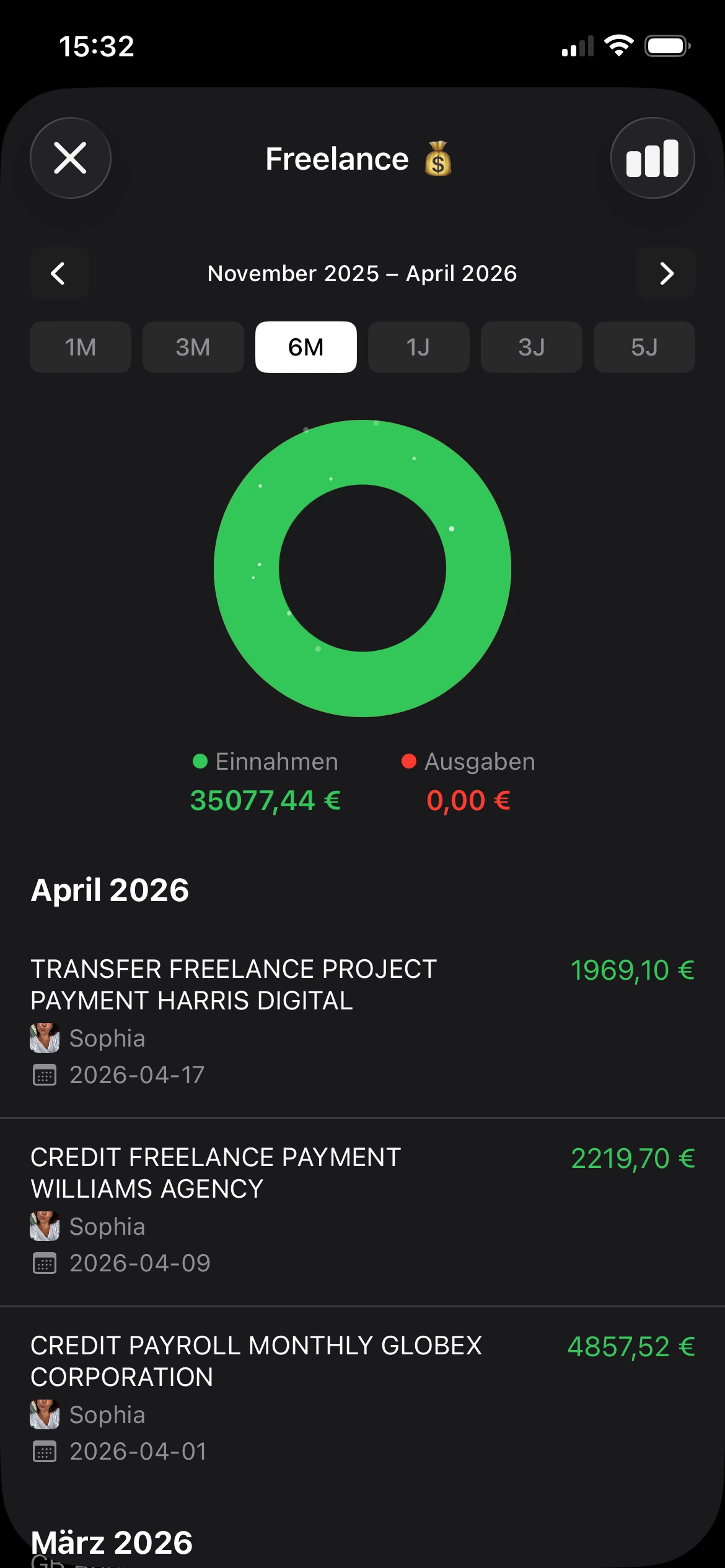
Freelancer brauchen oft eine Ausgaben-Tracker-App, die verschiedene Kontexte trennen kann. Das Privatleben ist ein Buch. Kundenbezogene Ausgaben sind ein anderes. Ein Nebenprojekt kann ebenfalls eine eigene Aufzeichnung benötigen.
Der Schlüssel ist nicht unbedingt steuerliche Komplexität. Es geht darum, vermischte Signale zu vermeiden. Wenn Business-Software-Abos, Transport und Lebensmitteleinkäufe in einem einzigen Strom landen, werden Auswertungen langsamer und Fehler wahrscheinlicher.
| Nutzertyp | Oberste Priorität | Wichtige Funktion | Rondre-Eignung |
|---|---|---|---|
| Einzelperson | Klare Sicht auf persönliche Ausgaben | Schnelle Eingabe, Suche, einfache Diagramme | Geeignet für Nutzer, die einfaches persönliches Tracking ohne Registrierung möchten |
| Paar oder Familie | Gemeinsame Haushaltsverwaltung | Geteilte Bücher, gemeinsame Kategorien, sofortige Aktualisierungen | Geeignet für gemeinsames Ausgaben-Tracking in geteilten Büchern |
| Freelancer | Trennung zwischen finanziellen Rollen | Mehrere Bücher, Importe, durchsuchbare Aufzeichnungen | Geeignet für Nutzer, die getrennte Bücher für private und berufliche Finanzen benötigen |
Eine gute Auswahl hängt von einer Frage ab. Passt die App zum Alltag, oder verlangt sie, dass sich der Alltag um die App biegt?
Ihre erste Woche: Ein praktischer Arbeitsablauf
Die erste Woche ist wichtiger als der erste Monat. Ein guter Start schafft die Gewohnheit. Ein komplizierter Start zerstört sie meist. Das Ziel sind keine perfekten Daten. Das Ziel ist eine wiederholbare Routine, die fast keinen Aufwand verursacht.

Einrichtung am ersten Tag
Beginnen Sie kleiner als erwartet. Zu viele Kategorien erzeugen Zögern.
Ein praktisches Startset sieht so aus:
- Wohnen: Miete, Nebenkosten, Reparaturen
- Essen: Lebensmittel, Restaurantbesuche, Kaffee
- Transport: Kraftstoff, öffentlicher Nahverkehr, Fahrdienste
- Rechnungen: Telefon, Internet, Abos
- Persönliches: Shopping, Gesundheit, Hobbys
- Einnahmen: Gehalt, freiberufliche Zahlungen, Rückerstattungen
Wenn die App eigene Regeln unterstützt, fügen Sie früh ein paar offensichtliche hinzu. Händler, die immer in derselben Kategorie landen, sollten keine wiederholten Entscheidungen erfordern.
Die tägliche Gewohnheit
Die zuverlässigste Routine ist eine kurze, die nahe am Kauf stattfindet. Am Ende der Woche alles einzutragen klingt effizient, aber das Gedächtnis wird schnell ungenau.
Ein praktikabler täglicher Ablauf sieht so aus:
Die App nach einer Zahlung öffnen
Nicht auf „später heute Abend“ warten.Betrag eingeben und Kategorie wählen
Notizen sind optional, es sei denn, die Transaktion braucht Kontext.Sofort weitermachen
Die Gewohnheit bleibt bestehen, wenn sie Sekunden dauert, nicht wenn sie zu einem Ritual wird.
Erst erfassen. Später verfeinern. So bleibt das Kassenbuch ehrlich.
Die wöchentliche Überprüfung
Nehmen Sie sich einmal pro Woche ein paar Minuten Zeit, um das Kassenbuch zu prüfen. Nicht, um jeden Kauf zu bewerten. Nur, um die Aufzeichnungen zu verbessern und Muster zu erkennen.
Nutzen Sie diese Checkliste:
- Vage Einträge korrigieren: Benennen Sie alles Unklare um, solange es noch wiedererkennbar ist.
- Kategorienabweichungen zusammenführen: Wenn „Snacks“ und „Kaffee“ beide unter Essen fallen sollten, bereinigen Sie das jetzt.
- Wiederholte Ausgaben suchen: Kleine wiederkehrende Abbuchungen fallen in einem wöchentlichen Scan leichter auf als in einer monatlichen Überraschung.
- Gemeinsame Ausgaben markieren: Wenn ein Partner oder Familienmitglied sie sehen sollte, ordnen Sie sie zeitnah dem richtigen Buch zu.
Die erste Woche sollte sich fast zu einfach anfühlen. Das ist gut. Wenn eine Ausgaben-Tracker-App Teil des Tages wird statt ein Projekt, beginnen die Zahlen die Wahrheit zu erzählen.
Umstieg von Tabellenkalkulationen oder Kontoauszügen
Der Wechsel von einer Tabelle zu einer Ausgaben-Tracker-App wirkt schwieriger, als er meist ist. Nutzer nehmen oft an, sie müssten Jahre an Daten bereinigen, bevor sie irgendetwas importieren. Das müssen sie nicht. Ein ordentlicher Umstieg ist besser als eine perfekte Bereinigung.
Ein sauberer Umstieg ist besser als ein perfekter Umstieg
Der einfachste Weg sieht meistens so aus:
- Zuerst aktuelle Daten exportieren: Beginnen Sie mit dem laufenden Monat oder den letzten Monaten aus einer Tabelle oder einem Bankdownload.
- CSV verwenden, wenn verfügbar: Das lässt sich vor dem Import leichter prüfen.
- PDF-Kontoauszüge verwenden, wenn nötig: Viele Menschen haben sie bereits, besonders für ältere Unterlagen.
- Nach dem Import eine kleine Stichprobe prüfen: Bestätigen Sie Daten, Beträge und Kategorien, bevor Sie sich auf die gesamte Historie verlassen.
Moderne Apps erledigen das im Hintergrund gut. Geräteinterne Datenbanken wie SQLite können Zehntausende Transaktionen sofort verarbeiten, und diff-basiertes CSV-Parsing kann eine 1MB-Datei in unter 2 Sekunden verarbeiten, wie in diesem technischen Beitrag über lokales Expense Tracking mit SQLite beschrieben.
Das ist aus zwei Gründen wichtig. Es ist schnell, und es hält sensible Finanzdateien auf dem Gerät, statt sie anderswohin zu senden, nur damit sie nutzbar werden.
Tabellenkalkulationen sind weiterhin gut für rohe Speicherung. Sie sind nur schwach im täglichen Gebrauch. Sobald alte Daten in eine dafür entwickelte App importiert wurden, werden sie durchsuchbar, sortierbar und viel leichter auswertbar.
Häufig gestellte Fragen
Kann eine Ausgaben-Tracker-App für freiberufliche Einnahmen und Kosten funktionieren?
Ja, wenn die App getrennte Bücher oder eine klare Kategorietrennung ermöglicht. Freelancer brauchen für den täglichen Überblick meist keine vollständige Buchhaltungssoftware. Sie brauchen eine saubere Aufzeichnung von Einnahmen, wiederkehrenden Tools, Transport und projektbezogenen Kosten, ohne diese mit Lebensmitteln und Miete zu vermischen.
Was ist der Unterschied zwischen Tracking und Budgetierung?
Tracking erfasst die Realität. Budgetierung setzt Grenzen oder Pläne. Tracking kommt meistens zuerst, weil es die Ausgangslage zeigt. Sobald Ausgabemuster sichtbar sind, werden Budgets realistischer und weniger frustrierend.
Wie lange dauert es, bis nützliche Ergebnisse sichtbar werden?
Meist schneller als erwartet. Schon wenige Tage mit genauen Einträgen können Gewohnheiten sichtbar machen, die vorher unsichtbar waren. Die größten Fortschritte entstehen durch Beständigkeit, nicht durch das Warten auf einen perfekten Datenmonat.
Sollte man Bank-Synchronisierung oder manuelles Tracking wählen?
Das hängt von den Prioritäten ab. Menschen, die maximale Automatisierung möchten, bevorzugen möglicherweise bankverknüpfte Tools. Menschen, denen Datenschutz, Kontrolle und einfache tägliche Nutzung wichtiger sind, fahren oft besser mit manueller Eingabe plus gelegentlichen Importen.
Sind Diagramme notwendig?
Nicht immer, aber kleine visuelle Zusammenfassungen helfen. Sie sind nützlich, wenn sie schnell eine echte Frage beantworten. Wenn ein Diagramm jemanden weniger zögern und mehr verstehen lässt, hat es seinen Platz verdient.
Ein praktischer nächster Schritt ist, rondre auszuprobieren, wenn eine kostenlose, registrierungsfreie, datenschutzorientierte Ausgaben-Tracker-App für iPhone näher am echten Leben klingt als eine weitere kontoverknüpfte Finanzplattform. Beginnen Sie mit einem Buch, fügen Sie die Transaktionen dieses Monats hinzu und überprüfen Sie die Kategorien am Ende der Woche.