Wer sein Budget im Griff haben will, braucht keine noch komplexere App. Er braucht weniger Schritte zwischen einem Kauf und einer klaren Antwort auf die entscheidende Frage: Wo ist das Geld geblieben?
Genau hier scheitern viele Systeme. Eine Tabelle funktioniert – bis sie sich anfühlt wie Hausaufgaben. Eine bank-verknüpfte App ist zunächst praktisch, bis sie zu viel Zugriff fordert, Werbung ausspielt oder aus einem simplen Check-in ein Dashboard-Projekt macht. Ein gutes einfaches Budgeting-Tool liegt dazwischen. Es hält das Erfassen schnell, macht Ausgaben sichtbar und verlangt nicht mehr Daten als nötig.
Der Unterschied liegt meistens am Aufwand. Wenn das Eintippen von Transaktionen nervt, Kategorien unübersichtlich sind oder das gemeinsame Führen eines Haushaltsbudgets sich invasiv anfühlt, hält das System nicht lange. Der praktische Aufbau ist einfacher als die meisten Ratgeber vermuten lassen: getrennte Bücher für verschiedene Ziele, vergangene Transaktionen importieren, Kategorien aufräumen, einmal pro Woche überprüfen – und nur teilen, was wirklich geteilt werden muss.
Inhaltsverzeichnis
- Warum ein einfaches Budgeting-Tool komplexe Tabellen schlägt
- Erste Schritte zu finanzieller Klarheit
- Finanzdaten in die App bringen
- Ausgaben mit cleveren Kategorien strukturieren
- Gemeinsames Budgetieren ohne Datenschutz-Kompromisse
- Eine dauerhafte Budgetierungsgewohnheit aufbauen
Warum ein einfaches Budgeting-Tool komplexe Tabellen schlägt
Sonntagabend ist ein häufiger Knackpunkt. Einige Belege fehlen, eine Formel stimmt nicht mehr, eine geteilte Registerkarte wurde von der falschen Person bearbeitet – und ein Budget, das letzte Woche noch ordentlich aussah, fühlt sich jetzt wie Aufräumarbeit an.
Tabellen bleiben beliebt, weil sie flexibel und kostenlos sind. Ich habe sie jahrelang verwendet. Sie funktionieren gut, wenn man es mag, sein eigenes System aufzubauen, und die Zeit hat, es zu pflegen. Das Problem: Budgetieren ist bereits eine wiederkehrende Aufgabe. Sobald auch das Tool selbst Wartung braucht, verlieren viele Menschen den Anschluss.
Der Kompromiss liegt nicht zwischen Einfachheit und Kontrolle. Er liegt zwischen Wartungsaufwand und Konsequenz.
| Option | Was funktioniert | Was scheitert |
|---|---|---|
| Große Tabelle | Volle Kontrolle, eigene Formeln, detaillierte Reiter | Manueller Pflegeaufwand, schwache mobile Nutzung, leicht zu ignorieren |
| Komplexe Finanz-App | Automatisierung, Diagramme, synchronisierte Feeds | Datenschutzbedenken, aufwändige Kontoeinrichtung, Feature-Überflutung |
Ein einfaches Budgeting-Tool gewinnt, wenn das Ziel klar ist: Einnahmen erfassen, Ausgaben überprüfen, Kategoriefehler schnell korrigieren und sehen, ob der Monat noch aufgeht. Das klingt simpel – aber genau das hält im Alltag stand. Ein Budget hilft nur, wenn es oft genug geöffnet wird, um Entscheidungen zu beeinflussen, bevor das Geld weg ist.
Das gilt im Haushalt noch mehr. Gemeinsame Tabellen beginnen oft als praktischer Kompromiss und werden dann zu Versionierungsproblemen. Eine Person aktualisiert Kategorien. Eine andere ändert Summen. Jemand vergisst einen mobilen Eintrag, weil die Tabelle auf dem Smartphone umständlich ist. Die Zahlen hören auf, die Realität widerzuspiegeln.
Ein datenschutzorientiertes mobiles Tool wie rondre schließt eine Lücke, die Tabellen und bank-verknüpfte Apps beide offen lassen. Es hält die Einstiegshürde niedrig – verlangt aber nicht die Art von Kontoeinrichtung oder finanziellem Zugriff, den viele Menschen nicht wollen, besonders wenn sie mit einem Partner, Mitbewohner oder Familienmitglied budgetieren. Für alle, die einfache mobile Workflows suchen, ist dieser Leitfaden zur einfachen Ausgabenverfolgung auf dem Smartphone ein nützlicher Ausgangspunkt.
Ein gutes Budgeting-Tool sollte Aufwand reduzieren – nicht noch ein weiteres Projekt schaffen.
Das stärkste System ist meist jenes, das schnelle Check-ins einfach macht, die Privatsphäre schützt und für eine einzelne Person genauso gut funktioniert wie für ein gemeinsames Haushaltsbudget.
Erste Schritte zu finanzieller Klarheit
Ein Budget wird einfacher, wenn es aufhört, alles an einem Ort abbilden zu wollen. Haushaltkosten, Wochenendausgaben, einen Nebenjob und einen Urlaubsfonds in ein riesiges Kontobuch zu packen, erzeugt Rauschen. Trennung schafft Klarheit.

Mit getrennten Büchern anfangen
Ein saubererer Ansatz ist, für jeden finanziellen Bereich ein eigenes Buch anzulegen:
- Haushaltsausgaben für Miete, Lebensmittel, Nebenkosten, Kinderbetreuung und gemeinsame Abonnements
- Persönliche Ausgaben für diskretionäre Käufe, die keine gemeinsame Überprüfung brauchen
- Nebenjob oder Freelance-Arbeit für Kundenhonorare, Software, Reisen und Steuerrücklagen
- Kurzfristige Ziele für eine Reise, Reparaturen oder Ferienausgaben
Diese Struktur verhindert, dass eine Kategorie eine andere verzerrt. Wenn Freelance-Einnahmen im selben Bereich landen wie Haushalts-Lebensmittel, wird es schwieriger zu erkennen, ob der Monat stabil war oder nur vorübergehend durch eine Projektzahlung aufgepeppt wurde.
Wer Tabellen ersetzt, findet es oft hilfreich, mit denselben Kategorien zu starten, die er bereits kennt. Ein Leitfaden zur einfachen Ausgabenverfolgung auf dem Smartphone ist für diesen ersten Durchgang nützlich – denn das Ziel ist keine perfekte Struktur, sondern eine, die den Alltagstest besteht.
Eine Budgetstruktur wählen, die zum echten Leben passt
Das erste Setup sollte drei Fragen beantworten:
- Welches Geld ist gemeinsam
- Welches Geld ist persönlich
- Welches Geld gehört zur Arbeit oder einem Projekt
Das reicht für den Anfang. Es ist nicht nötig, jeden künftigen Sonderfall zu durchdenken, bevor die erste Transaktion eingetragen wird.
Getrennte Bücher reduzieren Entscheidungsmüdigkeit. Ein gemeinsamer Lebensmittelkauf sollte nicht um Aufmerksamkeit konkurrieren mit einer Freelance-Softwarelizenz oder einem persönlichen Kaffee.
Ein praktisches Startbeispiel sieht so aus:
| Buch | Was hineinkommt | Warum es hilft |
|---|---|---|
| Haushalt | Miete, Lebensmittel, Nebenkosten | Hält gemeinsame Lebenshaltungskosten sichtbar |
| Persönlich | Restaurantbesuche, Hobbys, Kleidung | Schützt die Privatsphäre und zeigt diskretionäre Trends |
| Freelance | Kundenzahlungen, Geschäftsausgaben | Macht variable Arbeitsfinanzen einfacher lesbar |
Es geht nicht um Komplexität, sondern um klarere Entscheidungen. Wenn jedes Buch eine Aufgabe hat, gehen Überprüfungen schneller – und das Budget fühlt sich weniger nach Buchhaltung an.
Finanzdaten in die App bringen
Der schnellste Weg, ein Budget zum Stillstand zu bringen, ist, den Einrichtungsprozess wie ein Dateneingabeprojekt zu behandeln. Ein besserer Start: genug Verlaufsdaten importieren, um den Monat klar zu sehen, und nur das bereinigen, was Entscheidungen beeinflusst.

Import vor vollständiger Bankverknüpfung wählen
Beim ersten Durchgang schlägt der Import eine Live-Bankverbindung meist deutlich.
CSV-Dateien sind die sauberste Option, weil sie Datum, Betrag und Händlername in einem Format erhalten, das die App schnell sortieren kann. PDF-Kontoauszüge sind aufwändiger, aber trotzdem nützlich für ältere Monate, geschlossene Konten oder Banken, die den CSV-Export unnötig schwer machen.
Eine praktische Reihenfolge sieht so aus:
- CSV aus jedem aktiven Bank- oder Kartenkonto exportieren.
- PDF-Kontoauszüge nutzen, um Lücken zu füllen – besonders bei älteren Monaten.
- Ein Konto nach dem anderen importieren, damit Fehler leichter auffallen.
- Auf Duplikate, unklare Händlernamen und falsch erkannte Überweisungen prüfen.
- Nur die Einträge korrigieren, die das Bild des Monats verändern.
Diese Methode schützt auch die Privatsphäre. Dateien zu importieren bedeutet, selbst zu kontrollieren, was in die App gelangt – und keine Bankzugangsdaten preiszugeben, nur um loszulegen. Für Haushalte, die ein datenschutzorientiertes Tool ohne Kontozwang wie rondre nutzen, ist dieser Unterschied wichtig. Gemeinsame Übersicht entsteht, ohne dauerhaft Zugriff auf das eigene Finanzleben zu gewähren.
Live-Synchronisierung kann später Zeit sparen. Sie schafft aber auch Abhängigkeiten von Logins, Drittanbieter-Konnektoren und erneutem Verknüpfen, wenn Banken ihre Sicherheitsabläufe ändern. Für viele Menschen – besonders Paare oder Mitbewohner, die nur einen Teil ihrer Finanzen teilen – ist der Dateiimport die sauberere Wahl.
Lücken manuell erfassen
Importe übernehmen den Großteil der Historie. Manuelle Eingaben übernehmen den Rest des Alltags.
Sie funktionieren gut für:
- Barausgaben, die nie auf einem Kontoauszug auftauchen
- Sofortkäufe am selben Tag, die du erfassen willst, bevor die Bank sie bucht
- Gemeinsame Erstattungen, die eine Notiz brauchen
- Korrekturen, wenn ein Import einen Händler falsch zuordnet oder eine Zahlung seltsam aufteilt
Wer eine wiederholbare Methode sucht, findet in diesem Leitfaden zum konsequenten Ausgaben-Tracking eine gute Referenz.
Das stärkste Setup ist hybrid: Import für das große Volumen, manuelle Eingabe für die Ausnahmen. So entsteht ein vollständiges Bild, ohne dass Budgetieren zur täglichen Verwaltungsaufgabe wird.
Ein sauberer Import schlägt einen perfekten
Importierte Daten sind anfangs unordentlich. Das ist normal.
Kartenprozessoren benennen Händler um. Rückerstattungen treffen Tage später ein. Überweisungen zwischen eigenen Konten können wie Ausgaben aussehen, wenn man sie nicht korrekt kennzeichnet. Ich habe festgestellt, dass zehn konzentrierte Minuten Bereinigung mehr bringen als eine Stunde obsessiven Aufräumens.
Ein kurzer Überprüfungsdurchgang reicht:
- Zuerst Datum prüfen, damit Einnahmen und Rechnungen im richtigen Monat landen
- Überweisungen klar kennzeichnen, damit Kontobewegungen keine Ausgaben aufblähen
- Offensichtliche Händlervarianten zusammenführen bei häufig genutzten Geschäften
- Randeinträge mit geringer Auswirkung liegenlassen bis zur nächsten Überprüfung
Importierte Kontoauszüge sollen Schwung geben – keinen Aufräum-Marathon auslösen.
Ein einfaches Budgeting-Tool sollte diesen Prozess schnell, privat und leicht wiederholbar machen. Das ist der Hauptvorteil eines Tools, das auf lokale Kontrolle und reibungsarmes Teilen ausgelegt ist. Eine Person kann die Kontohistorie importieren, eine andere die gemeinsamen Ausgaben überprüfen – und keine der beiden muss dafür vollständigen Bankzugriff gewähren.
Ausgaben mit cleveren Kategorien strukturieren
Die meisten Budgets scheitern auf der Kategorienebene, nicht an der Mathematik. Die Kategorien sind entweder zu grob, um nützlich zu sein, oder so kleinteilig, dass niemand sie pflegen möchte.

Kategorien um Entscheidungen herum aufbauen
Eine nützliche Kategorie sollte eine praktische Frage beantworten. „Essen" ist oft zu grob. „Lebensmittel", „Mittagessen außer Haus" und „Kaffeestops" sind hilfreicher, weil jede eine andere Handlung nahelegt.
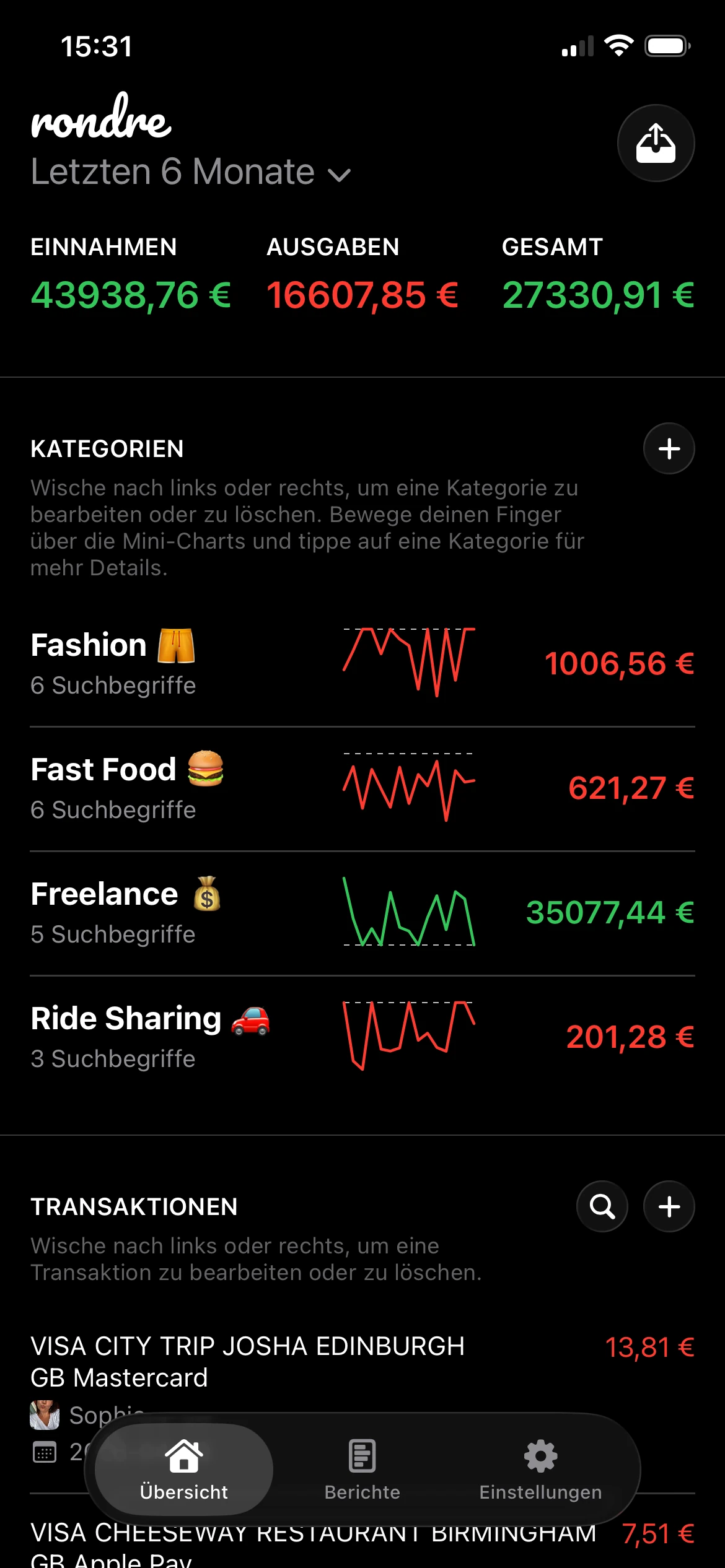
Clevere Kategorien funktionieren gut, wenn sie Suchbegriffe verwenden, die Stammhändler automatisch erfassen. So kann eine Kategorie zusammengehörige Ausgaben sammeln, auch wenn die Händlernamen leicht variieren.
Beispiele:
- Morgenkaffee kann Starbucks, lokale Cafés und andere Coffeeshop-Namen einschließen
- Haushaltsbedarf kann Drogeriemärkte, Supermärkte und ähnliche Einkäufe bündeln
- Arbeitssoftware kann wiederkehrende App-Abonnements für Freelancer oder Selbständige erfassen
- Kinder-Aktivitäten kann Kurse, Ausrüstung und Veranstaltungsgebühren an einem Ort sammeln
Eine praktische Referenz für Ausgabenkategorien, die dauerhaft nutzbar bleiben, hilft hier – denn das beste Kategoriensystem ist eines, das Entscheidungen unterstützt, nicht Analyse um ihrer selbst willen.
Ein besseres Setup für unregelmäßiges Einkommen
Unregelmäßiges Einkommen ist der Punkt, an dem viele Budgetierungsratgeber aufhören, nützlich zu sein. Sie setzen ein stabiles Gehalt und einen sauberen Monatszyklus voraus. Freelancer, Auftragnehmer, Gig-Worker und Menschen mit Nebeneinnahmen leben nicht in diesem Muster.
Diese Lücke ist real. Quickens Budget-Kalkulator-Leitfaden für variables Einkommen stellt fest, dass viele einfache Ratgeber ein stabiles Monatsgehalt voraussetzen und Freelancer sowie Gig-Worker dazu bringen, vergangene Einzahlungen manuell zu mitteln. Ein Tool, das volatiles Einkommen kategorisiert und visualisiert, löst genau dieses Alltagsproblem.
Ein praktikables Setup sieht so aus:
| Kategoriengruppe | Beispielkategorien | Warum es wichtig ist |
|---|---|---|
| Kerneinkommen | Stammkunden, Gehalt, wiederkehrende Auszahlungen | Zeigt, was verlässlich ist |
| Variables Einkommen | Projektarbeit, Saisonarbeit, Boni | Verhindert Übercommitment auf Basis eines starken Monats |
| Betriebskosten | Software, Auftragnehmer, Reisen | Macht das tatsächliche Nettoeinkommen sichtbarer |
| Entnahmen | Geld für private Nutzung | Hält Geschäfts- und Haushaltsentscheidungen getrennt |
Wer gemischte Einnahmen hat, kann die letzten Monate der Eingänge überprüfen, den niedrigeren und stabileren Basiswert ermitteln und die Ausgaben darauf aufbauen. Die stärkeren Monate können Ersparnisse, Steuern oder Nachholziele finanzieren – statt die Lebenshaltungskosten dauerhaft zu erhöhen.
Wenn das Einkommen schwankt, sollte das Budget die Volatilität abpuffern. Die Ausgaben sollten nicht jeden Hochmonat widerspiegeln.
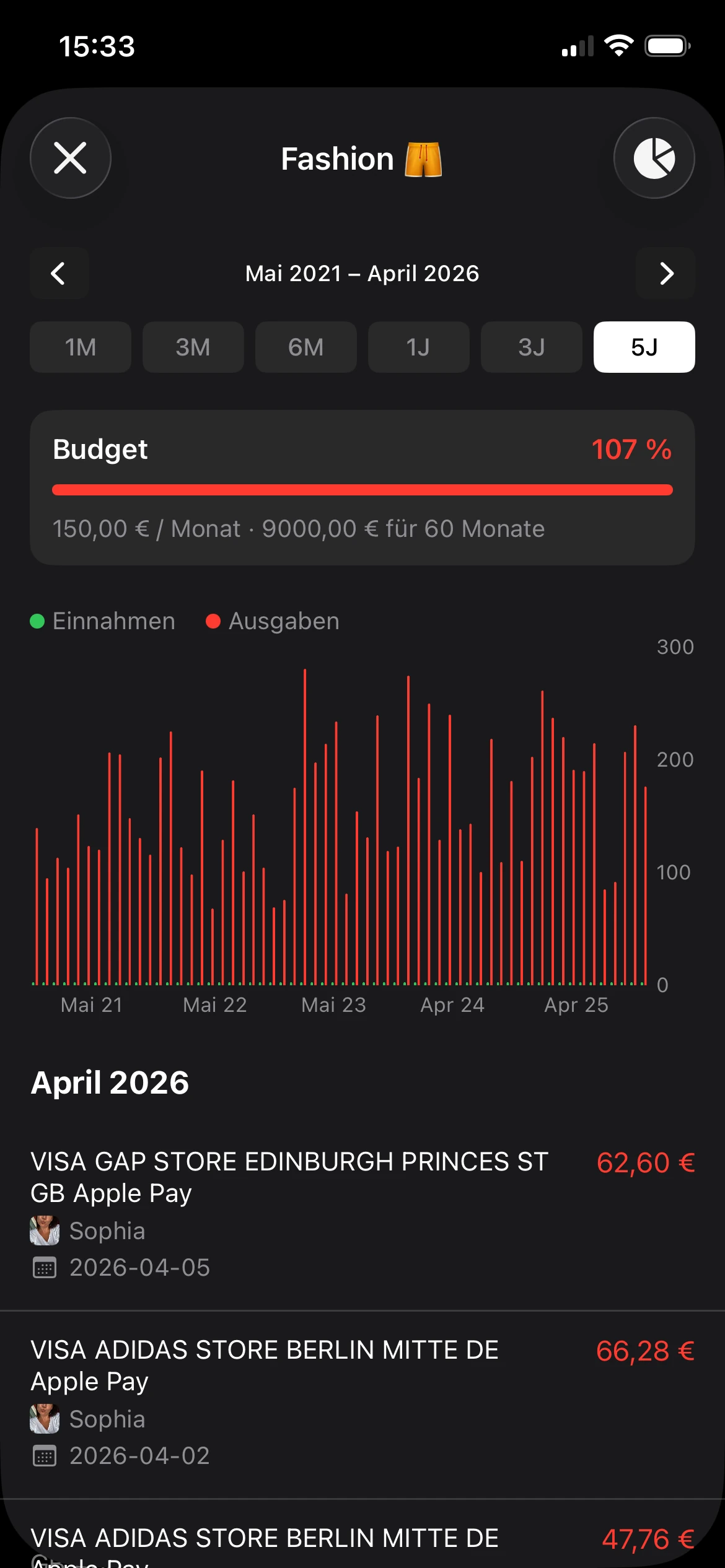
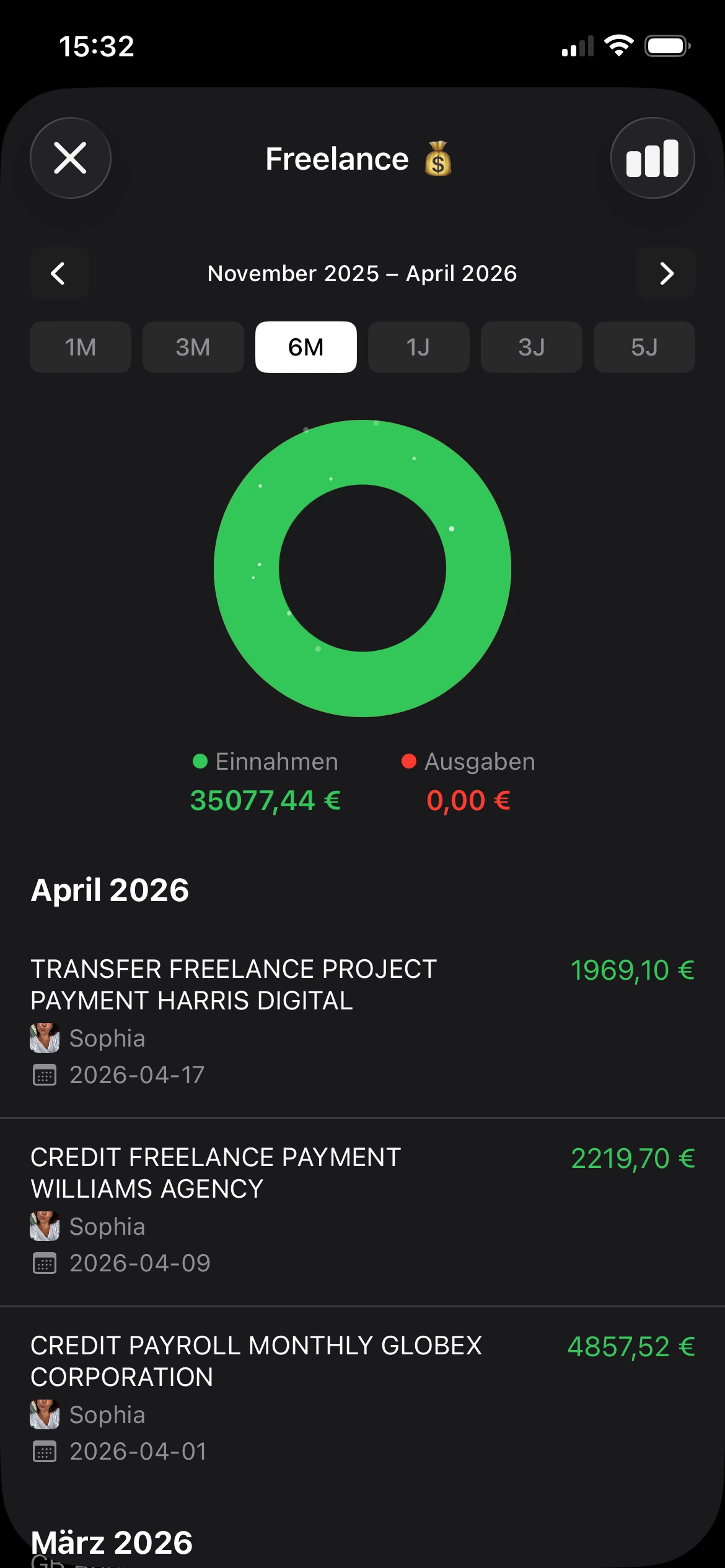
Diagramme helfen, sobald die Kategorien stabil sind. Mini-Charts und einfache Balken können zeigen, ob die Restaurantausgaben steigen, ob ein Nebenjob seine eigenen Kosten deckt oder ob die Lebensmittelausgaben saisonal schwanken – statt „irgendwie zufällig" zu wirken. Das Ziel ist nicht, Datenanalyst zu werden. Das Ziel ist, aufzuhören zu raten.
Eine praktische Option für diesen Workflow ist rondre: anpassbare Kategorien mit Suchbegriffen, sofortige Transaktionssuche, getrennte Bücher sowie CSV- oder PDF-Import – ohne Kontopflicht. Diese Details zählen am meisten, wenn das Budget einfach genug bleiben soll, um es tatsächlich zu pflegen.
Gemeinsames Budgetieren ohne Datenschutz-Kompromisse
Gemeinsames Geld ist einer der schnellsten Wege, ein einfaches Budget unangenehm zu machen. Paare und Familien brauchen in der Regel Einblick in Miete, Lebensmittel, Nebenkosten, Schulkosten oder Urlaub. Sie brauchen meist keinen vollen Zugriff auf jeden persönlichen Kauf und jedes Finanzkonto.

Warum gemeinsame Tabellen scheitern
Die alten Methoden sind vertraut – aber sie erzeugen schnell Reibung.
- Gemeinsame Tabelle: Jemand vergisst sie zu aktualisieren, Kategorien driften, und niemand weiß mehr, welche Version aktuell ist.
- Gemeinsamer Bank-Login: Zeigt Transaktionen, die gar nicht geteilt werden müssen.
- Ein riesiges gemeinsames App-Konto: Verursacht oft Login-Chaos und vermischt persönliche mit gemeinsamen Ausgaben.
Diese Marktlücke wurde direkt benannt. Financial Footworks Diskussion zum Household Money Mapping hebt den Bedarf an gemeinsamem Haushaltsbudgetieren mit Datenschutz und ohne Kontozwang hervor – statt Paare in gemeinsame Tabellen oder bank-verknüpfte Apps zu drängen.
Das Budget teilen – nicht das gesamte Finanzleben
Ein besseres Modell ist simpel: nur das Buch teilen, das gemeinsame Verpflichtungen enthält.
Das bedeutet: Ein Paar kann ein Buch für Haushaltsausgaben führen und separate Bücher für persönliche Ausgaben behalten. Eine Familie kann eine gemeinsame Aufzeichnung für Schulkosten, Lebensmittel und Nebenkosten führen, ohne jede unzusammenhängende Transaktion offenzulegen.
Dieser Ansatz löst mehrere praktische Probleme auf einmal:
| Problem | Traditionelle Methode | Besserer Shared-Book-Ansatz |
|---|---|---|
| Datenschutz | Zu viel Kontooffenlegung | Nur gemeinsame Ausgaben sind sichtbar |
| Einrichtungsaufwand | Passwörter, Einladungen, Banksync | Schnelleres Onboarding |
| Klarheit | Persönliche und gemeinsame Ausgaben vermischen sich | Jedes Buch hat einen klaren Zweck |
Ein Workflow ohne Kontozwang ist wichtiger, als er klingt. Wenn das Teilen Passwörter, Kontowiederherstellung und Berechtigungen erfordert, die sich anfühlen wie Unternehmens-Software, werden viele Haushalte es schlicht nicht dauerhaft nutzen.
Gutes Haushaltsbudgetieren respektiert zwei Realitäten gleichzeitig. Manche Ausgaben sind gemeinsam. Manche nicht.
Das ist der praktische Maßstab. Das Tool sollte gemeinsame Ausgaben einfach überprüfbar machen – und gleichzeitig Raum für persönliche Autonomie lassen. Alles, was invasiver ist, erzeugt meist Spannungen, die mit dem Budget selbst gar nichts zu tun haben.
Eine dauerhafte Budgetierungsgewohnheit aufbauen
Sonntagabend ist der Moment, an dem viele Budgets scheitern. Belege stecken noch in der Brieftasche, ein paar Kartenbuchungen sind unkategorisiert, und niemand möchte eine Stunde damit verbringen, ein System zu reparieren, das sich schon wie Arbeit anfühlt. Eine dauerhafte Gewohnheit entsteht, wenn der Prozess kurz genug ist, um ihn zu wiederholen.
Regelmäßige Überprüfungen helfen, weil sie kleine Fehler früh erkennen. Sie halten das Budget auch an echten Entscheidungen verankert – statt es zu einer Aufzeichnung zu machen, die man erst ansieht, wenn das Geld weg ist. In der Praxis zählt die Gewohnheit mehr als das Tool. Das Tool muss die Gewohnheit nur einfach haltbar machen.
Kurze wöchentliche Überprüfung etablieren
Eine wöchentliche Überprüfung reicht in der Regel für die alltägliche Kontrolle. Sie gibt die Chance, die vergangene Woche aufzuräumen und eine nützliche Anpassung vorzunehmen, bevor die nächste beginnt.
Die Routine einfach halten:
- Aktuelle Transaktionen importieren oder eingeben
- Unkategorisierte Einträge korrigieren
- Nach Ungewöhnlichem Ausschau halten
- Gemeinsame Ausgaben überprüfen, wenn eine weitere Person involviert ist
- Eine Anpassung für die nächste Woche wählen
Schritt fünf macht die Überprüfung nützlich. Ohne ihn pflegt man nur Datensätze. Mit ihm beginnt das Budget, das Verhalten zu lenken. Die Anpassung könnte eine vorübergehende Obergrenze für Takeout sein, eine Entscheidung, einen Kauf aufzuschieben, oder die Erkenntnis, dass eine Kategorie ein höheres Limit braucht, weil die ursprüngliche Schätzung unrealistisch war.
Ich habe festgestellt, dass fünfzehn Minuten eine gute Obergrenze sind. Längere Sitzungen bedeuten meist, dass das Setup zu kompliziert ist oder die Kategorien zu viel leisten müssen.
Den monatlichen Check-in klein halten
Die monatliche Überprüfung hat eine andere Aufgabe. Wöchentliche Überprüfungen erkennen Abweichungen. Monatliche zeigen Muster.
Den monatlichen Check-in nutzen, um zu fragen:
- Welche Kategorie hat immer wieder das Limit überschritten
- Welche Ausgabe sollte zu einem geplanten Budgetposten werden
- Ob das Einkommen stabil oder unregelmäßig war
- Welche Kategorienamen oder Limits angepasst werden müssen
Hier hilft ein einfaches, datenschutzorientiertes Setup besonders. Wenn das Budget in einem Tool ohne Kontozwang wie rondre gespeichert ist, lässt es sich leichter öffnen, korrigieren und wieder schließen – ohne Login-Probleme, Sync-Fehler oder eine Tabelle, die inzwischen ein eigenes Nebenprojekt geworden ist. Für gemeinsame Haushaltsbudgets zählt diese geringe Hürde noch mehr. Zwei Menschen überprüfen ein gemeinsames Buch viel eher regelmäßig, wenn der Prozess Zeit und Privatsphäre respektiert.
Ein dauerhaftes Budget sollte sich wie Routine anfühlen. Schnelle Eingabe, klare Kategorien, kurze Überprüfungen und ein kleiner monatlicher Reset reichen meistens aus.
Setz dir diese Woche einen 15-Minuten-Geldcheck in den Kalender. Die letzten Transaktionen bereinigen, das gemeinsame Buch überprüfen – falls vorhanden – und eine Änderung für die nächsten sieben Tage wählen. Diese Gewohnheit tut einem Haushaltsbudget mehr Gutes als jede weitere komplexe Vorlage, die unberührt bleibt.